How to Run a One-Person Shopify Store: The Full System
Last updated: · Shopify features, pricing, and platform policies change. Verify with official sources before acting.
A one-person Shopify store doesn’t fail for lack of effort. It fails when the operating decisions — when to reorder, when to add an app, what to fix this week — get made by reaction instead of by system. The difference between a store that runs you and a store you run is a set of small, repeatable decisions made on a schedule.
This guide is the operating system for solo Shopify operations. It maps the recurring decisions a one-person store in the $5,000–$50,000 MRR range actually faces — the weekly rhythm, inventory, customer issues, email, growth bets, and scaling — and gives the one rule that matters in each, with a link to the deep-dive workflow. Read it to see the whole machine; use the linked guides when you need the step-by-step.
The numbers here — MRR bands, app-spend percentages, repeat-purchase rates, time windows, shipping thresholds — are planning assumptions, not universal benchmarks. Actual thresholds depend on your traffic, margins, product mix, and store setup; treat them as starting points and adjust to your own measured numbers.
Quick answer: solo Shopify operations at a glance
- Weekly cadence — Run a 30-minute weekly check across five blocks (orders, refunds, inventory, customer signals, numbers) on the same day every week. The rhythm is what keeps small problems small.
- Inventory — Reorder by a formula, not a feeling: available inventory, lead-time variance, and cash float. Classify SKUs into velocity tiers and match review frequency to each.
- Customer ops — Handle refunds and chargebacks on the clock. Dispute response deadlines vary by card network, and a missed deadline is an automatic loss.
- Email & retention — Pick one capture method by your traffic tier; pick your email tool by subscriber count. One change at a time.
- Growth bets — Subscriptions and shipping are margin decisions. Add subscriptions only after a 60-day pilot; set shipping rates by margin, not by copying competitors.
- Scaling — Keep total app spend near 3–6% of MRR, and outsource only what passes an ROI-and-readiness check.
Who this Shopify operations guide is for
- You run a US Shopify store alone — no staff, no agency, no operations manager, so Shopify operations means whatever you personally do this week.
- Monthly revenue sits roughly between $5,000 and $50,000, so the store is real but every hour still comes out of your own week.
- You already handle the work; what’s missing is the schedule that decides when each piece of it gets handled.
- You want the decision rule for each area, not a tool list.
If you already know which area you’re fixing, skip to that section’s deep-dive link. This page exists to show how the areas fit into one operating rhythm.
The operating system, in one view
The operating cadence
Everything below runs on a rhythm. The core of solo Shopify operations is a weekly review that takes about 30 minutes and catches the small issues before they compound — a stockout forming, a refund queue building, a chargeback deadline approaching.
Deep dive: The Weekly Shopify Checklist for a One-Person Store — the five-block method and a free one-page checklist.
Daily, weekly, monthly: the three Shopify operations layers
The weekly review is the spine, but it isn’t the whole schedule. Work that arrives every day can’t wait a week, and work that only pays off over months shouldn’t interrupt a Tuesday. Most solo Shopify operations problems are scheduling errors rather than skill gaps — a monthly question being asked daily, or a daily task with no owner at all.
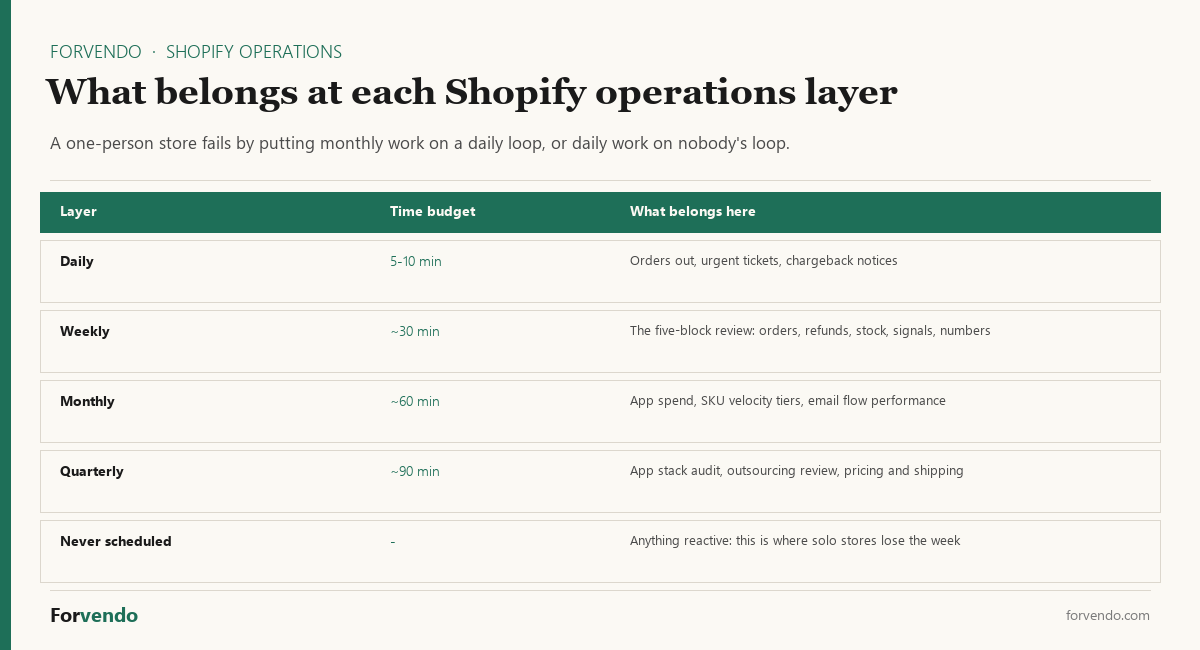
Daily (5–10 minutes). Only three things genuinely need a same-day look: orders that must ship, tickets where a delay makes the outcome worse, and any chargeback or dispute notice. Everything else can wait for the weekly block. The discipline here is subtraction — a daily loop that grows past ten minutes has absorbed work that belongs one layer up.
Weekly (about 30 minutes). The five-block review below. Same day, same order, every week.
Monthly (about an hour). The questions that need more than a week of data to answer: what the app stack actually cost, which SKUs moved between velocity tiers, how the email flows performed, whether shipping is still covering its own cost.
Free download
The Solo Shopify Weekly Operating Checklist
A one-page PDF plus a copyable Google Sheet — the weekly cadence these guides build on. Free; bring your own store data.
Get the free checklist →Quarterly (about 90 minutes). The decisions that change the shape of the store rather than run it — auditing the whole app stack, revisiting what to outsource, and re-checking pricing and shipping models against current margins.
A practical test for sorting any recurring task into a layer: ask what happens if it slips by one cycle. If the answer is “a deadline is missed,” it’s daily. If it’s “the week gets noisier,” it’s weekly. If it’s “nothing measurable,” it’s monthly or quarterly — and it does not belong in your morning.
Inventory: reorder by formula
The most expensive inventory mistakes in a one-person store are the two extremes: stocking out of a top seller, or tying up cash in slow stock. Both come from reordering by gut. The fix is a reorder point: the stock level at which you place the next order, calculated from how fast a SKU sells, how variable its lead time is, and how much cash float you can carry.
Forvendo decision rule
Reorder when available inventory falls to roughly (daily sales velocity × lead time) plus a safety buffer sized to lead-time variance. Classify SKUs into velocity tiers and review fast movers weekly, slow movers monthly — do not give every SKU the same attention.
Deep dive: How to Calculate a Reorder Point — the 4-step system, SKU tiers, and a free reorder calculator.
Customer operations: refunds and chargebacks
Refunds are a customer-experience decision; chargebacks are a deadline-driven one. The two are often confused, and the confusion is costly. A refund you control. A chargeback runs on the card network’s clock, and the response window — generally on the order of one to three weeks depending on the network — is short. Miss it and the dispute is lost automatically, regardless of who was right.
Forvendo decision rule
Calendar every chargeback’s response deadline the day the notice arrives, and treat the dispute amount as cash held until it resolves. For refunds, decide your policy once and apply it consistently — ad hoc refund decisions cost more in time than a clear rule does in margin.
Two adjacent pieces belong in the same block rather than in whatever order the inbox delivers them. Support is best batched into one daily slot with a small set of reusable replies, because the cost of one-person support is context-switching, not volume. Returns are mostly settings rather than prose — the policy decisions turn into return rules in the admin, and a self-serve flow removes most of the back-and-forth before it reaches you.
Deep dives: How to Fight a Shopify Chargeback — response deadlines by network and a handling workflow. Customer Support for a One-Person Store — the daily block and four copy-paste templates. Returns and Exchanges on Shopify — five policy decisions as return rules, plus the self-serve flow.
Email and retention
Email is the one channel a one-person store owns outright, so the operating questions are narrow and answerable: how to capture addresses, and which tool to send with. Both have a one-variable answer.
For capture, choose one method by your monthly traffic — a footer form at low traffic, an exit-intent popup once you have enough volume to measure it, layered methods only at higher traffic. Add one method at a time so you can tell what worked. For the tool, choose by subscriber count: Shopify’s native email at the smallest scale, a creator-focused tool in the middle, a segmentation-heavy platform once flows justify it.
Forvendo decision rule
One capture method per month, matched to your traffic tier; one email tool, matched to your subscriber count. Changing both at once means you learn nothing from either.
Abandoned-cart recovery sits inside this same channel, and it is worth knowing what the native version does before paying for an app: it reaches a narrower set of shoppers than most operators assume, which is the variable that decides whether an app earns its subscription.
Deep dives: Shopify Email Capture Decision Framework (five methods by traffic), Kit vs Klaviyo Welcome Email Flow (the three-tier tool decision), and Abandoned Cart Recovery (what the native flow covers, and when a paid app pays off).
Growth bets: subscriptions and shipping
Two growth decisions tempt one-person stores before the numbers support them: adding subscriptions, and offering free shipping. Both are margin decisions disguised as growth tactics.
Forvendo newsletter
Operating notes, once a week
One email a week for US-based solo Shopify operators at $5,000–$50,000 MRR: a decision, a checklist, or a teardown. No fluff, unsubscribe anytime.
Join the newsletter →Subscriptions work only when a product has a genuine repeat-purchase rate (above ~25%), total app spend stays under ~5% of MRR, and a 60-day manual pilot confirms people actually re-order. For a first program under $50K MRR, Shopify’s native subscriptions are usually the right start.
Shipping should be priced by margin, not by copying a competitor’s free-shipping banner. Run a 30-order leak audit comparing what you charged for shipping against the actual label cost; if you’re losing on most orders, a threshold (“free over $X” near 1.5× your average order value) usually protects margin while keeping the offer.
Forvendo decision rule
Do not add a subscription program or a blanket free-shipping policy until the margin math supports it. Pilot subscriptions for 60 days before paying for an app; audit 30 orders before setting a shipping model.
Two more revenue levers belong in the same category, for the same reason. Conversion work should follow the funnel report rather than opinion — find where the drop actually happens, then work the fixes in return-on-effort order instead of redesigning the product page first. Discounts are a margin decision before they are a marketing one, so the break-even math comes before the campaign.
Deep dives: Should You Add Subscriptions to Your Shopify Store?, Shopify Shipping Rates: A Margin-First Decision System, How to Increase Your Shopify Conversion Rate (the five fixes in ROI order), and Shopify Discount Strategy (the break-even math first).
Scaling: apps and outsourcing
The two ways a solo store adds capability — installing an app or hiring help — both quietly add fixed cost and complexity. Each deserves a check before it goes in.
Keep total app spend in a band: roughly 3–6% of MRR across the whole stack. A single $99 app can push a sub-$40K-MRR store past that line on its own, so new apps earn their place by replacing manual time worth more than their fee. For outsourcing, the task should pass a check on ROI multiple, how cleanly you can hand it off, and whether it becomes a single point of failure.
Forvendo decision rule
Audit the app stack quarterly against the 3–6%-of-MRR band, and cut anything that no longer saves time worth its fee. Outsource a task only when it has a clear ROI multiple, you have documented it well enough to hand off, and losing the helper would not stop the store.
Deep dives: How Many Shopify Apps Is Too Many? and When to Hire Help for Your Shopify Store. For the operational setup itself, Shopify’s own Shopify Admin documentation covers the underlying settings.
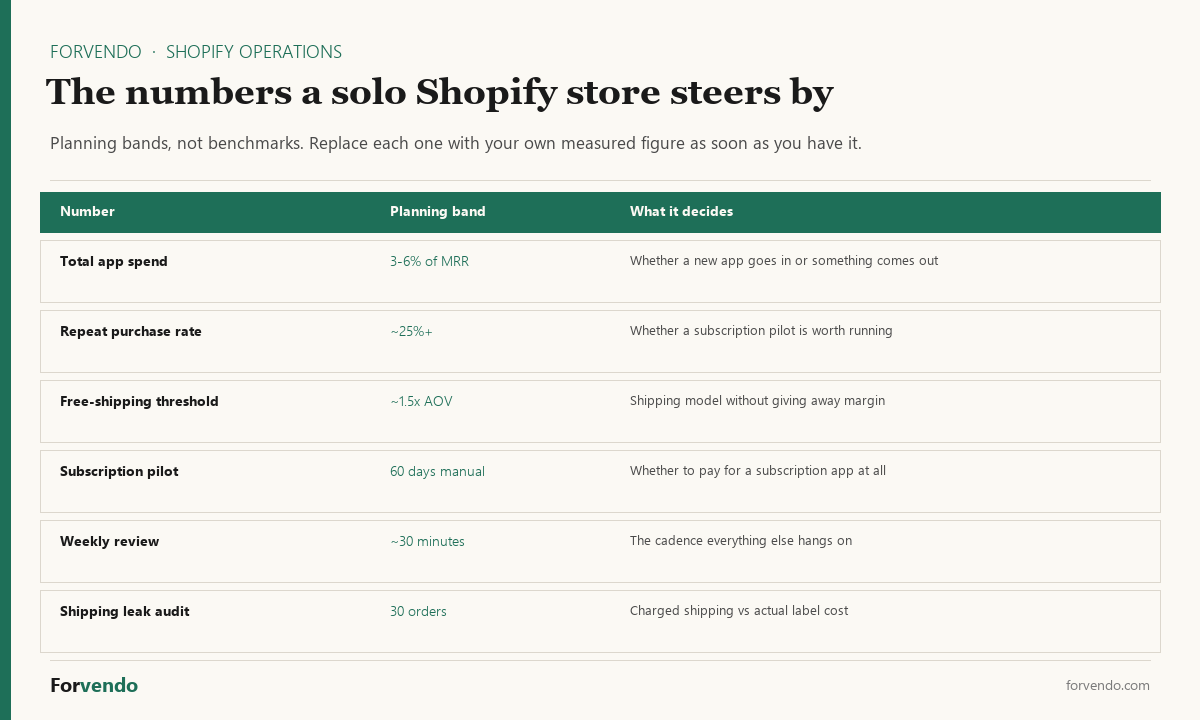
Every Shopify operations decision above leans on a number. Collected in one place, they’re the dashboard a one-person store steers by:
What to automate first when time runs out
Automation is the last lever in Shopify operations, not the first. Every one-person store eventually hits the week where the rhythm doesn’t fit, and the instinct is to automate whatever feels most annoying. The better order is by consequence: automate what punishes you for being late before you automate what merely takes time.
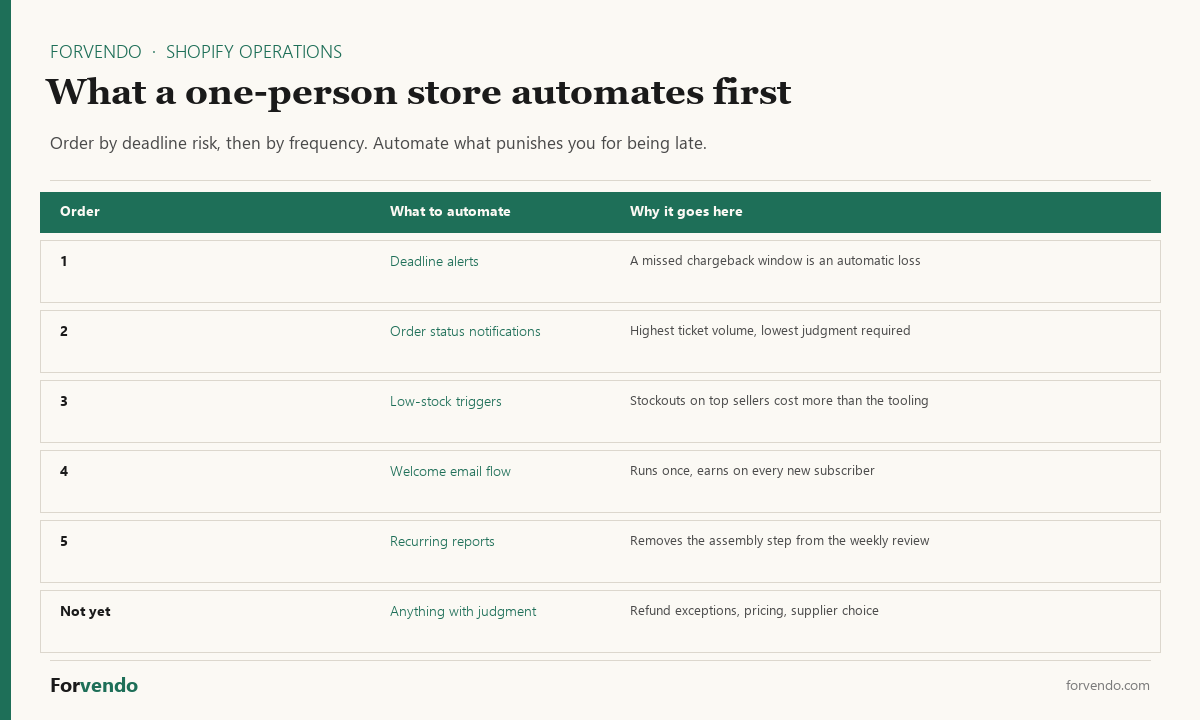
Deadline-bound work comes first because lateness converts directly into loss — a chargeback response window that closes decides the dispute regardless of the evidence you had. A calendar reminder is the cheapest automation in the store and usually the highest-return one.
Volume-driven work comes next: order status notifications, low-stock triggers, the welcome email flow. These are high-frequency and low-judgment, which is exactly the profile automation handles well. The one-at-a-time rule from the email section applies here too — automate one workflow, watch it for a cycle, then move to the next.
What stays manual longest is anything carrying judgment: refund exceptions, pricing changes, supplier selection, and which growth bet to run next. Automating a judgment call usually means encoding a decision you haven’t made yet, and the cost shows up later as a rule nobody remembers writing.
Forvendo decision rule
Automate in this order: deadline alerts, then high-volume notifications, then reporting. Leave judgment calls manual until the rule behind them is written down and stable for a quarter.
If a task is painful but happens twice a year, don’t automate it — schedule it. Automation earns its complexity on frequency, not on annoyance.
Reading the Shopify admin
Several Shopify admin screens use words that mean something narrower than they sound, and misreading them leads to the wrong fix. Five come up most in a one-person store:
- Payouts that look stuck. Shopify payout status pending: Pending is a transaction status, not a payout that is late.
- Payouts that stopped. Shopify payout on hold: which of seven holds you have, and what ends each one.
- Orders that will not clear. Shopify unfulfilled orders: what the status means next to each payment status, and the deadlines it starts.
- Inventory numbers that disagree. Shopify Available vs On hand: which number a reorder decision should read.
- Sessions that do not turn into orders. Shopify bot traffic: how to tell bots from buyers before changing the store.
Tools and templates
Each part of solo Shopify operations above pairs with a free, no-email-gate sheet on the free resources page: the weekly operating checklist, a reorder-point calculator, a refund and chargeback kit, an email-capture decision sheet, a subscription readiness audit, a shipping-rate decision sheet, and an app-stack audit sheet. Open them in Excel, Google Sheets, or Numbers.
Solo Shopify Operations Health Score
A self-assessment, not a score that is stored anywhere. Links go to the matching Forvendo guide.
What this guide does not cover
This solo Shopify operations guide is an operating map for a one-person store in the US on the Basic plan. It doesn’t cover paid acquisition and ad operations, brand and creative strategy, wholesale or B2B motions, international logistics and customs, or the tax side of the business — which has its own hub in Shopify Taxes Explained. Each linked deep-dive goes further on its topic.
Frequently asked questions
What is the most important operating habit for a solo Shopify store?
A fixed weekly review. In a one-person store it is the single habit the rest of Shopify operations hangs on: a 30-minute check across orders, refunds, inventory, customer signals, and numbers — same day every week — catches the small issues (a forming stockout, a refund backlog, a chargeback deadline) while they’re still small. The rhythm matters more than the length.
How do I know when to add an app versus doing it manually?
Measure the manual time the app would save and compare it to the fee, and check it against the 3–6%-of-MRR app-spend band. An app earns its place by replacing time worth more than it costs; below that, the manual workflow is cheaper than the complexity.
When should I add subscriptions to my store?
Only after a product shows a repeat-purchase rate above ~25%, your app spend has room under ~5% of MRR, and a 60-day manual pilot confirms real demand. Start with Shopify’s native subscriptions and move to a paid platform only when features, not catalog fit, are the bottleneck.
Should I offer free shipping?
Treat it as a margin decision, not a default. Run a 30-order leak audit comparing shipping charged to label cost; if you’re losing on most orders, a free-shipping threshold near 1.5× your average order value usually protects margin while keeping the offer attractive.
How much should a one-person store outsource?
Outsource a task when it passes three checks: a clear ROI multiple, documentation good enough to hand off cleanly, and no single-point-of-failure risk if the helper leaves. Start with well-defined, repeatable tasks rather than judgment-heavy ones.
How many hours a week do Shopify operations actually take?
For a store in this range, the recurring operating load is smaller than most people expect: roughly 5–10 minutes daily, 30 minutes weekly, and an hour monthly. What consumes the week isn’t that schedule — it’s the unscheduled work that arrives because nothing has a layer.
What should I do first if my Shopify operations feel out of control?
Fix the weekly review before anything else. It is the cheapest repair available to a one-person store: pick a day, block 30 minutes, and run the five blocks in the same order. Almost every other problem on this page becomes visible — and small — inside a rhythm, and stays invisible without one.
Do I need an operations app to run this?
No. The whole Shopify operations system on this page runs on the Shopify admin plus a spreadsheet and a calendar. Apps become worth their fee when a specific manual step is costing more time than the subscription, which is the check in the scaling section — not before.
Forvendo Editorial note. Forvendo publishes educational operating resources for solo ecommerce operators. Articles may cover tax, sales tax, 1099-K reporting, software pricing, platform policies, and other operating topics that change over time.
This content is for general research and operational planning. It is not legal, tax, accounting, financial, or professional advice. Readers should verify details with official sources or qualified professionals before acting on them. Platform rules, tax thresholds, software pricing, and affiliate program terms can change without notice.
Forvendo articles may be drafted with AI assistance and are reviewed by the operator before publication according to our Editorial Policy, which covers sourcing, AI use, update cadence, and corrections. See also About, Disclosure, and Privacy Policy.