Shopify Email Capture: 5 Ways to Grow Your List (and Which to Pick)
Last updated: · Shopify features, pricing, and platform policies change. Verify with official sources before acting.
Quick answer
You don’t need five capture methods running at once. Pick the one that fits your current traffic, run it for thirty days, and add a second only if the first produces usable signups without hurting mobile UX. The five methods, and a traffic-based way to choose between them, are below.
Table of contents
- Who this Shopify email capture guide is for
- Why email capture method choice is not obvious
- The 5 Shopify email capture methods compared
- Forvendo decision rule
- Decision tree by monthly traffic
- The 5 methods: when each one works and where it breaks
- Mobile UX, brand trust, and Core Web Vitals
- The 90-day Shopify email capture test framework
- Free Email Capture Decision Sheet
- Common mistakes
- What this article does not cover
- Frequently asked questions
Who this Shopify email capture guide is for
This guide is for one-person Shopify stores in the $5K–$50K monthly revenue range who are deciding which Shopify email capture method to introduce or replace. It assumes a Shopify store you run on your own, with limited time to test multiple capture surfaces in parallel. The framework is built around one practical constraint: a one-person store can rarely sustain more than one active capture test at a time. Choosing the wrong starting method, or stacking too many at once, tends to produce confusing data, mobile UX damage, and weaker brand trust — all compounding over months.
Why email capture method choice is not obvious
Three pressures make the choice harder than a “best popup app” article suggests.
First, list size and list quality aren’t the same thing. A popup can lift signups by several percentage points and still produce a list with high unsubscribe rates, because the signup intent is shallow. A footer form produces fewer signups but each one often comes from a higher-intent reader. Choosing a method by signup-rate alone routinely overstates its value.
Second, capture methods carry mobile UX cost that a desktop preview hides. Interstitial popups can trigger Core Web Vitals penalties on small screens; floating bars can collide with native browser chrome on iOS; footer forms are safest only when not competing for attention with two other surfaces.
Third, no single method dominates across stores. A content gate works well for a brand with strong educational content and poorly for a pure transactional storefront. Post-purchase consent works for any store but grows lists slowly. Without a framework, store owners rotate methods every quarter without measuring one cleanly.
The 5 Shopify email capture methods compared
These ranges are planning assumptions, not universal benchmarks. Actual capture rate depends on traffic source, offer strength, mobile layout, page intent, and brand trust. Treat them as a starting point for designing a single 30-day test, then replace the assumptions with your own measured numbers.
A few honest implications of the table. Exit-intent popups produce the highest raw signup rate on triggered impressions but pay for it in mobile experience and brand perception. Footer forms produce the lowest raw signup rate but the highest list quality per signup. Content gates sit in the middle on intrusiveness but produce the highest conversion of any method on the people who actually engage with the gated CTA — they’re the only method where signup intent and content intent align by design.
Forvendo decision rule
Forvendo decision rule
Choose one primary capture method per month. Do not stack a popup, bar, gate, and footer form on the same page before you know which one is working. Test one method for 30 days, measure signup quality and page behavior, then layer the second method only if it does not damage mobile UX or purchase intent.
The cost of layering too early is twofold: the data becomes uninterpretable because two surfaces are competing, and the mobile experience compounds — two interrupts on a small screen feel like four. The cost of waiting one extra month before layering is a small, recoverable opportunity cost.
Decision tree by monthly traffic
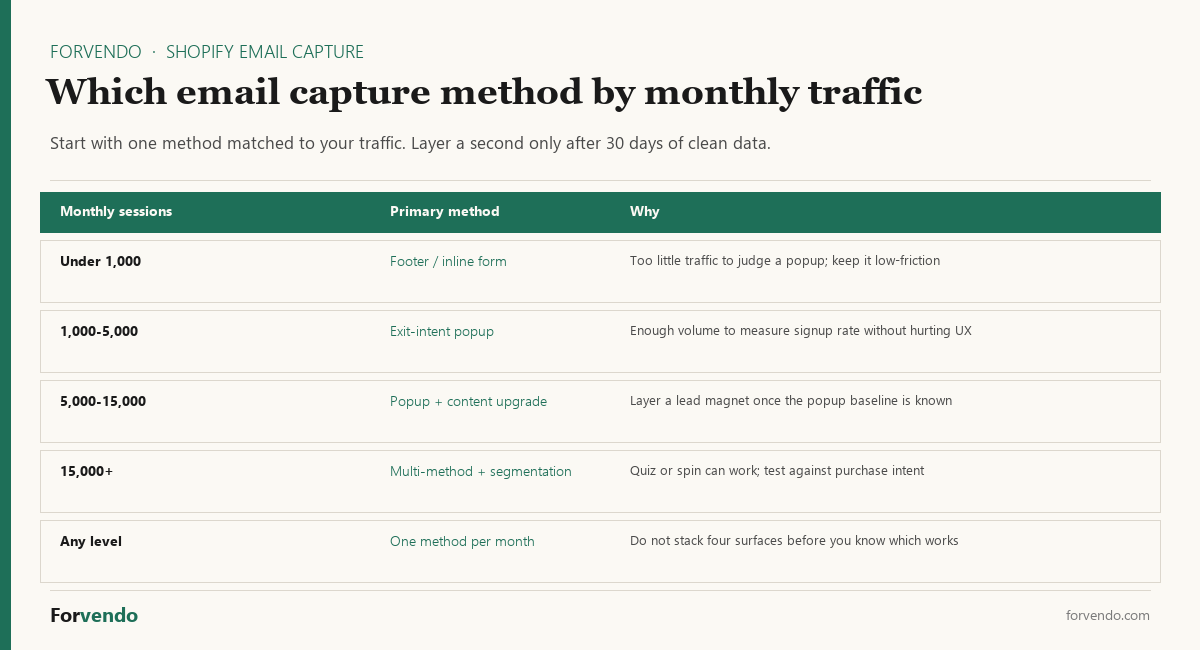
The decision tree below picks a starting point by current monthly Shopify sessions. It assumes you’re starting from zero active capture surfaces, or replacing an existing setup that isn’t working. If you already have one method running cleanly, the tree tells you what to layer next, not what to replace.
Shopify email capture decision tree — traffic-tier-based starting point.
Free download
The Solo Shopify Weekly Operating Checklist
A one-page PDF plus a copyable Google Sheet — the weekly cadence these guides build on. Free; bring your own store data.
Get the free checklist →The tree intentionally treats post-purchase consent as a constant across all three tiers. It’s the only method that doesn’t compete with any other surface for attention, and it tends to produce higher-quality signups than any of the pre-purchase methods.
The 5 methods: when each one works and where it breaks
Exit-intent popup
An exit-intent popup detects mouse movement toward the browser chrome (desktop) or a back-button/scroll pattern (mobile) and shows a full-screen capture form. The desktop signal is reliable; the mobile signal is approximate — the source of most mobile UX complaints. Exit-intent works best with a real offer (discount code, specific guide, early-access list). It tends to break on premium-positioned stores, where the popup undercuts the brand impression the homepage just spent paragraphs building.
Floating bar
A floating bar attaches to the top or bottom of the viewport and stays visible as the visitor scrolls. It’s the most brand-safe persistent capture surface — no interruption, no content blocking, no modal friction on dismiss. Conversion rates are lower than popups but signup quality is meaningfully higher. The most common failure mode is collision with the Shopify theme’s sticky header on iOS, pushing the bar partly under the address bar.
Content gate
A content gate places a high-value asset — buying guide, calculator, checklist, template — behind an email-confirm step. Done well, the value exchange is obvious and signup intent is genuine. Done poorly, the gate feels like a wall and bounce rates rise. The biggest predictor of success is the asset itself: a generic newsletter signup behind a gate underperforms; a specific, named, downloadable asset overperforms. A single piece of content can produce signups for years without further work.
Footer / inline form
A footer or inline form is the lowest-friction surface available — no interrupt, no dismiss, no animation. Raw conversion rate is low (only a fraction of visitors scroll to it) but the visitors who do convert tend to be high-intent. A footer form is the right default for any store, regardless of traffic tier. The mistake is treating it as the only method on a store doing 5K+ sessions per month — the missed capture surface area is significant.
Post-purchase consent
Post-purchase consent is the email-marketing opt-in that appears at Shopify checkout. It’s the highest-signal email source available — a buyer just chose to give you money. Setup is one toggle in Shopify checkout settings or a single field in your post-purchase upsell app. The only failure mode is order volume: a store doing 30 orders a month can’t grow a list quickly on post-purchase alone. Pairing it with any of the four other methods produces a better list than that method alone.
Mobile UX, brand trust, and Core Web Vitals
The capture method choice has measurable consequences on three signals that most one-person stores undervalue. Mobile UX is the first. Google’s Page Experience documentation flags intrusive interstitials on mobile as a ranking concern. Exit-intent popups, depending on implementation, can trip this signal on small screens. Floating bars generally don’t. Content gates are evaluated as part of the page content, not as interstitials, and are usually unaffected.
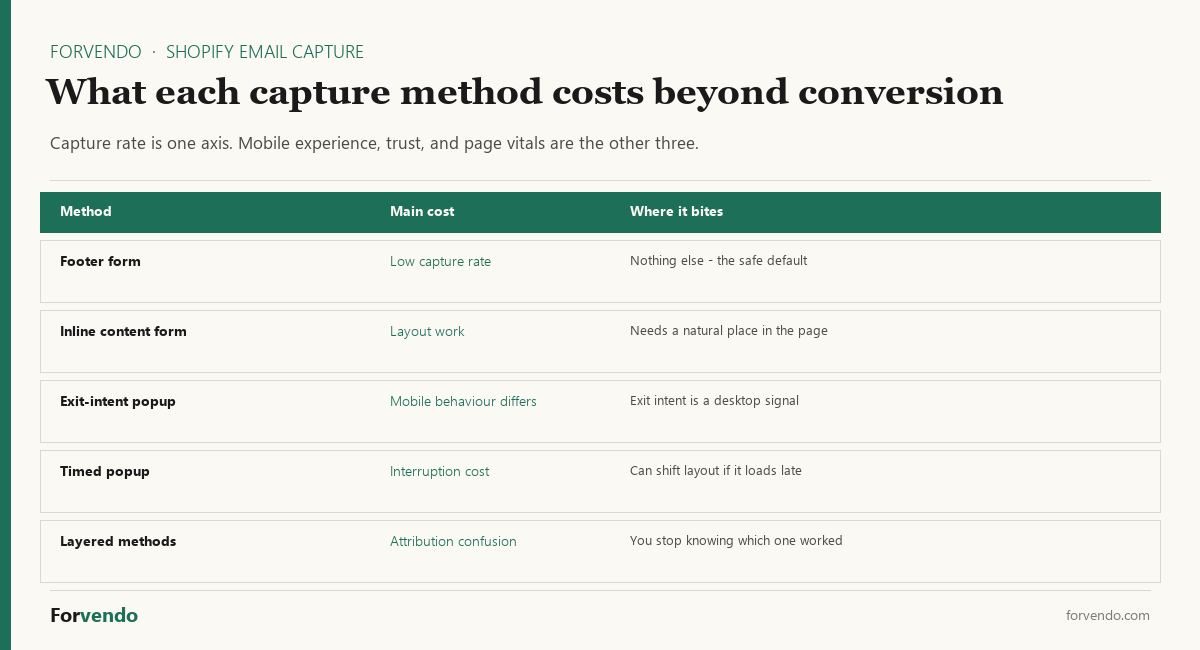
Brand trust is the second signal. A popup on the homepage tells the first-time visitor that the store is optimizing for conversion before they have even seen what the store sells. For some brand positions this is acceptable. For premium, considered-purchase, or trust-driven positions, it can cost more in long-term loyalty than it gains in short-term list size. There’s no universal correct answer here — the question is whether the brand you’re building is one that the popup is consistent with.
Core Web Vitals are the third signal. The Largest Contentful Paint (LCP) and Cumulative Layout Shift (CLS) metrics are affected when capture surfaces load asynchronously after the page renders. A popup app that injects 100KB of JavaScript and triggers a layout shift on appearance can pull a store’s Page Experience score down enough to affect search visibility. The fix is usually to pick a capture tool with a small footprint and lazy-load behavior, but the constraint is real and worth measuring with PageSpeed Insights before and after any setup change.
The 90-day Shopify email capture test framework
A 90-day window is the right horizon for an honest evaluation of any single Shopify email capture method. Thirty days catches the initial novelty effect; sixty days reveals the steady-state rate; ninety days lets you compare against the same period the year before (if applicable) and against the secondary method you layer in month two or three.
Forvendo newsletter
Operating notes, once a week
One email a week for US-based solo Shopify operators at $5,000–$50,000 MRR: a decision, a checklist, or a teardown. No fluff, unsubscribe anytime.
Join the newsletter →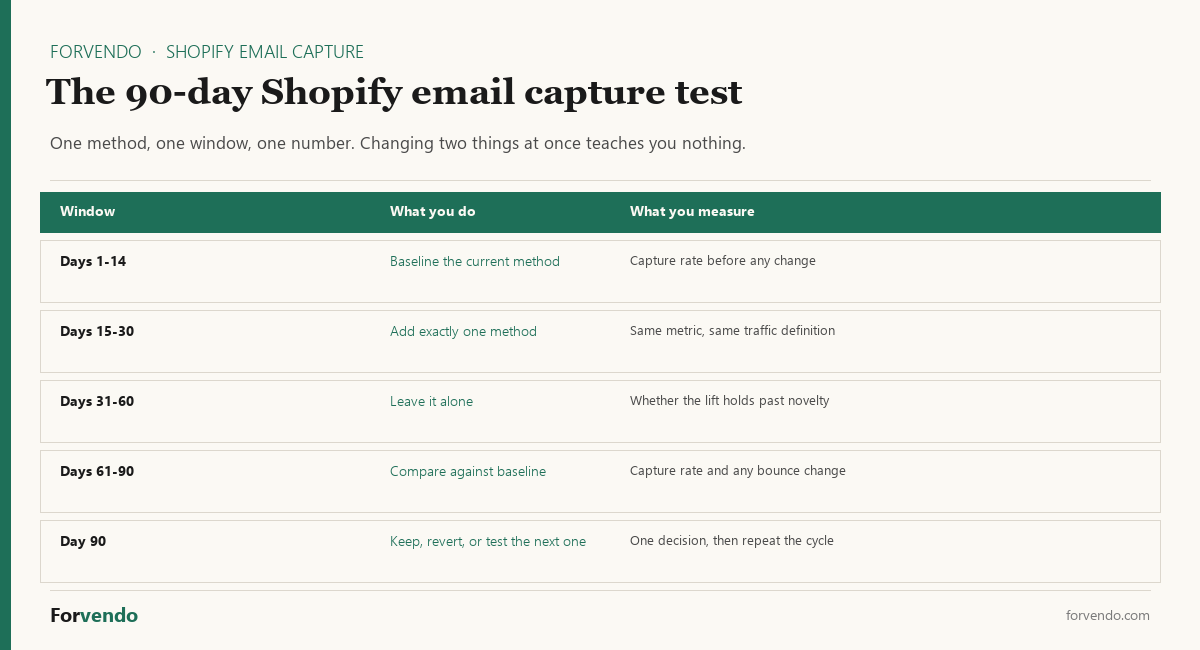
| Stage | Days | Action | Measure |
|---|---|---|---|
| Stage 1 | Days 0–30 | Run primary method only. No secondary surfaces, no overlays, no exit-intent on the same store. | Impressions, signups, conversion rate, mobile bounce rate, signup-to-first-open rate |
| Stage 2 | Days 31–60 | If Stage 1 produced a usable rate and didn’t damage mobile UX, layer the secondary method recommended by the decision tree. | Combined signup rate, attribution split, Core Web Vitals change, brand-feedback signals |
| Stage 3 | Days 61–90 | Hold the two-method setup steady. Begin evaluating the third method by drafting the asset or copy — don’t deploy yet. | Stable monthly capture, list-quality indicators (open rate, click rate, unsubscribe rate) |
The decision at the end of day 90 is whether to deploy the third method, retire one of the first two, or hold the current two-method setup for another quarter. Most solo stores end the 90-day window at two active methods, not five. This is by design.
Free Email Capture Decision Sheet
The Email Capture Decision Sheet 2026 is a downloadable spreadsheet that walks you through the framework in this article with your own store numbers. It includes a store-input section (monthly sessions, mobile share, traffic source mix, average order value), a 5-method scoring sheet, a recommendation engine that suggests primary and secondary methods, and a 30-day test log with built-in conversion-rate and revenue-impact tracking. Use it before launching a new capture method to commit a specific hypothesis, and after the 30-day window to make the layer-or-hold decision honestly.
Download the free Email Capture Decision Sheet 2026 to score the five methods against your own traffic, mobile share, offer type, and test capacity.
Download the Email Capture Decision Sheet 2026 · XLSX 13 KB
The sheet is paired with the Weekly Shopify Checklist for a One-Person Store, which includes a weekly block for reviewing capture performance alongside the rest of your operating cadence.
Common mistakes
The first common mistake is enabling four capture surfaces in the first week without measuring any of them cleanly. Each surface absorbs signups that another would have caught and the data becomes uninterpretable.
The second is treating signup volume as the only success metric. A method that triples signups but also triples 30-day unsubscribes isn’t a win — it’s a list-quality problem deferred by a month.
The third is leaving an underperforming exit-intent popup live for six months because the dashboard shows a number. The right comparison isn’t “popup vs no popup” but “popup vs the next best method you could be testing in the same slot.”
The fourth is forgetting that post-purchase consent is the highest-quality source on the store and treating it as an afterthought. It should be the first surface enabled, not the last.
What this article does not cover
This article doesn’t cover SMS capture, push-notification capture, paid-acquisition landing-page capture, or quiz-funnel capture. It doesn’t address GDPR / CCPA consent language in detail beyond noting that all five methods should have a clear and lawful basis for marketing email — consult your privacy counsel before launching any of them. It doesn’t benchmark specific apps (Klaviyo, OptiMonk, Privy, Mailmunch, Justuno) head-to-head — the framework here is method-first, app-second, by design. App selection follows method selection, not the reverse.
Related Forvendo guides
Email capture is one input to the broader operating system. Once a list exists, Kit vs Klaviyo: Which Email App for a Small Store covers what to send first and which tool fits the $5,000–$50,000 MRR band. The The Weekly Shopify Checklist for a One-Person Store includes the weekly block for reviewing signup performance, and the How to Calculate a Reorder Point applies the same method-first decision approach to inventory.
Frequently asked questions
Which Shopify email capture method should I start with if I have no list at all?
If you’re starting from zero list, enable post-purchase consent first (one toggle, no UX risk) and add a footer form on the same week. Then pick one pre-purchase method based on your monthly traffic tier and run it for 30 days. This sequence captures the highest-intent signups (post-purchase) while testing one variable on the pre-purchase side.
Will Shopify email capture popups hurt my SEO?
Intrusive interstitial popups on mobile can trigger a ranking signal in Google’s Page Experience evaluation. Exit-intent popups, depending on implementation and timing, may fall under this definition. Floating bars, content gates, footer forms, and post-purchase consent generally don’t. If SEO is a primary acquisition channel for your store, test any mobile popup setup against PageSpeed Insights before and after launch.
Do I need a dedicated email capture app or can I do this in Shopify natively?
For footer forms and post-purchase consent, Shopify native functionality is sufficient. Floating bars and content gates can be implemented natively with theme customization, but most sellers use a lightweight app. Exit-intent popups generally require a dedicated tool. The right answer depends on your theme, your developer comfort, and your test cadence — not on a one-size-fits-all recommendation.
How do I know if my capture method is working or just collecting low-intent signups?
Track three signals beyond raw signup count: first-email open rate (above 30% is a reasonable target for a fresh signup), 30-day unsubscribe rate (below 5% is a useful threshold), and signup-to-first-purchase rate over 60 days. These thresholds are planning assumptions, not universal benchmarks — actual numbers vary by traffic source, offer strength, and brand trust. A method that produces 10x signups but tanks all three of those signals isn’t adding value — it’s creating churn.
When should I add a second capture method?
Add a second method only after the first method has run for 30 days, produced a measurable and stable rate, and not damaged mobile UX or purchase intent. The framework above explicitly recommends post-purchase consent + one pre-purchase method as the starting two-method setup; layer a third only after another 30 days of clean data.
Can I use the same content gate asset across multiple pages?
Yes — and you should. A single high-value asset (buying guide, calculator, template) placed on three to five high-traffic guide pages tends to outperform three separate weaker assets. The asset is the leverage point; the surface is the delivery mechanism.
What if my store has very low traffic — under 500 sessions a month?
At very low traffic, your primary leverage isn’t capture method choice — it’s traffic itself. Enable post-purchase consent, add a footer form, and put one content gate on your single best content page. Then spend your time on the content and acquisition work that drives traffic upward. Email capture method optimization at sub-500 traffic returns very little; content and SEO work returns much more.
Forvendo Editorial note. Forvendo publishes educational operating resources for solo ecommerce operators. Articles may cover tax, sales tax, 1099-K reporting, software pricing, platform policies, and other operating topics that change over time.
This content is for general research and operational planning. It is not legal, tax, accounting, financial, or professional advice. Readers should verify details with official sources or qualified professionals before acting on them. Platform rules, tax thresholds, software pricing, and affiliate program terms can change without notice.
Forvendo articles may be drafted with AI assistance and are reviewed by the operator before publication according to our Editorial Policy, which covers sourcing, AI use, update cadence, and corrections. See also About, Disclosure, and Privacy Policy.