The Weekly Shopify Checklist for a One-Person Store
Last updated: · Operating practice for solo Shopify store owners. Tax and compliance items in this checklist should be confirmed with a CPA or qualified professional before acting.
This solo Shopify weekly operating checklist is designed for one-person stores that need a repeatable review rhythm, not another multi-hour operations ritual. Most solo Shopify store owners don’t lose money to bad strategy. They lose it to forgetting things — a refund that never went out, an app that quietly billed $39 for nine months, a state where a sales tax registration may need to be reviewed. The first thirty minutes every Sunday is what catches those leaks.
Key takeaways
- A one-person Shopify store running 30–80 orders per week typically needs less than 30 minutes of weekly review to stay clean, not the multi-hour rituals most blog posts prescribe.
- The checklist is split into Daily (5 min), Weekly (30 min), Monthly (1 hour), Quarterly (2 hours) — and is meant to run at the same fixed time slot each week.
- One-person stores who skip a weekly review tend to lose money in two predictable places: app stack creep (apps installed and forgotten) and sales tax / 1099-K drift (state registrations not reviewed in time, mismatched W-9 or 1099-K records).
- The downloadable solo Shopify weekly operating checklist (free) is built for a 5–10 hour-per-week operating budget. If you spend more than 12 hours a week on operations, the bottleneck is usually missing automation, not a missing checklist.
Table of Contents
- Who This Checklist Is Actually For
- Problem: Time Leaks You Can’t See
- Why a Weekly Operating Checklist Works
- The Solo Shopify Operating Checklist Overview
- What Breaks First When a Solo Store Grows
- Example: A Realistic $18,000 MRR Solo Operator Week
- Common Mistakes When People Try to Run a Weekly Review
- How to Start Without Rebuilding Your Whole Operations Stack
- What to Review After the First 30 Days
- What This Checklist Does Not Cover
- Frequently Asked Questions
- Get the Free Checklist
Who This Checklist Is Actually For
The fit is fairly specific. This system is built for a particular shape of store, and using it outside that shape usually means either over-engineering a small operation or under-equipping a larger one.
You’re in the right place if most of these are true:
- You run a Shopify store solo, no full-time employees, possibly with a part-time virtual assistant for routine tasks.
- Monthly revenue sits roughly between $5,000 and $50,000.
- Order volume is somewhere in the 30–80 orders per week band — about 120 to 320 orders a month.
- You spend roughly 5–10 hours a week on the store (often after a full-time job).
- You’re on Shopify Basic or Shopify, not Plus, and your app stack has between four and twelve installed apps.
- You ship into more than one US state and have at least started thinking about multi-state sales tax exposure.
The checklist is probably premature if:
- You’re pre-revenue or your store has under $1,000 MRR. The leaks the checklist catches don’t yet add up to enough money to justify the routine. Focus on getting to first revenue.
- You sell exclusively through a single marketplace integration and Shopify is incidental. You need a marketplace-specific checklist, not this one.
- You already have a team of two or more handling orders, marketing, and bookkeeping. At that point your weekly review is a different shape — closer to a team standup than a solo Sunday block.
- You ship into a single state with no plans to expand. The state tax sections become low-priority noise for you.
You’ve outgrown this checklist if:
- You’re past about $50K MRR with a team and a fractional CFO. At that scale you typically need an actual operations system (SOPs, dashboards, role-based ownership), not a one-person checklist.
- You spend more than 15 hours a week on the store and most of that time is repetitive. The fix is automation and delegation, not a longer checklist.
If you sit somewhere in the middle of that range, the system is built for you. The rest of this article explains how to run it without it becoming another thing you eventually quit.
Problem: Time Leaks You Can’t See
A one-person store running a Shopify Basic store at $5,000–$50,000 MRR usually assumes the time problem is order volume. It isn’t. The volume is workable — 30 to 80 orders a week is manageable for one person. The problem is the unnamed work hidden between the orders.
This range isn’t a hard rule. It’s a practical operating band: large enough that missed refunds, app fees, and inventory issues matter, but still small enough that one person can review the store without a team meeting or a formal operations department.
Five places time leaks for a solo store owner who doesn’t run a weekly checklist:
- Repeated decision resets. Every Tuesday at 9pm you ask yourself “what should I work on tonight?” That decision takes 10–15 minutes of low-quality thinking before you start. Five nights a week is over an hour of pure friction.
- App stack creep. You installed three apps during a Black Friday sprint and never reviewed them. They bill $19–$39 each month for nine months until you notice on an unrelated bookkeeping pass. Two of them you don’t actually use anymore. The Shopify app stack audit covers how to score and prune them.
- Refund and chargeback drift. A refund sits in the inbox for four days. A chargeback notice goes to spam. The bank dispute window closes. The dispute is lost by inaction. A simple Refund & Chargeback SOP prevents most of this.
- Sales tax and 1099-K drift. A state account may need to be reviewed, amended, or closed after nexus status changes — but the correct step depends on the state and should be confirmed with a CPA or state tax professional. Some states may also assess penalties, notices, or filing obligations even when little or no tax is due. Separately, Shopify Payments, W-9, or 1099-K records may need to be checked for legal-name and taxpayer-identification consistency before tax season. The multi-state sales tax guide walks through the registration-review side in detail.
- Inventory miss. A bestseller hits a five-day reorder lead time exactly when Q4 demand spikes. You stock out for two weeks. The lost margin tends to exceed the cost of any tracking tool you might have used to catch it.
For some stores, these leaks can add up to hundreds of dollars per month through unused app fees, missed refunds, avoidable stockouts, and delayed compliance cleanup. The exact number depends on order volume, app stack, SKU mix, and state tax exposure. Each individual leak feels small. Over a year, the total can become hard to ignore.
Why a Weekly Operating Checklist Works
A weekly operating checklist works because it removes the decision reset: you don’t have to decide what to check every Sunday. The solo Shopify weekly operating checklist standardizes the review surface — same categories, same order, same time slot — so the mental cost of starting is close to zero.
Most operating checklists fail one-person stores because they were written for teams: a Monday standup, a content calendar review, a stakeholder update. A solo Shopify store owner doesn’t have a team. The checklist has to assume one person, limited time, and an evening operating window.
Three principles make a solo operating checklist actually run:
Fixed time slots, not flexible blocks. Saying “I’ll do my weekly review when I have time” almost guarantees it won’t happen. Saying “Sunday 7:30–8:00pm, while the laundry is going” can run every week for years.
Category-based, not project-based. A seller running everything alone doesn’t have the time to break work into projects. The checklist is grouped by what kind of thing you’re checking (orders, money, inventory, tools, tax), not by what initiative it serves.
Three cadences, not one. A single weekly checklist becomes either bloated (everything jammed into one slot) or stale (quarterly items keep getting skipped because they don’t fit). Splitting Daily / Weekly / Monthly / Quarterly lets each cadence stay short and finishable.
The downloadable checklist applies all three.
The Solo Shopify Weekly Operating Checklist Overview
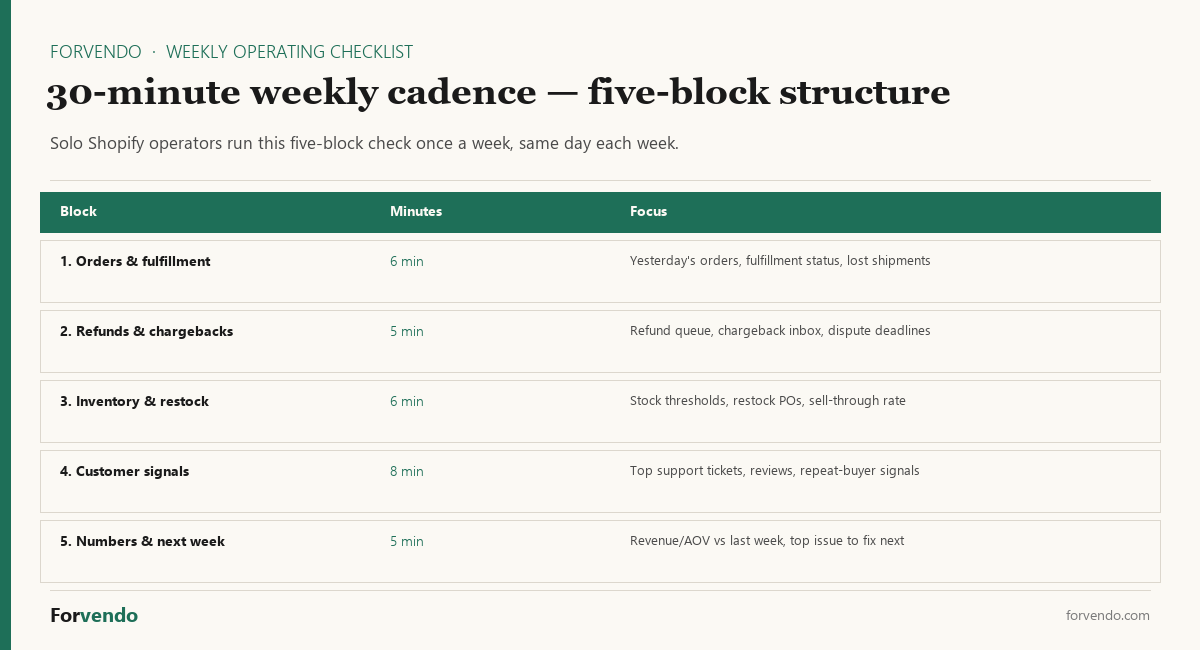
The structure below is organized by cadence so daily support checks don’t get mixed with monthly app audits or quarterly tax-exposure reviews. The full version is in the free PDF + Google Sheet — link at the end. Here is what it contains, with the time budget that makes it sustainable.
Daily — 5 Minutes
Run twice: once around lunch, once before bed. Goal: nothing breaks overnight.
Free download
The Solo Shopify Weekly Operating Checklist
A one-page PDF plus a copyable Google Sheet — the weekly cadence these guides build on. Free; bring your own store data.
Get the free checklist →- New orders flagged for review (high-risk addresses, large orders, gift orders with custom notes)
- Refund or replacement requests in inbox — reply or queue, don’t let one age past 24 hours
- Chargeback alerts — open every notification, don’t skim past
- Out-of-stock SKUs on storefront — confirm the “out of stock” message is showing, not a 500 error
- One social DM or X reply if relevant — not all platforms, just the one active channel this week
If any of these takes longer than five total minutes a day, the underlying workflow is broken — not the checklist.
Weekly — 30 Minutes
This is the load-bearing slot, usually Sunday evening. Without it the daily checklist becomes a survival treadmill.
This is the core part of the weekly review because it connects money, inventory, tools, tax exposure, and next-week priorities in one short slot.
- Money (10 min): pull the Shopify week-over-week numbers. Revenue, orders, refund rate. Compare to the prior 4-week rolling average. For report definitions, use Shopify’s official documentation on analytics and reports rather than relying only on dashboard labels.
- Inventory (5 min): top 10 SKUs by velocity. Days of cover. Anything under 14 days, queue a reorder.
- Marketing (5 min): which post, channel, or email drove the most clicks this week. Repeat what worked. Cut what didn’t.
- Tools (3 min): any app billed this week that you don’t remember using? Flag for next month’s audit.
- Tax and Finance (3 min): pull the trailing-12-month sales by state. Glance at the four or five states closest to current economic nexus thresholds. Use the free Sales Tax Nexus Tracker Sheet to keep this glance under two minutes.
- Next week (4 min): pick two specific things you’ll execute Tuesday–Thursday. Not “improve marketing” — something like “rewrite product page copy on SKU-021” and “send re-engagement email to lapsed customers.”
Monthly — 1 Hour
Usually the first Saturday morning of the month.
- App stack audit — every active app, charge for the month, last meaningful use
- Refund rate by SKU — anything over 7% gets investigated
- Email list health — opens, clicks, unsubscribes. Confirm the welcome flow still works.
- Affiliate or partnership review — any program with $0 in conversions gets moved down the priority list
- One personal check: are you under the weekly operating budget or over it?
Quarterly — 2 Hours
- Multi-state sales tax nexus review (use the Sales Tax Nexus Tracker Sheet — it removes most of the manual work)
- Shopify Payments, W-9, and 1099-K reconciliation. Confirm the legal name and TIN on file match across records before tax season. For general background on Form 1099-K, review the IRS guidance on Form 1099-K and confirm store-specific questions with a qualified tax professional.
- Affiliate program terms re-check (programs change rates and cookie windows over time)
- Content update sweep — any article older than 90 days on a fast-moving topic gets re-reviewed
- Cancel something. Apps, subscriptions, partnerships, or products that aren’t earning their slot.
What Breaks First When a Solo Store Grows
The same checklist works across the $5K–$50K MRR band, but the failure points shift as revenue grows. Knowing which one breaks first at your stage tells you what to actually pay attention to during the weekly review.
Around $5K MRR — refund response time. At lower volume the store usually feels manageable, but the most common silent leak is refunds and customer-service replies aging past 24 hours. Returns that should have been processed in three days drift to ten, and a small share turn into chargebacks. The Daily and Weekly support items matter more than the rest at this stage.
Around $18K MRR — app stack and inventory days-of-cover. This is the range where most stores accumulate apps faster than they review them, and where a single five-day reorder gap on a popular SKU starts costing real money. The Monthly app audit and the Weekly inventory check earn their slot here. Multi-state sales tax exposure also starts showing up at this stage if a single state grows past its economic nexus threshold.
Around $40K MRR — multi-state compliance and 1099-K reconciliation. By this stage, exposure across multiple states is usually real, not theoretical. State accounts may need to be reviewed or registered. 1099-K records start to matter at tax season because the gap between gross Shopify Payments and Schedule C revenue is now large enough to flag. The Quarterly slot starts pulling more weight than the Weekly one.
Past $40K MRR — the checklist is no longer enough on its own. Once a single person spends more than 12 hours a week on operations, the answer is rarely “add more checklist items.” The fix is one of three things: a part-time helper or VA for daily execution, a meaningful automation (3PL, shipping rules, app consolidation), or a transition into a lightweight operating system with delegated ownership. Setting Shopify shipping rates from margin rather than habit is one of the higher-leverage automations at this stage. The one-person Shopify operating guide covers that transition.
The point isn’t to time-travel through the stages. It’s to know which row of the checklist matters most at your current revenue, so the 30-minute slot stays focused.
Example: A Realistic $18,000 MRR Solo Operator Week
This is a composite example, not a case study from one specific store.
“Sam” runs a niche apparel store on Shopify Basic, average order value $52, ships about 350 orders a month while holding a full-time corporate job. Sam works on the store roughly 7 hours a week. Here is what Sam’s calendar looks like with the solo Shopify checklist applied:
| Day | Time | Activity |
|---|---|---|
| Mon | 10 min (during lunch) | Daily check — flag weekend orders, reply to two refund requests |
| Tue | 90 min (evening) | Product page rewrite for SKU-021 (next-week’s plan) |
| Wed | 30 min | Send re-engagement email + a few social replies |
| Thu | 60 min | Write the next article for the blog, or update an old one |
| Fri | 10 min (during lunch) | Daily check — confirm nothing is sitting in the chargeback queue |
| Sat | 60 min (first Saturday only — monthly review) | App stack audit + refund rate by SKU + email list health |
| Sun | 30 min (evening, 7:30pm) | Weekly review (the load-bearing slot) |
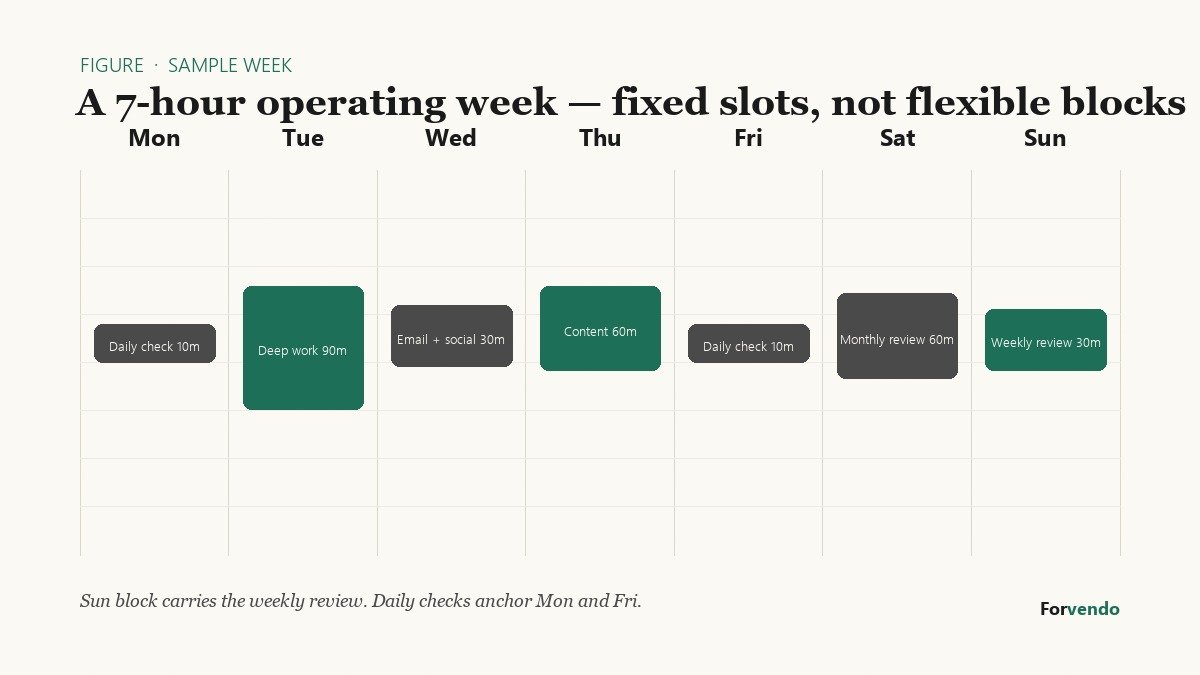
Total: about 4.5 hours of routine operations + 90 minutes of deeper work on Tuesday. Sam’s working week comes in just under 6 hours, with roughly an hour of slack for the occasional support escalation.
Forvendo newsletter
Operating notes, once a week
One email a week for US-based solo Shopify operators at $5,000–$50,000 MRR: a decision, a checklist, or a teardown. No fluff, unsubscribe anytime.
Join the newsletter →The point of the example isn’t the exact split. It’s that the slots are fixed. Sam doesn’t decide what to do on Sunday evening. The checklist decides. Sam executes.
Weekly Operating Checklist
Saved only in your browser (localStorage); nothing is sent anywhere.
Common Mistakes When People Try to Run a Weekly Review
Most weekly reviews quietly die in the first six weeks. The reasons are predictable.
The checklist gets too long. The first version usually grows to two pages because every “I want to remember to check this” item gets added. Two pages can’t be finished in 30 minutes. The Sunday block starts feeling like punishment and gets skipped. The fix is the opposite of intuition: cut items, don’t add. A useful weekly review is shorter than you think.
The makeup-week trap. A missed Sunday turns into “I’ll do two weeks next Sunday.” Two weeks of review jammed into one block makes the slot feel exhausting and most store owners stop running it within a month. The skipped week’s items get caught at the monthly review instead. Don’t double up.
Metrics with no action. Reviewing the dashboard without picking two specific tasks for the coming week turns the review into reading. The Next-Week step (4 minutes, two specific tasks) is the part that converts the review into operating output. If you skip it, the review feels productive but the store doesn’t move.
Apps stack up between audits. The Monthly app audit gets postponed once or twice and then the queue is too long to face. By the time someone audits, twelve months of $19/month apps have quietly billed. A useful rule: if an app was billed and you can’t describe what it did this month in one sentence, it’s a candidate for cancellation.
The review turns into a growth brainstorm. Sunday evening isn’t the time to redesign the store or pick a new market segment. Growth work belongs in the Tuesday or Thursday block where you have an hour and a clear head. When the weekly review drifts into brainstorming, the operating items stop getting reviewed.
If you notice two or more of these creeping in, the fix is usually structural — shorter list, fixed time slot, a separate growth block — not more willpower.
How to Start Without Rebuilding Your Whole Operations Stack
The most common reason sellers put off starting is the assumption that they need to set up Notion, build a dashboard, and pick the right SaaS first. They don’t. Habit comes before tooling, every time.
Week 1 — pick a slot, not a tool. Choose a 30-minute window for Sunday and put it on the calendar. Paper, a plain text file, the free PDF — any container works. The first run of the checklist is supposed to feel rough. The goal is to finish, not to feel finished.
Weeks 2–3 — run it three times, then start cutting. After the third run you’ll know which items take 30 seconds and which feel like work for nothing. Cut the second kind. Most first-time checklists shrink by about a third in the first month.
Week 4 — review the cadence, not the checklist. Is Sunday actually the right day, or does Friday evening fit better? Is the laptop the right tool for it, or are you trying to do it on a phone? Adjust the container before adjusting the content.
Month 2 and beyond — graduate to a tool only when the habit is steady. Once the slot has run four consecutive Sundays, then move the checklist into a Google Sheet, a Notion page, or whatever else you actually use during the day. Moving into a tool too early just gives you a tool to maintain on top of a habit that isn’t yet running.
The pattern is the same one used for any sustained operating routine: prove the habit first, formalize it second.
Forvendo decision rule
Run the weekly review on the same day every week — Sunday evening, Monday morning, or Friday afternoon. The day matters less than the cadence consistency. Store owners who try to fit the review in “when convenient” skip roughly 4 of 12 weeks per quarter.
If the review starts taking more than 35 minutes, the cause is usually skipped weeks compounding into catch-up work. The fix is to resume the cadence next Sunday, not to extend the time slot.
What to Review After the First 30 Days
After four runs, the checklist should look different than the version you started with. The thirty-day review is a short, structured check on the system itself — not on the store.
Ask four questions:
- Was the slot finishable in the time budget? If you consistently ran over 30 minutes on the Weekly block, the checklist is too long. Cut two items.
- What got skipped most often? Items that get skipped three weeks in a row either belong on a different cadence (move them to Monthly or Quarterly) or aren’t load-bearing and should be removed.
- What did you catch that you would have missed otherwise? This is the value test. If after four weeks the checklist hasn’t caught at least one refund, app, inventory issue, or compliance question, the items might not be tuned to your store. Replace some.
- What deserves to be automated instead? Anything you’ve manually checked four weeks in a row is an automation candidate. Low-stock email alerts, refund queue notifications, monthly app billing reports — most can be set up once and removed from the checklist.
Run the same thirty-day review every quarter. The checklist should evolve as the store does, and the quarterly check is what keeps it tuned.
Quarterly review trigger
Block 90 minutes on the first Sunday of each quarter to run the four-question check above.
- Pull the trailing 12 weeks of checklist logs (or memory if not logged) (~10 min)
- Answer the four questions in order (~30 min)
- Cut, add, or move items based on the answers (~30 min)
- Write down what changed and the date — this is the version history of your operating system (~10 min)
- Schedule one automation candidate for the next 30 days (~10 min)
Most quarterly reviews remove 1–2 items and automate 1 — net the checklist gets shorter over time, not longer.
What This Checklist Does Not Cover
The Solo Shopify Weekly Operating Checklist is for operating an existing Shopify store. The solo Shopify weekly operating checklist is intentionally limited to recurring operations, not launch planning or advanced growth strategy.
It isn’t:
- A growth playbook (different problem, different cadence)
- A launch checklist (separate process for pre-revenue stores)
- A bookkeeping system (use a CPA or accounting SaaS for the actual books)
- A legal or tax filing schedule for your specific jurisdiction (the checklist flags items; your CPA files them)
Treat it as the store’s operating system — the thing you run every week — and pair it with a separate growth plan and a separate accounting workflow.
Frequently Asked Questions
These answers clarify how to keep the checklist useful without letting it turn into another project.
What if I have a part-time helper or a virtual assistant?
The checklist still anchors on you. Hand off the Daily 5-minute check to the helper, but keep the Weekly, Monthly, and Quarterly slots. Your job is the review, not the execution. Even when a helper handles daily execution, you should still own the weekly review.
Can I run this on a phone?
The Daily checklist works fine on a phone. The Weekly and beyond should be on a laptop — pulling Shopify reports and comparing rolling averages is painful on a small screen.
What if I miss a week?
Skip it, don’t catch up. The weekly review is intentionally short because the goal is to catch leaks early, not rebuild the store every Sunday. Two weeks of work jammed into one Sunday makes the slot feel punishing and most store owners stop running it. The skipped week’s leaks get caught at the monthly review.
What changes if I go from $18K MRR to $40K MRR?
The cadence stays the same. The Weekly slot grows from 30 to about 45 minutes, the Monthly from 1 to about 1.5 hours. Past roughly $40K MRR, a one-person store usually needs to add an automation rather than more checklist time.
How often should a solo Shopify operator review sales tax exposure?
A quick monthly or quarterly review is usually enough for small solo stores, but the right cadence depends on where you sell, how quickly revenue is growing, and whether you’re approaching any state-level economic nexus thresholds. The checklist is meant to flag issues early; final filing and registration decisions should be confirmed with a CPA or state tax professional.
Is there a Notion or Airtable version?
The free download includes a Google Sheet mirror. A Notion version is on the planned product roadmap (see the Operations Toolkit note below).
Get the Free Checklist
The full solo Shopify weekly operating checklist is a single self-contained download built to be used the same evening you grab it.
What is included:
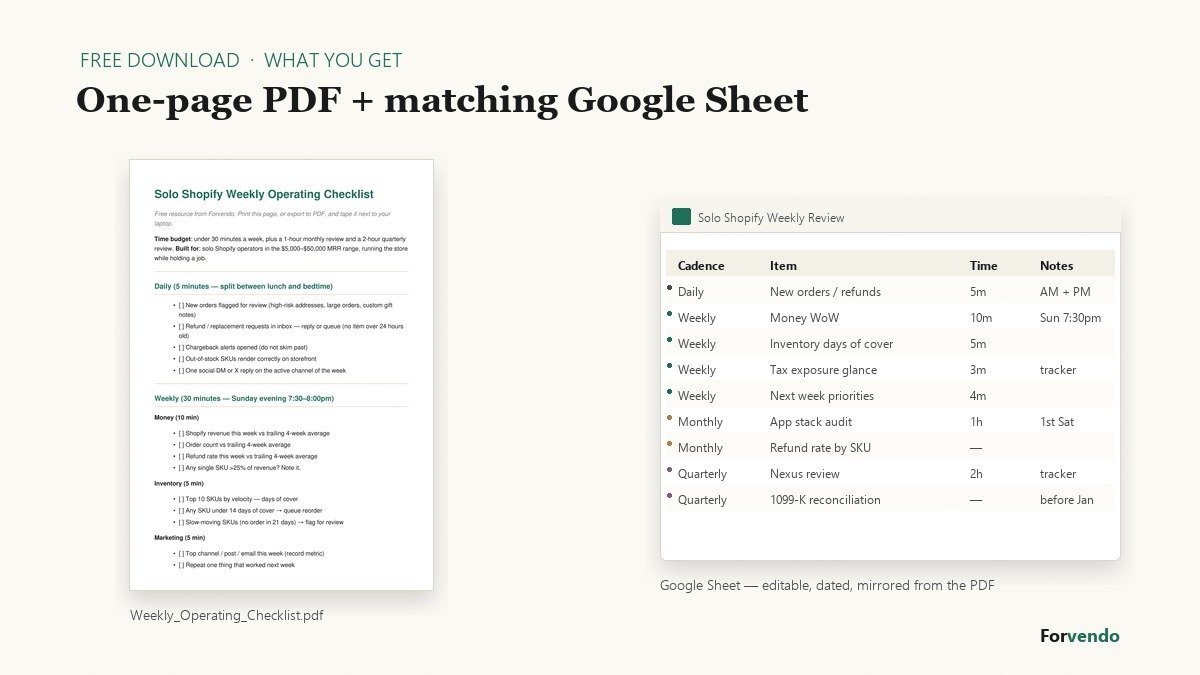
- One-page PDF — Daily, Weekly, Monthly, and Quarterly sections on a single printable sheet
- Google Sheet mirror — same structure in editable form, with separate tabs for state nexus, SKU velocity, and the monthly app review
- Pre-formatted review tables — drop in your own numbers without rebuilding the layout
- Time-budget column on every row — so you can see at a glance which items earned their slot
- Designed for a 5–10 hour weekly operating budget, not an agency workflow
Download the free Solo Shopify Weekly Operating Checklist PDF and use it as the base version before building a larger operations system. The same Free Resources page hosts the matching Refund and Chargeback Response Kit for the second block of the checklist.
For a deeper system — inventory reorder formulas, customer service SOPs, and editable weekly, monthly, and quarterly templates — the Operations Toolkit is planned for release.
Forvendo Editorial note. Forvendo publishes educational operating resources for solo ecommerce operators. Articles may cover tax, sales tax, 1099-K reporting, software pricing, platform policies, and other operating topics that change over time.
This content is for general research and operational planning. It is not legal, tax, accounting, financial, or professional advice. Readers should verify details with official sources or qualified professionals before acting on them. Platform rules, tax thresholds, software pricing, and affiliate program terms can change without notice.
Forvendo articles may be drafted with AI assistance and are reviewed by the operator before publication according to our Editorial Policy, which covers sourcing, AI use, update cadence, and corrections. See also About, Disclosure, and Privacy Policy.