How to Set Shopify Shipping Rates Without Losing Money on Every Order
Last updated: · Shopify features, pricing, and platform policies change. Verify with official sources before acting.
Quick answer
Your Shopify shipping rates should be set from one number: the gap between what a customer pays for shipping and what the label actually costs you, averaged across real orders. Most solo stores pick a shipping model — free shipping, flat rate, threshold-based free shipping, or real-time carrier-calculated — by copying a competitor, then quietly absorb the difference on every order.
The four models aren’t equally good for every store; the right one depends on your average order value (AOV), gross margin, and how much your package weight varies. This guide gives you a four-model comparison, a margin-first decision rule, a 30-order leak audit you can run in 20 minutes, and a free decision sheet that recommends a model from your own numbers.
Who this guide is for
This is for solo Shopify sellers in the $5,000–$50,000 MRR range who ship physical products from their own stock or a single 3PL, on Shopify’s Basic or Shopify plan, fulfilling roughly 50–600 orders a month. It assumes you set rates yourself in Settings > Shipping and delivery and buy labels through Shopify Shipping or a single label tool.
If you ship only digital products, Shopify shipping rates don’t apply to you. If you run a large multi-warehouse operation with negotiated carrier contracts, the decision rule here still holds, but you’ll layer zone-level and contract-rate precision on top of it.
The constraint this guide is built around is the one small stores consistently hit: shipping margin leaks slowly and invisibly. A 60-cent loss per order on 300 orders a month is $180 a month, or roughly $2,160 a year, that rarely shows up as a line item. It just makes the store feel less profitable than the dashboard suggests.
Why “free shipping” and “whatever the calculator says” both leak margin
There are two default shipping decisions solo stores fall into, and both leak margin for predictable reasons.
The first is flat free shipping with no threshold. It converts well, and the advice to offer it is everywhere. The problem is that free shipping isn’t actually free — you’re paying the label out of gross margin on every order, including the $18 orders where the $7 label eats most of the margin. On a store with wide AOV variance, blanket free shipping subsidizes your smallest, least profitable orders the most.
The second is real-time carrier-calculated rates with no review. Shopify can show live USPS, UPS, or FedEx rates at checkout, which feels accurate and safe. But carrier-calculated rates can suppress conversion when the displayed number feels high relative to the product, and they shift the entire shipping experience onto the customer at the most fragile moment of the funnel. Calculated rates also assume your package dimensions and weights in Shopify are current; if they’re stale, the quoted rate and the real label diverge.
Both defaults share the same root cause: the shipping model was chosen for a reason other than margin. The fix is to make your Shopify shipping rates a measured decision tied to AOV and margin, then revisit them on a schedule rather than setting them once and forgetting it.
The four Shopify shipping rate models
There are four models a solo Shopify store realistically chooses between when setting Shopify shipping rates. Each fits a different combination of AOV, margin, and weight variance.
Most solo stores below $50K MRR land on either flat-rate or threshold-based free shipping. Flat free shipping tends to fit only high-margin, low-weight catalogs. Carrier-calculated rates tend to fit heavier or highly variable catalogs where a single flat number would be wildly wrong.
The margin-first decision rule
The model choice follows three inputs you can pull from your own store: gross margin percentage, AOV, and weight variance across SKUs. If the margin figure is the one you are least sure of, the Shopify profit margin calculator derives it per order from product cost, shipping, processing and ad spend.
Free download
The Solo Shopify Weekly Operating Checklist
A one-page PDF plus a copyable Google Sheet — the weekly cadence these guides build on. Free; bring your own store data.
Get the free checklist →Forvendo decision rule
Choose the shipping model from margin and AOV, not from what competitors display. If gross margin is above 60% and package weight is consistent, flat free shipping can work. If margin is 40–60%, use threshold-based free shipping with the threshold set at roughly 1.5× your current AOV. If margin is below 40% or weight varies widely across SKUs, charge shipping — flat-rate for consistent weights, carrier-calculated for variable ones.
Then review the model once a quarter against the leak audit below. A shipping model that fit at $8K MRR can leak margin at $25K MRR once the product mix shifts.
The threshold formula is worth isolating because it’s the most common solo-store case. If your AOV is $42 and your margin supports free shipping above a certain basket size, a threshold near $63 (1.5× AOV) nudges customers to add one more item to qualify while keeping your smallest, thinnest-margin orders out of the free-shipping pool. These figures are planning assumptions, not universal benchmarks — the right multiplier depends on your margin curve, repeat-purchase rate, and how price-sensitive your buyers are, so treat 1.5× as a starting point and tune it after one quarter of data.
The Shopify shipping calculator applies the same starting rule: enter your average order value and median label cost, and it returns a threshold near 1.5× AOV and a flat rate near your median label.
Quick test: the 30-order shipping margin leak audit
Before changing any rate, measure the current leak. This takes about 20 minutes with your last 30 orders.
- Pull your last 30 orders from Shopify Admin (Orders, exported to CSV, or read directly).
- For each order, record two numbers: shipping charged to the customer, and the actual label cost you paid (from Shopify Shipping or your label tool).
- Subtract label cost from shipping charged for each order. A negative number is a per-order shipping loss.
- Sum the column. A negative total is your 30-order shipping leak. Multiply by your monthly order count ÷ 30 to estimate the monthly leak.
- Flag the pattern. If the losses cluster on low-AOV orders, your model is subsidizing small baskets — a threshold or charged-shipping model can stop it.
If the audit shows a leak above roughly 2–3% of revenue, the shipping model is the likely cause, and the decision rule above is where to start. If the leak is near zero, the model is fine and this is a quarterly check, not a fix.
The Shipping Margin & Rate Decision Sheet automates this audit — paste in 30 orders, enter your margin and AOV, and it returns the recommended model plus a suggested free-shipping threshold.
Download the Shipping Margin & Rate Decision Sheet 2026 · XLSX 16 KB
Mapping the four models to your store
Once you have margin, AOV, and the leak number, the model behind your Shopify shipping rates usually picks itself.
A note on Shopify Shipping itself: buying labels through Shopify can lower the label cost via its negotiated rates, which directly improves the leak number regardless of which model you charge with. Confirm current discounts and carrier availability against Shopify’s shipping rates documentation and your own admin, since carrier partnerships and rates change over time.
Forvendo newsletter
Operating notes, once a week
One email a week for US-based solo Shopify operators at $5,000–$50,000 MRR: a decision, a checklist, or a teardown. No fluff, unsubscribe anytime.
Join the newsletter →Worked example: an $18K MRR store
This is a composite store, not a real customer, used to show the decision in motion. The numbers reflect a plausible mid-band pattern, not a forecast.
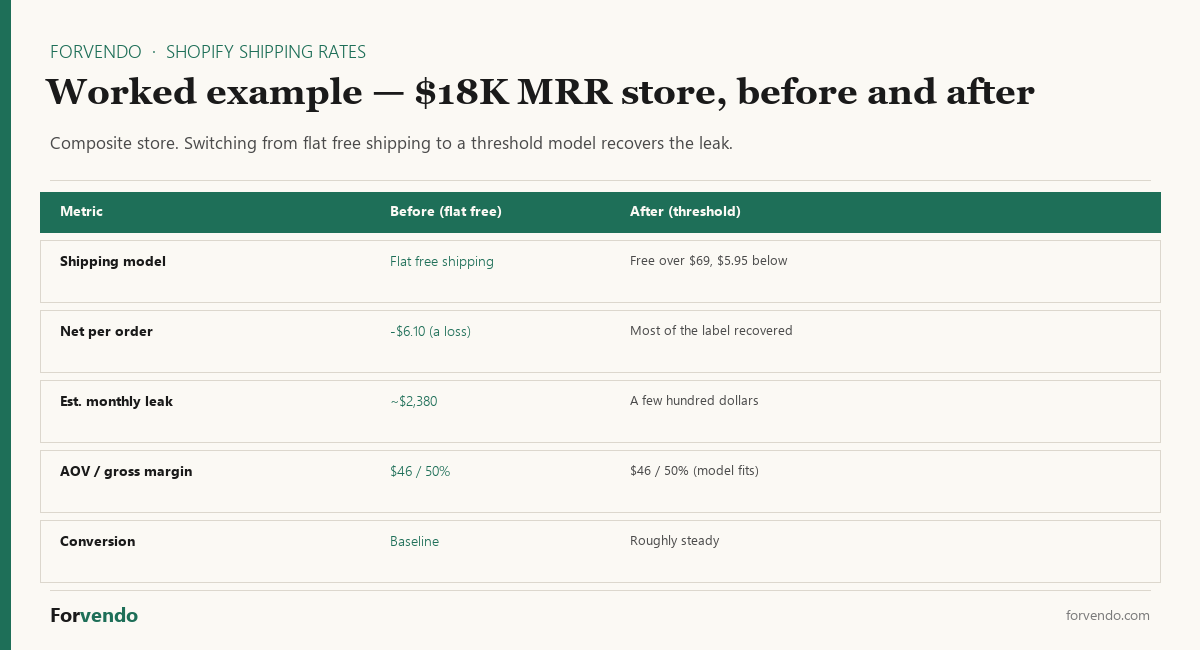
The store runs $18,000 MRR, AOV of $46, and gross margin around 50%. It offers flat free shipping because a competitor does. The 30-order leak audit shows shipping charged of $0 against an average label of $6.10, for a $6.10 loss on every order. At roughly 390 orders a month, that’s about $2,380 a month flowing out invisibly.
Applying the decision rule: margin is 50%, so threshold-based free shipping fits. You set free shipping above $69 (1.5× the $46 AOV) and a $5.95 flat rate below it. Over the next quarter, AOV rises toward the threshold as some customers add an item to qualify, and orders below the threshold now recover most of the label. The modeled result is the monthly leak shrinking from roughly $2,380 toward a few hundred dollars — recoverable margin that was previously invisible, with conversion held roughly steady because the free-shipping offer still exists, just with a floor.
Turning the model into an actual rate in Shopify
Picking the model is the decision. Building it takes about five minutes in Settings > Shipping and delivery, and it’s where two avoidable mistakes get made.
Every rate lives inside a shipping profile, and inside that profile it lives inside a zone. Shopify’s steps for setting up shipping rates are: open the shipping profile, pick the zone, click Add shipping option, and configure the rate. The four models map onto Shopify’s rate types directly.
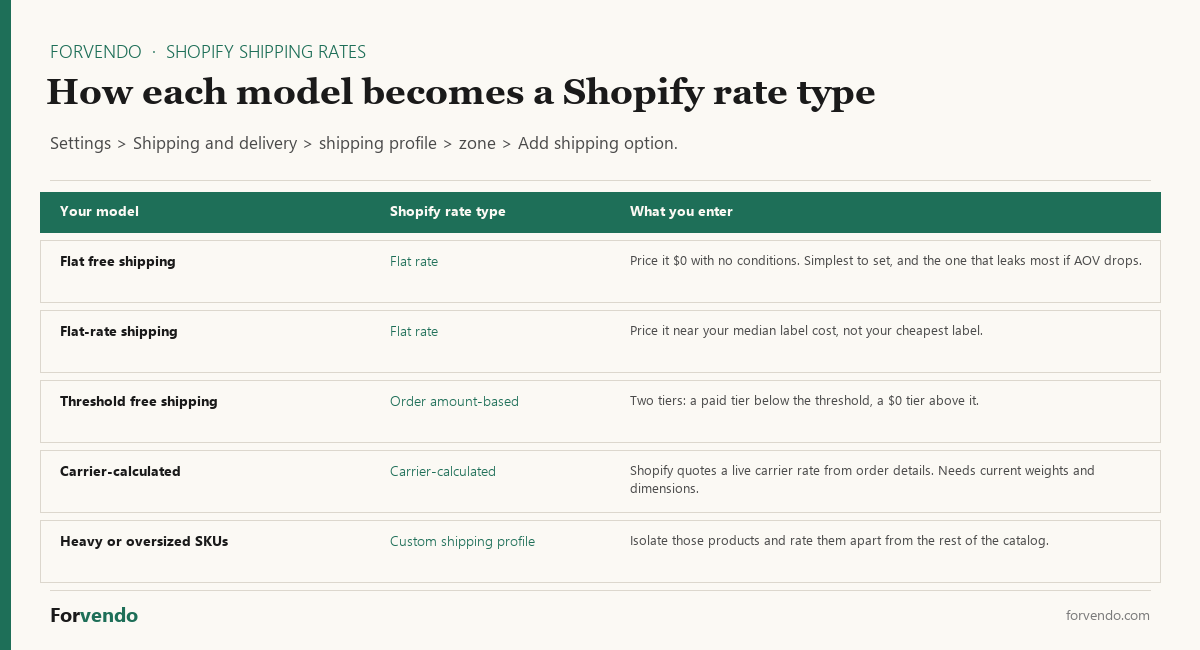
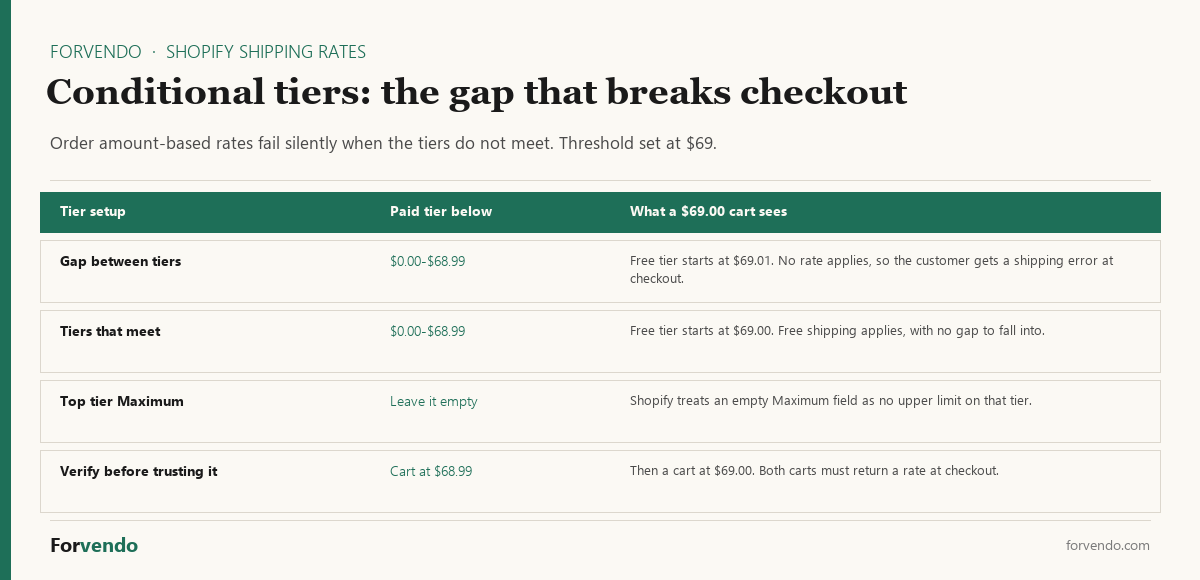
The first mistake is a gap between tiers. Say you set the paid tier to cover $0.00 through $68.99 and start free shipping at $69.01. A cart that lands at exactly $69.00 falls outside both. Shopify’s documentation is blunt about what happens next: if an order falls outside your tiers, no rate applies and the customer gets a shipping error at checkout. The fix is small. Set the paid tier’s maximum and the free tier’s minimum so they meet, and leave the top tier’s Maximum field empty — Shopify treats an empty maximum as no upper limit.
The second mistake is moving the whole catalog to carrier-calculated rates because a handful of SKUs are heavy or oversized. Products sit in the general shipping profile by default, which is the profile that covers everything you haven’t assigned somewhere else. You can create a custom profile for the oversized SKUs alone, give that profile carrier-calculated rates, and leave the rest of the catalog on the simpler flat or threshold model that converts better. One caveat from Shopify’s docs: a product or variant can belong to only one profile at a time, and adding it to a second profile automatically removes it from the first. A SKU can’t sit in both.
That split is usually the honest answer to the “wide weight variance” row in the mapping above. Variance is rarely spread evenly across a catalog. It’s concentrated in a few products, and isolating those keeps carrier-calculated complexity where it earns its keep instead of taxing every order.
Once the rate is saved, check it the way a customer will. Build a cart one cent below your threshold and another right at it, and confirm both return a shipping rate. Those two carts are exactly where a tier gap surfaces, and testing them takes a minute.
Shopify shipping rate setup checklist
Run this once when you set or change your Shopify shipping rates, then revisit quarterly.
- [ ] Pull the 30-order leak audit and record the current monthly leak
- [ ] Confirm gross margin % and AOV from the last 90 days
- [ ] Check weight variance — are most packages within a similar band, or wildly different?
- [ ] Pick the model from the decision rule
- [ ] If threshold-based, set the threshold near 1.5× AOV and the under-threshold flat rate near your median label
- [ ] Verify product weights and dimensions in Shopify are current (especially for carrier-calculated)
- [ ] Confirm Shopify Shipping (or your label tool) is giving you the best available label rate
- [ ] Re-run the leak audit 30–60 days after the change to confirm it worked
- [ ] Add the quarterly shipping review to your operating cadence
What this article does not cover
This guide doesn’t cover international shipping rates and customs duties, which add destination-country rules and landed-cost considerations beyond a domestic margin decision. It doesn’t benchmark specific shipping apps or carrier accounts head-to-head, because the model decision comes first and the tool follows. It doesn’t address packaging cost optimization or dimensional-weight strategy in depth, though both feed the label-cost number the audit measures.
Related Forvendo guides
Shipping rates are one input to the broader operating system. The The Weekly Shopify Checklist for a One-Person Store sets the weekly and quarterly review blocks where the shipping leak audit lives. The How to Calculate a Reorder Point applies the same measure-then-decide approach to inventory, and the How Many Shopify Apps Is Too Many? helps decide whether a dedicated shipping or label app earns its monthly cost.
Free-Shipping Threshold Calculator
A planning starting point; test the threshold against your own checkout conversion.
Frequently asked questions
What shipping model should I use if I am just starting out with no order history?
With no order history, start with threshold-based free shipping at a threshold near 1.5× your expected AOV, using your product prices to estimate AOV. It protects small orders while keeping a free-shipping offer. Re-run the 30-order leak audit once you have 30 real orders and adjust from there.
Is free shipping better for conversion?
Free shipping can lift conversion, but the lift is rarely worth subsidizing every small order at full label cost. Threshold-based free shipping usually captures most of the conversion benefit while protecting margin on low-AOV orders. Test the threshold against your own checkout data rather than assuming.
How often should I review my Shopify shipping rates?
A quarterly review tends to be enough for a solo store, plus an immediate review any time AOV, product mix, or carrier rates shift noticeably. Carrier rates and Shopify Shipping discounts can change, so a model that fit last year may leak margin now.
Should I use Shopify’s calculated carrier rates?
Carrier-calculated rates fit stores with wide weight or zone variance, where a single flat number would be far off. They depend on accurate weights and dimensions in Shopify, and they can suppress conversion when the displayed rate feels high. For consistent-weight catalogs, a flat or threshold model is usually simpler and converts better.
Why is no shipping rate showing at checkout?
The usual cause is a gap in conditional tiers. If your paid tier stops at $68.99 and free shipping starts at $69.01, a $69.00 cart matches neither, and Shopify’s documentation says that when an order falls outside your tiers, no rate applies and the customer sees a shipping error. Check that each tier’s maximum meets the next tier’s minimum, and leave the top tier’s maximum empty. The other common cause is a product sitting in a shipping profile whose zones don’t cover the customer’s destination.
Does charging for shipping hurt my store’s competitiveness?
It depends on margin. If charging shipping is the difference between a profitable and an unprofitable order, a transparent flat rate or a free-shipping threshold is more sustainable than absorbing the loss. Customers respond to total cost; a slightly higher product price with free shipping and a fair shipping charge with a lower price can net out similarly.
Forvendo Editorial note. Forvendo publishes educational operating resources for solo ecommerce operators. Articles may cover tax, sales tax, 1099-K reporting, software pricing, platform policies, and other operating topics that change over time.
This content is for general research and operational planning. It is not legal, tax, accounting, financial, or professional advice. Readers should verify details with official sources or qualified professionals before acting on them. Platform rules, tax thresholds, software pricing, and affiliate program terms can change without notice.
Forvendo articles may be drafted with AI assistance and are reviewed by the operator before publication according to our Editorial Policy, which covers sourcing, AI use, update cadence, and corrections. See also About, Disclosure, and Privacy Policy.