How Many Shopify Apps Is Too Many? A Stack Audit for Small Stores
Last updated: · Shopify app pricing, plan tiers, and feature sets change frequently. Confirm current pricing and feature details on each vendor’s pricing page and in the Shopify App Store before making decisions.
There’s no fixed number. The usable limit is what the stack costs as a share of MRR — roughly 3% for a lean store, 6% for a well-tooled one — and whether each app still maps to a workflow you actually run. App spend sits alongside the plan fee and card processing on the same bill, which what Shopify really costs breaks down line by line. Under $20K MRR, forgotten subscriptions leak more margin than almost any other line.
Quick answer
- Most solo Shopify sellers below $20K MRR run between 8 and 12 apps but actively use only 4 to 6 of them. The unused subscriptions can add up to several hundred dollars per month.
- The real cost of a Shopify app isn’t only its monthly fee. It also includes setup time, maintenance, reporting confusion, support burden, and the risk of building workflows around a tool the store may not need yet.
- The Shopify app stack audit is a 90-minute task the first time and roughly 30 minutes per quarter after that, once the format is known.
- A 5-question keep/remove/delay test handles most decisions: revenue/fulfillment/support/compliance/reporting dependency, usage frequency, duplication of built-in features, workflow breakage on removal, and cost relative to MRR.
- A cleaner app stack can reduce fixed software cost and make operating decisions easier, but margin impact depends on the store and the specific apps reviewed.
The framework here is consistent with the broader operating cadence described in the The Weekly Shopify Checklist for a One-Person Store.
Table of Contents
- Who this is for
- Why Shopify app stacks get bloated below $20K MRR
- The real cost of an app
- Key definitions
- The practical app-stack audit framework
- The 5-question keep/remove/delay test
- App categories to review
- What to check inside Shopify Admin
- Common app-stack waste patterns
- Example: A composite $18K MRR audit
- Monthly app-cost review checklist
- When to keep a paid app
- When to remove, replace, or delay an app
- What this article does not cover
- Practical next steps
- Frequently Asked Questions
Who this is for
This article is built for a specific reader.
- You sell on Shopify, typically on the Basic plan or Shopify (not Plus).
- Monthly recurring revenue sits roughly between $5,000 and $20,000.
- You run the store alone or mostly alone.
- You have between four and twelve apps installed and you aren’t sure which ones are still earning their cost.
- You suspect that app subscriptions are eating margin, but you haven’t stopped to do the math.
- You want a practical audit workflow, not a generic “best apps for Shopify” list.
If your store is pre-revenue, on Shopify Plus, or running through a multi-employee operation with a dedicated tools owner, the framework still has useful parts, but the calibration is different. Pre-revenue store owners should focus on getting to first revenue before optimizing tools. Plus-tier stores usually need an enterprise tooling review, not a solo audit.
This article doesn’t provide individual financial, tax, or business advice. Specific app and pricing decisions should be reviewed against current vendor documentation and, where appropriate, with a qualified professional.
Why Shopify app stacks get bloated below $20K MRR
The install pattern for a one-person store tends to follow a predictable shape:
- A specific need shows up (recover abandoned carts, collect product reviews, add a popup, build a landing page).
- You search the Shopify App Store, pick a well-rated app, and install the free trial.
- The trial converts to a paid plan around day 15.
- The app works, but only partially fits the original need.
- You build an adjacent workflow somewhere else and don’t uninstall the original app.
- A few months later you can’t describe what the app does, but it continues to bill every month.
Multiply that by 8 to 12 apps and the total monthly subscription cost can sit between $200 and $600. For a store doing $18,000 MRR with a roughly 35% net margin, a few hundred dollars per month in unused subscriptions can represent several percentage points of monthly profit — large enough to matter, small enough that nobody flags it in the bank feed.
Three structural reasons make this worse at the $5K–$20K MRR band specifically:
- Apps feel individually cheap at this revenue. A $19/month subscription feels affordable to a store owner earning $10,000 a month, even though the stack of those subscriptions doesn’t.
- One-person stores don’t have a finance lead. A larger team usually has a fractional CFO or operations lead who tags every recurring SaaS charge. Solo stores see the charges in the bank statement and assume each one was a reasonable past decision.
- Vendor pricing tiers shift right as the store grows. A $19/month app on the “Solo” plan may auto-upgrade to $49/month on the “Growth” tier when the subscriber list, order count, or sales volume crosses a threshold. The bill rises without an explicit decision.
The result is that a solo store owner at $10K MRR sometimes spends more on apps as a percentage of revenue than the same store at $30K MRR. Both numbers tend to fall over time when the store has an audit cadence in place.
The real cost of an app
The real cost of a Shopify app isn’t only its monthly price. For a seller running everything alone, the cost also includes setup time, maintenance, reporting confusion, support burden, and the risk of building workflows around a tool the store may not need yet.
When weighing whether an app earns its cost, the full operating cost generally includes:
- Monthly subscription fee — the visible line on the Shopify billing page
- Setup time — the hours spent installing, configuring, and integrating the app with the theme, the order workflow, and other tools
- Maintenance time — the recurring effort to keep the app current, resolve theme conflicts, and adjust settings when the store changes
- Theme conflicts — code injected by some apps can interact with the theme in ways that cause checkout, layout, or performance issues
- Customer support complexity — every app adds another vendor support queue if something breaks
- Reporting confusion — multiple tools producing different versions of the same metric can make weekly decisions slower, not faster
- Duplicate features — paying twice for capability that already exists in Shopify or in another installed app
- Lock-in risk — an app that owns a critical workflow (subscriptions, customer accounts, abandoned-cart sequences) creates switching cost
- Slower decision-making — a heavier stack often means more places to check before making a small operating change
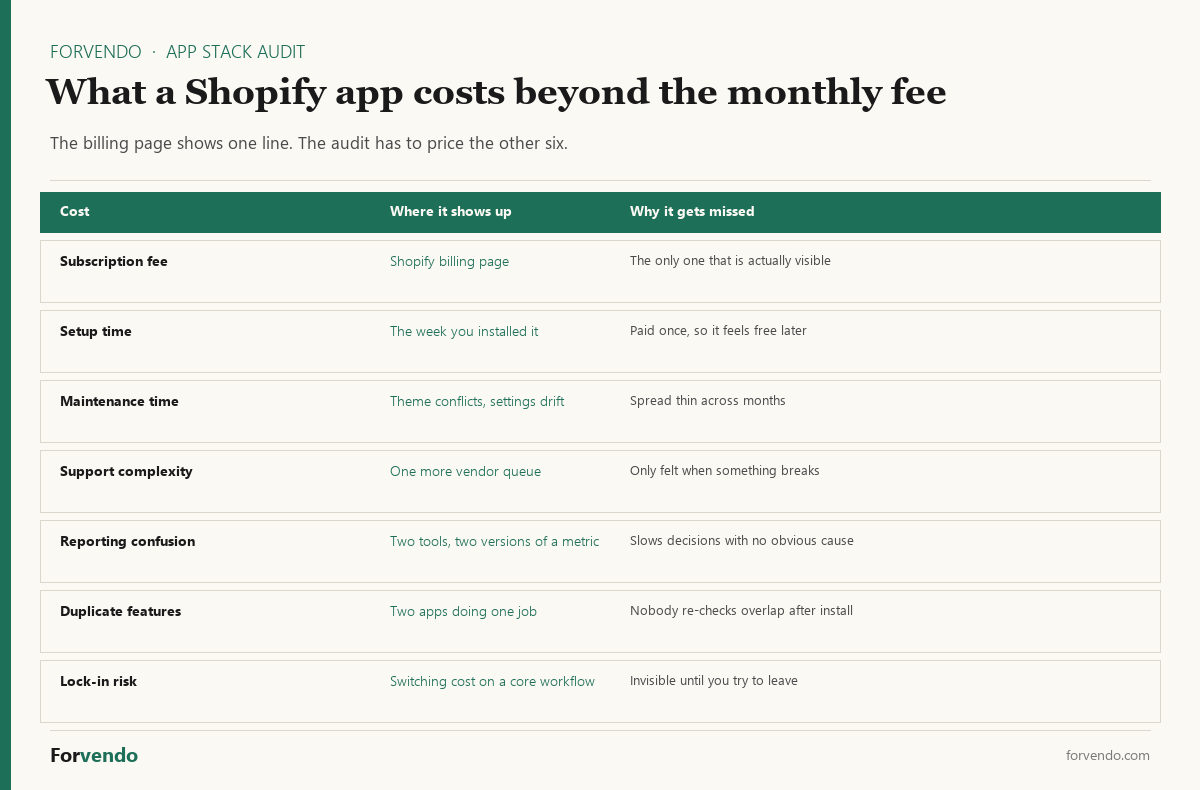
Thinking in total operating cost rather than monthly sticker price is the central shift that separates an effective audit from a vague “should I cancel this?” feeling.
Key definitions
The vocabulary below shows up across the audit. These are educational starting points, not legal or accounting definitions.
App stack. The full set of installed Shopify apps and connected third-party tools that the store relies on for operations. A solo store’s app stack typically contains email, reviews, payments, shipping, analytics, and one or two niche tools.
Monthly recurring app cost. The sum of every active subscription on the Shopify billing page plus any external SaaS the store uses (Klaviyo, Kit, ConvertKit, AWeber, Lemon Squeezy, helpdesk tools, analytics dashboards). This is the visible line in the operating cost stack.
Usage frequency. How often you actually open or interact with the app — daily, weekly, monthly, quarterly, or never. An app that “runs in the background” (e.g., a tax-calculation tool) can still have high implicit usage even if the dashboard is rarely opened.
Revenue dependency. Whether the app directly supports revenue (checkout, payments, sales tax calculation, abandoned-cart recovery, upsells, subscriptions) or supports something further from revenue (theme customization, layout helpers, decorative widgets).
Workflow dependency. Whether removing the app would break an existing operating workflow that the store actively runs. A page builder that built one landing page eight months ago has low workflow dependency; an email automation app that triggers post-purchase flows weekly has high workflow dependency.
Overlap. When two or more apps provide substantially the same capability. Overlap commonly shows up in reviews, popups, analytics, and email marketing, where multiple tools were tried over time and not removed when a winner was chosen.
Switching cost. The effort required to move from the current app to an alternative — data export, configuration rebuild, theme adjustment, customer communication, and any temporary workflow gap. High switching cost can justify keeping an app that scores poorly on revenue dependency.
Lock-in. A specific form of switching cost where the app owns customer data, billing relationships, or workflow state that’s difficult to extract. Subscription billing apps and helpdesk apps often carry high lock-in.
Implementation debt. The accumulated effort required to maintain custom configurations, code snippets, theme edits, and integrations that were added when an app was first installed. Implementation debt is the hidden tax of every “I’ll figure it out later” install.
The practical Shopify app stack audit framework
The audit walks through six steps. Each step produces a record you can refer back to in the next quarterly review.
The Shopify Help Center on managing apps covers the current admin interface for installing, removing, and reviewing billing for installed apps.
Free download
The Solo Shopify Weekly Operating Checklist
A one-page PDF plus a copyable Google Sheet — the weekly cadence these guides build on. Free; bring your own store data.
Get the free checklist →The Shopify app stack audit 5-question keep/remove/delay test
Most app decisions can be made with a small set of questions. The test below replaces multi-factor scoring with five plain-language questions, applied to each app in the Shopify app stack audit.
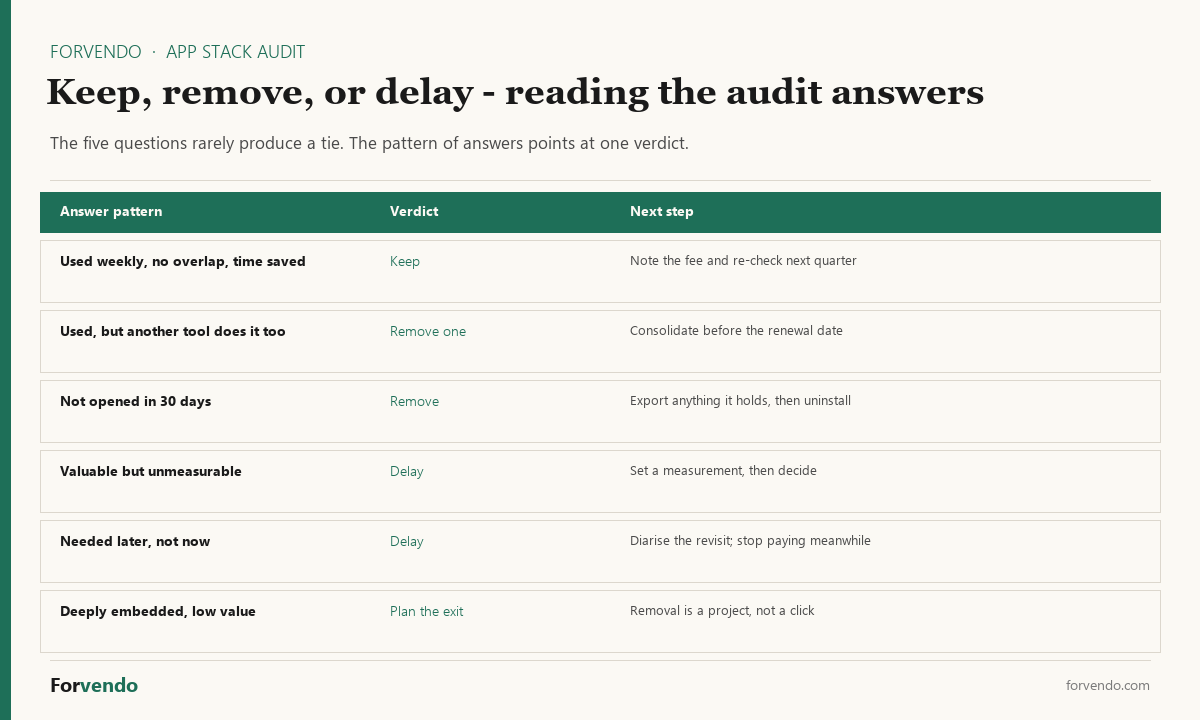
Reading the answers together matters more than scoring them individually — an app used weekly but duplicated elsewhere is a different decision from one that is valuable and simply unmeasured.
An app that doesn’t support revenue, fulfillment, support, compliance, reporting, or a documented workflow should be reviewed for removal or delay. Unused apps should be reviewed carefully, especially when they add cost, code, support complexity, or reporting confusion. A cleaner stack can reduce fixed software cost and make operating decisions easier, but actual margin impact depends on the store and the specific apps reviewed.
Forvendo decision rule
Remove or replace any app that fails three or more of the five keep questions. One Sunday of migration work usually recovers months of subscription waste that would otherwise compound silently.
If total monthly app spend divided by MRR is greater than 6%, treat that ratio as a hard stop on installing any new app until a full audit has been walked.
Shopify app stack audit — categories to review
Most below-$20K MRR overspend concentrates in four categories. Each one has its own decision pattern.
Email and SMS automation
Klaviyo is the default install for many sellers and earns its cost at higher list sizes with active segmentation. At a smaller list size (for example, below roughly 1,500 active contacts) or limited segmentation usage, the same store may be paying for capability the list can’t yet fill.
Forvendo newsletter
Operating notes, once a week
One email a week for US-based solo Shopify operators at $5,000–$50,000 MRR: a decision, a checklist, or a teardown. No fluff, unsubscribe anytime.
Join the newsletter →| Use case | What may be enough |
|---|---|
| Welcome flow + abandoned cart only | Kit (formerly ConvertKit) on a free or starter tier, or AWeber on a starter tier, often handles this |
| Add post-purchase and win-back flow | A mid-tier email tool (Omnisend, Mailchimp paid tier, or comparable) can fit |
| Add segmentation by purchase history and product affinity | Klaviyo or a comparable advanced tool may justify its cost |
A rough rule: if the last email touch generated meaningful subscriber-level revenue, the tool is generally paying for itself. If recent campaigns produced little measurable lift, the tool may be over-spec for the list state. Confirm current pricing directly on each vendor’s pricing page.
Reviews and user-generated content
The Shopify reviews ecosystem sits on three tiers. A native or free option (Shopify’s built-in reviews, or a free third-party app) can cover stores that don’t yet run an active review-collection program. Mid-tier paid apps (around $15–$30/month, names such as Judge.me, Loox, or Stamped at the time of this writing) earn their cost when the store is actively sending hundreds of review-request emails per month and tracking review-display impact on product pages. The top tier (around $100/month or more) usually targets stores running formal review programs at higher revenue.
Most below-$20K stores running a paid mid-tier review app should review whether the review flow is actually running. If review requests aren’t being sent on a documented cadence, downgrading to a free option may make sense.
Page builders
Page builders are useful when the store actively runs landing-page tests, custom collection layouts, or campaign-specific pages. They’re dead weight when you built one landing page months ago and haven’t touched it since.
A practical rule: if no page has been edited in the builder in the last 30 days, the builder is a candidate for removal. Where one page is genuinely useful, hard-coding it into the theme and removing the builder usually reduces ongoing cost.
Subscription billing
Subscription apps (names such as ReCharge, Loop, or Bold Subscriptions at the time of this writing) are required infrastructure for stores actively running a subscription product. They’re wasted cost when the store has zero active subscribers, or when the subscriber base is small enough that the app fee approaches or exceeds the subscription revenue itself.
For stores with fewer than roughly 30 active subscribers paying small monthly amounts, the math frequently doesn’t work. Pausing the subscription product (or moving it to a different mechanism) may be more practical than maintaining the app.
For tax-handling apps (sales tax calculation, multi-state collection, 1099-K reconciliation helpers), the audit should be more conservative than for marketing apps. Tax and compliance tools tied to active obligations shouldn’t be removed without a clear plan to replace the workflow they support. See the multi-state sales tax operating guide and the Does Shopify Send You a 1099-K? for the surrounding context.
What to check inside Shopify Admin
The audit relies on a small number of admin surfaces.
| Admin surface | What to check |
|---|---|
| Apps → All apps | Full list of installed apps, install date, and current status |
| Apps → App charges | Active recurring charges, plan tier for each app, and upcoming charges |
| Settings → Billing → Subscriptions | Shopify plan and any Shopify-issued subscriptions (Markets, Shipping, etc.) |
| Settings → Apps and sales channels → Develop apps | Custom apps and private app integrations (often overlooked) |
| Online Store → Themes → Customize | Theme blocks and sections that reference specific apps (some apps inject code that stays after uninstall) |
| Analytics → Reports → Finances | Cross-check the cost of an app against the revenue category it’s supposed to support |
The Shopify App Store is also worth checking for the current pricing and feature set of every app in the stack. Pricing pages on the app’s listing change more often than most store owners realize.
Common app-stack waste patterns
After running this audit on enough stores, the same waste patterns recur.
The forgotten trial. An app installed for a one-time experiment that converted to paid on day 15 and continued billing for 6–12 months without active use. Removing the app immediately stops the recurring charge.
The duplicate analytics stack. Two or three analytics tools (a free dashboard, a paid attribution tool, an SMS analytics tool, a customer-data tool) producing different versions of the same numbers. Choosing one and removing the others usually reduces reporting confusion more than it reduces cost.
The plan-tier creep. An app that started on a free tier or a low-cost starter tier and auto-upgraded to a higher plan when the list, order count, or feature usage crossed a threshold. The bill rose without an explicit decision. Downgrading back to the lower tier when usage doesn’t justify the upgrade is often available through the vendor’s account portal.
The “I might need it later” app. A tool you believe might be useful in the future. Reinstalling most Shopify apps takes a few minutes; paying $19/month for nine months while waiting “in case” costs roughly $170. The default for “I might need it later” should be removal, with a calendar reminder to revisit if the need actually appears.
The integration that owns the workflow. A subscription, helpdesk, or customer-accounts app that controls a critical workflow. Switching cost is real, but the audit should still ask whether the workflow itself is earning its cost, separate from whether the app is the right tool for it.
The decorative widget. Popups, countdown timers, sticky bars, exit-intent tools, and similar widgets that contribute small or unclear lift. Removing them and watching the next month’s data is generally safe.
The forgotten side-channel. SMS apps, push notification apps, or chatbots that were tested once and never built into a running workflow. These typically fail every question of the 5-question test.
Example: A composite $18K MRR audit
This is a composite example, not a case study from one specific store.
The reference composite (an apparel store at $18,000 MRR) entered the audit with 11 active apps costing roughly $384 per month combined. After applying the framework above:
| Action | Apps | Approximate monthly change |
|---|---|---|
| Removed (uninstalled) | 4 — a page builder unused for months, a subscription app with no active subscribers, two redundant analytics apps | Approximately $122 reduction |
| Downgraded to a lower tier or free option | 3 — review app moved to the native free option, email tool moved from a higher tier to a starter tier, SMS app paused | Approximately $63 reduction |
| Kept | 4 — affiliate tracking, accounting integration, shipping rates app, a theme add-on used weekly | No change |
| Total monthly reduction | Approximately $185 |
At $18,000 MRR with a roughly 35% net margin, $185 per month represents several percentage points of monthly profit recovered with no measurable operational impact. Over twelve months, that totals around $2,200. At a typical small-store multiple, that could correspond to several thousand dollars in enterprise value if the store is ever sold. These figures are illustrative; actual outcomes depend on the store, the specific apps reviewed, and the broader operating context.
Quick app-spend test
Sum the monthly fees of every installed app, then divide by the store’s monthly recurring revenue.
- Over 5% — run a full audit this week
- 3% to 5% — quarterly audit cadence is enough
- Under 3% — bi-annual audit cadence is enough; document the stack and revisit when MRR or app count changes meaningfully
The ratio matters more than the absolute dollar figure. A $250/month app stack on a $5,000 MRR store leaks more margin than a $700/month stack on a $35,000 MRR store, even though the dollar number looks smaller.
Monthly Shopify app stack audit review
Between quarterly audits, a short monthly review keeps the stack from drifting. The four buckets below fit inside the broader operating cadence described in the The Weekly Shopify Checklist for a One-Person Store.
The monthly review takes roughly 20 minutes total. The quarterly audit then has clean inputs instead of starting from scratch.
When to keep a paid app
Some apps consistently earn their cost. The pattern is generally:
- Directly supports revenue, fulfillment, support, compliance, or reporting
- Used weekly (directly or through background automation)
- Replaces a workflow you would otherwise have to build manually
- Has no overlap with built-in Shopify features or other installed apps
- Pricing is reasonable for the current revenue band
- Setup and maintenance burden is small relative to the value delivered
- No clear revenue, workflow, compliance, or reporting role
- Not opened or triggered in the last 30 to 90 days
- Duplicates a Shopify built-in feature or another installed app
- Plan tier has crept up without a usage change to justify it
- Implementation debt (theme code, integrations) doesn’t match the value
- “I might need it later” with no concrete near-term need
Treat the keep/remove decision as a working answer rather than a final verdict. Each app review carries a 90-day re-review date.
When to remove, replace, or delay an app
The three actions aren’t the same. Choosing between them matters.
Remove. The app fails most of the 5-question test, isn’t part of an active workflow, and reinstalling it later would be inexpensive in time and configuration. Uninstall from the Shopify admin and confirm in the vendor’s account portal that billing has stopped. Some vendors require an explicit cancellation in their own portal in addition to the Shopify uninstall — check both.
Replace. The app supports a useful capability but the current tier, vendor, or feature set doesn’t match the store’s stage. A cheaper or free alternative covers the same workflow with less cost or less complexity. Replacement usually involves a short data export, a switch-over window, and a brief monitoring period to confirm the new tool covers the prior workflow.
Delay. The app is for a workflow that may become important later but isn’t active today. Note the app’s name, why it might matter, and a re-review date. Then uninstall it for now. A queued list of “apps to revisit when X” is generally less expensive than paying every month for “in case.”
Some categories deserve more conservative treatment. Tax, compliance, accounting, or payment-related apps tied to active obligations shouldn’t be removed casually. See the multi-state sales tax operating guide for the registration context and the Does Shopify Send You a 1099-K? for the reporting context before removing anything in this category.
What this article does not cover
This article is scoped to app-stack auditing for one-person Shopify stores below $20K MRR. It doesn’t cover:
- Individual app recommendations as a “best of” list
- App pricing reviews (pricing changes too frequently for static commentary)
- Affiliate-linked product comparisons (those belong in dedicated category articles, with the affiliate relationships disclosed)
- Shopify Plus tooling reviews
- Custom app development, Shopify Functions, or theme-level engineering
- Migration between Shopify and other platforms
- General SaaS procurement strategy outside the Shopify ecosystem
- Tax, accounting, or legal implications of specific subscription expenses (these should be reviewed with a qualified professional)
- Marketing strategy or growth playbooks built on top of the app stack
Store owners who need help in any of the above categories should reach out to a Shopify Expert, a qualified accountant, or a specialist suited to the situation.
Practical next steps
What to do this week, in order:
- Open Shopify admin → Apps → App charges and write down every recurring charge with its current amount.
- Add any external SaaS bills (Klaviyo, Kit, ConvertKit, AWeber, helpdesk, analytics) to the same list. The point is total monthly app cost, not just Shopify-billed charges.
- Run the 5-question test on the top five most expensive apps. The biggest savings usually live at the top of the list.
- Note any plan-tier creep — apps that auto-upgraded to a higher tier without an explicit decision. Check the vendor account portal for downgrade options.
- Set a 90-day re-review date for the quarterly audit. Same day of the quarter, same evening, every quarter.
- Integrate the monthly review into your existing operating cadence. The The Weekly Shopify Checklist for a One-Person Store has the structure.
- For payment, accounting, or tax-related apps, confirm any change against the broader workflow described in the multi-state sales tax operating guide and the Does Shopify Send You a 1099-K? before removing.
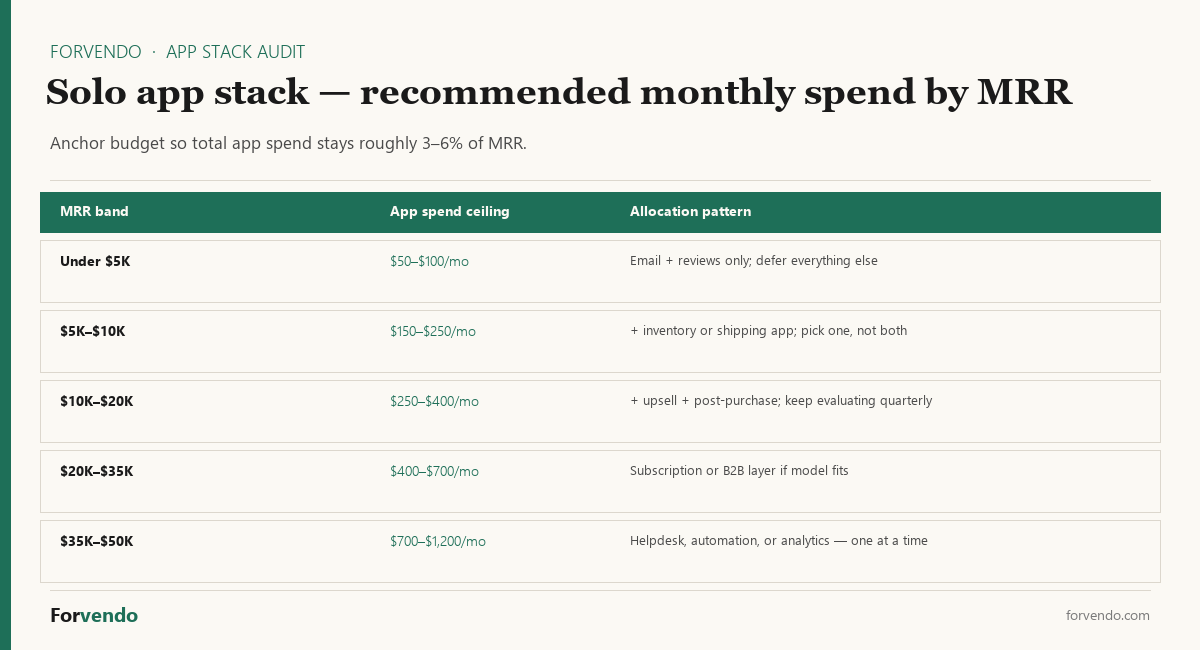
The free Shopify App Stack Audit Sheet automates the cost rollup, the 5-question test, and the KEEP/DELAY/REMOVE auto-flag for up to 30 apps. It also includes the MRR-based budget guide (lean 3% vs well-tooled 6%) on a separate tab so you can sanity-check whether your stack sits inside the recommended band for your revenue level.
App Spend Health Check
Planning heuristic for solo stores; the 3–6%-of-MRR band is a guideline, not a rule.
Frequently Asked Questions
What if I remove an app and then realize I needed it?
Most Shopify apps can be reinstalled in a few minutes. Many vendors retain account configuration for a short period after uninstall, so the reinstall is often transparent. Specific data-retention behavior should be confirmed on the vendor’s documentation before relying on it.
Should I remove affiliate or referral apps during the audit?
Affiliate and referral apps go through the same 5-question test as any other app. Below a small active partner count or limited monthly affiliate-driven sales, a lower tier or a free alternative may be appropriate. Specific affiliate program rules should be reviewed on the vendor’s terms page.
What about Shopify’s own paid features (Markets, Shipping, Bundles, etc.)?
Each Shopify-billed feature can be treated like an app in the audit. The current pricing and feature set should be confirmed on the Shopify plans page or the relevant feature page. Some Shopify features have transaction fees rather than monthly subscriptions; both should be included in the total cost rollup.
Should I outsource the audit to a Shopify Expert or agency?
At under $20K MRR, the audit is generally inexpensive to run alone — about a single evening per quarter. Agency engagements typically start at a significant fixed cost that’s hard to justify at this revenue band. As the store grows past roughly $50K MRR and the app stack becomes more complex, an external review may make more sense.
How often should I rerun this audit?
A quarterly cadence is generally appropriate at this revenue band, paired with the lightweight monthly review described above. Between audits, you can note any new install or plan-tier change so the next quarterly review starts with cleaner inputs.
What is the difference between “remove” and “delay”?
Removal uninstalls the app and stops the billing. Delay records that the capability may matter later, then still uninstalls the app for now, with a calendar reminder to revisit. The functional outcome is similar; the difference is whether you have a documented reason to consider the tool again in the future.
How do I know if a tool is “over-spec for my stage”?
A useful test: if the tool’s headline features (advanced segmentation, AI-driven recommendations, multi-store dashboards) aren’t actually being used in the store’s current workflow, the tool may be over-spec. The simpler version of the same tool, or a free alternative, often covers the basic use case.
Can a paid app pay for itself?
A paid app can earn its cost when it directly supports a running workflow that you would otherwise have to build manually. The audit framework is designed to make this visible — apps that pass the 5-question test on every question generally are paying for themselves, while apps that fail multiple questions usually aren’t.
Forvendo Editorial note. Forvendo publishes educational operating resources for solo ecommerce operators. Articles may cover tax, sales tax, 1099-K reporting, software pricing, platform policies, and other operating topics that change over time.
This content is for general research and operational planning. It is not legal, tax, accounting, financial, or professional advice. Readers should verify details with official sources or qualified professionals before acting on them. Platform rules, tax thresholds, software pricing, and affiliate program terms can change without notice.
Forvendo articles may be drafted with AI assistance and are reviewed by the operator before publication according to our Editorial Policy, which covers sourcing, AI use, update cadence, and corrections. See also About, Disclosure, and Privacy Policy.