Does Shopify Send You a 1099-K? How to Find and Reconcile It
Last updated: · 1099-K reporting thresholds, payment processor formats, and IRS guidance change between tax years. Confirm details with current IRS guidance, your payment processor’s documentation, or a qualified US tax professional before relying on this article for filing decisions.
The 1099-K you get in January won’t match your Shopify dashboard, your bank deposits, or your taxable income. That gap is structural, not an error. Here’s why the numbers differ and how to reconcile them.
Quick answer
- Yes, if your volume crosses the reporting threshold. Shopify issues Form 1099-K through Shopify Payments once you pass more than $20,000 and more than 200 transactions for the year. Several states set lower thresholds of their own, so you can receive a state 1099-K without a federal one. If you sell through a third-party gateway instead, that processor issues the form.
- Form 1099-K reports gross payments processed by a payment platform, not net revenue, and not taxable income. The number Shopify Payments reports to the IRS is generally larger than what reached your bank account.
- A few adjustments explain most of the mismatch. To reach the net receipts on your return, take out refunds, chargebacks you lost, and sales tax collected (if your 1099-K includes it). To reach your bank deposits, take out refunds, chargebacks, and processing fees. Shipping you charge customers is part of your sales and stays in.
- A 1099-K reconciliation worksheet usually takes 30–45 minutes per tax year if done once during January, and considerably longer if it has to be reconstructed during filing.
- The federal 1099-K threshold reverted to more than $20,000 and more than 200 transactions under Section 70432 of the One Big Beautiful Bill Act (OBBBA), signed July 4, 2025. The restoration is retroactive to tax year 2022. However, a few states set their own lower 1099-K threshold (Massachusetts at $600, for example), so a store based in one of them can receive a state-issued 1099-K with no federal one.
- The 1099-K reconciliation pattern below is the same pattern most CPAs follow. Store-specific treatment should be reviewed with a qualified tax professional.
The Forvendo multi-state sales tax operating guide covers the registration and state-threshold side. This article focuses on the 1099-K reconciliation workflow after 1099-K forms and payment records exist.
Table of Contents
- Who this is for
- Why your 1099-K does not match your bank deposits
- Key definitions
- The practical reconciliation framework
- The reconciliation model: two bridges
- Shopify Payments records to export
- Example: A composite $238K Box 1a Shopify operator
- Common mismatch scenarios
- Monthly reconciliation checklist
- The state 1099-K trap
- When to ask a CPA, bookkeeper, or tax professional
- If you also sell on a marketplace
- What this article does not cover
- Practical next steps
- Frequently Asked Questions
Who this is for
This article is built for a specific reader.
- You sell on Shopify, typically on the Basic plan or Shopify (not Plus).
- You accept card payments through Shopify Payments (and possibly other processors such as PayPal or Shop Pay Installments).
- Monthly revenue sits roughly between $5,000 and $50,000, with annual gross payments likely above the federal reporting threshold of more than $20,000 and more than 200 transactions, or above a state-level threshold.
- You’ve already received, or expect to receive, a Form 1099-K from Shopify Payments or another processor.
- You’re confused because the 1099-K gross amount doesn’t equal your bank deposits, Shopify payout totals, accounting revenue, or taxable income.
- You want a practical reconciliation workflow that produces a clear hand-off document for a CPA or bookkeeper.
The framework is also useful for store owners who haven’t yet received a 1099-K but are approaching a reporting threshold. Knowing the reconciliation pattern in advance avoids a January scramble.
If your store is pre-revenue, sells exclusively through a marketplace facilitator (where the marketplace handles 1099-K reporting), or runs full enterprise accounting with a dedicated tax team, the article still has useful parts, but the calibration is different.
This article doesn’t provide individual tax advice. Store-specific reconciliation, accounting method choices, and filing decisions should be reviewed with a qualified US tax professional.
Why your 1099-K does not match your bank deposits
If you exported a Shopify “Total sales” report for tax year 2025 and lined it up against the 1099-K from Shopify Payments, the numbers will generally not match. Store owners see this every January. The mismatch is expected.
A Form 1099-K is required by the IRS to report gross payments processed by a payment settlement entity — the amount of customer money that flowed through the payment processor before any deduction. That number generally includes:
- Payments that were later refunded
- Payments that were later charged back
- The portion that funded shipping
- The portion that funded sales tax collected for state authorities
- The portion later paid to the processor as fees
What you report on Schedule C (sole proprietorship), or the corresponding line on Form 1120, 1120-S, or 1065, starts from gross receipts. Refunds, and chargebacks you lost, are usually treated as returns and allowances, and sales tax imposed on the buyer that you collected for a state stays out of your receipts. Shipping you charge customers stays in. Processing fees do not reduce your sales at all: they are deducted separately as a business expense. The IRS page on what to do with Form 1099-K says fees and shipping inside the gross “are not taxable income” and can be deducted from it; on Schedule C that deduction is taken through the expense lines (the fees, and what you paid to ship), so net profit comes out the same. What matters is taking each one off once.
The result is that a Shopify Payments 1099-K showing roughly $238,000 in gross payments can reconcile cleanly to about $216,200 of net receipts on the return and about $218,000 of bank deposits for the same store in the same year, with nothing inappropriate happening. The IRS receives the 1099-K from Shopify Payments and your return, and matches reported payments against reported income. A gap on its own isn’t a problem. A gap that can’t be explained is. The reconciliation workflow below is what produces the explanation in a few pages instead of a few weeks.
Form 1099-K is generally a payment-reporting form. It usually needs to be reconciled against refunds, fees, chargebacks, payout timing, and bookkeeping records before it can be used in tax preparation. Confirm the current IRS treatment with About Form 1099-K on IRS.gov before filing.
Key definitions
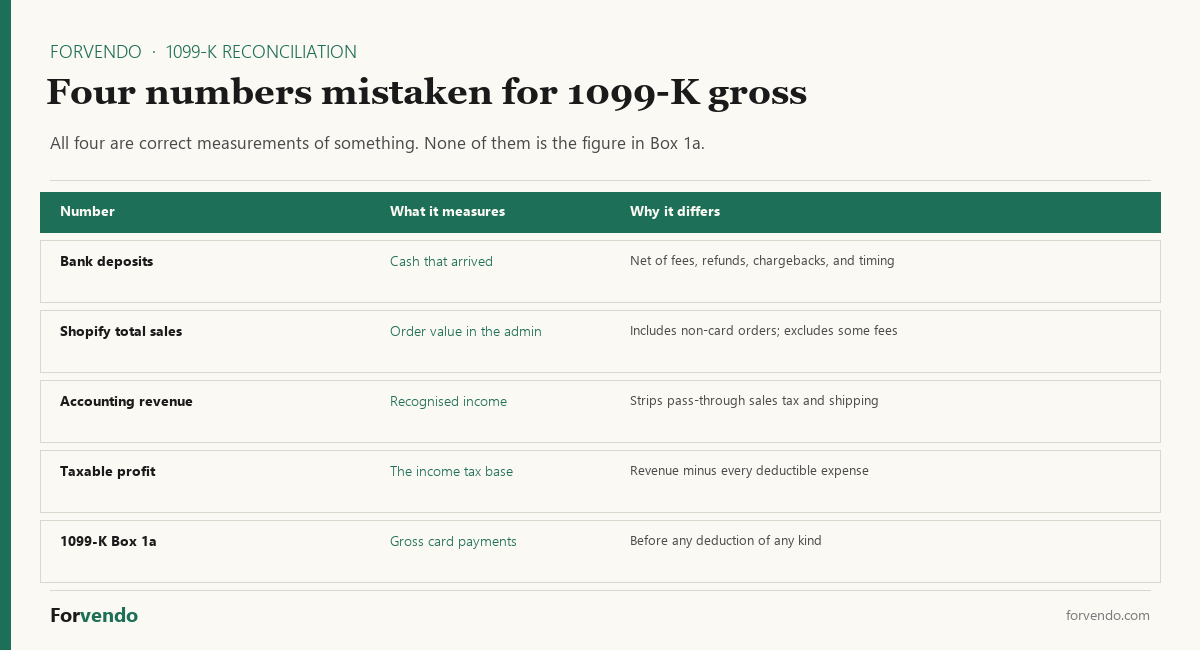
Knowing which number you are holding is half of the reconciliation. The other half is doing it early enough that a discrepancy is still fixable:
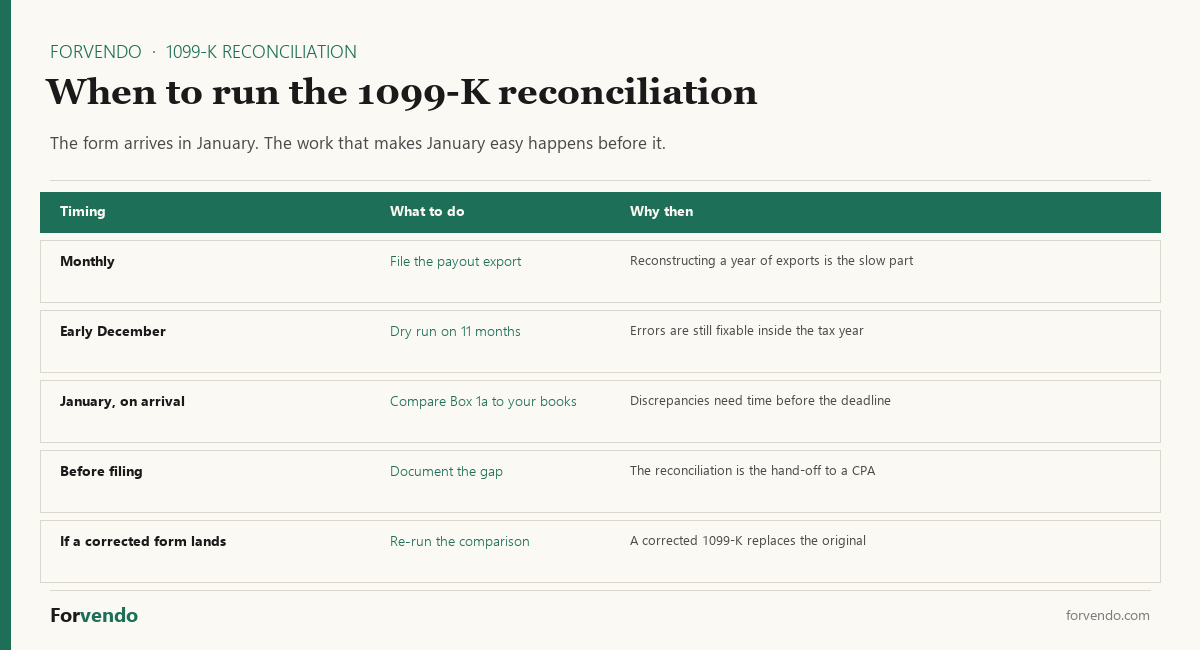
Reconciliation conversations move faster when the vocabulary is shared. The nine terms below show up in most 1099-K discussions for a Shopify store owner. These are educational starting points, not legal definitions; specific tax treatment varies by accounting method, entity type, and state.
Form 1099-K. An IRS information return that a payment settlement entity (such as Shopify Payments, PayPal, or Stripe) issues to a seller and to the IRS to report the gross amount of payment card and third-party network transactions processed for the seller in a calendar year. The federal threshold reverted to more than $20,000 and more than 200 transactions under OBBBA Section 70432 — retroactively applied to tax year 2022 onward; state thresholds vary.
Gross payments. The total dollar value of card and third-party-network payments processed for the seller during the period, before any deductions. This is the figure reported in Box 1a of Form 1099-K.
Refunds. Money returned to the buyer by the seller after the original payment was processed. A refund generally appears as a separate transaction in the processor’s ledger; the original charge usually remains in the 1099-K gross figure.
Fees. Amounts the processor deducts before paying out to the seller — typically a percentage of the transaction (often around 2.9% for US cards on Shopify Payments) plus a fixed per-transaction amount. Confirm the current fee schedule on Shopify’s own documentation before relying on a specific rate.
Chargebacks. A dispute initiated by the buyer’s card-issuing bank that pulls the original payment back from the seller. A chargeback won by the buyer generally removes the funds from the seller’s account but doesn’t remove the original transaction from the 1099-K gross figure.
Payouts. The batched transfers from the processor to the seller’s bank account. A payout is generally net of fees and refunds processed during the batch window. Shopify Payments groups individual transactions into payouts on a schedule that depends on the seller’s bank, country, and payout settings. The status names attached to that batching are covered in Shopify payout status pending, which also explains why a sale can sit outside any payout for several business days.
Deposits. The credits that appear in the seller’s bank account when a payout settles. The deposit amount usually equals the payout amount, but timing can differ by 1–3 business days, which matters at year-end when payouts cross calendar boundaries.
Taxable income. The income reported on the seller’s tax return after applicable deductions and adjustments. Taxable income isn’t the 1099-K gross figure; it’s what remains after refunds, fees, cost of goods sold, expenses, and other deductions, and depends on the entity’s accounting method. Definitions and treatment should be confirmed with a CPA.
Bookkeeping records. The seller’s own ledger of sales, refunds, fees, sales tax collected, and other transactions, kept in QuickBooks, Xero, Wave, a spreadsheet, or another accounting system. Bookkeeping records are the seller’s source of truth for filing; the 1099-K is a third-party verification.
The most useful mental separation: the 1099-K is a single-platform gross-payment report; the bookkeeping records are the seller’s full ledger; the tax return is the net-income filing. Reconciliation is the act of showing how the three relate.
The practical 1099-K reconciliation framework
The framework has six stages, each tied to a specific record. Each stage is a question, not a conclusion. The answers depend on the seller’s processor mix, accounting method, and state.
Reconciliation walks across these six stages and matches the totals at each one against the surrounding records. The two-bridge model below is the compact version of the same workflow.
Free download
The Solo Shopify Weekly Operating Checklist
A one-page PDF plus a copyable Google Sheet — the weekly cadence these guides build on. Free; bring your own store data.
Get the free checklist →Forvendo decision rule
Reconcile a Shopify Payments 1099-K within 30 days of receiving the form, not the day before the filing deadline. The cost of catching a mismatch in February is one Sunday afternoon. The cost of catching it in April is an amended return and possibly an IRS notice 12 to 18 months later.
If the gap between 1099-K Box 1a and reported gross revenue is greater than 5%, treat it as a hard stop on filing until both bridges below have been walked.
The 1099-K reconciliation model: two bridges
The 1099-K gross has to be walked to two different numbers, and they use different adjustments. The first is the net receipts on your tax return. The second is the money that reached your bank. Mixing them up is the most common way a reconciliation goes wrong: processing fees explain part of the gap to your bank deposits, but they are not taken out of your sales on the return, and shipping you charge customers stays in your sales.
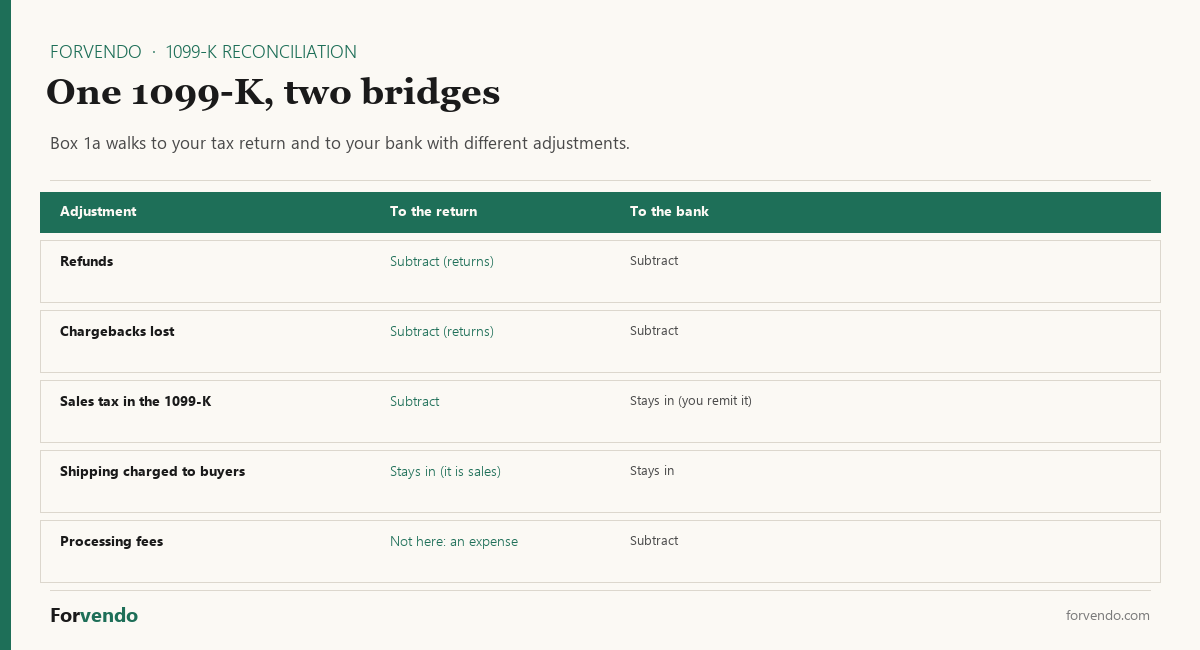
Bridge 1: from Box 1a to the tax return.
IRS Publication 334 covers gross receipts, returns and allowances, and sales tax collected from buyers.
Bridge 2: from Box 1a to your bank deposits.
The numbers above are illustrative. Actual line items will differ by store, processor mix, and accounting method. The model doesn’t replace tax or accounting advice — it’s a reconciliation pattern that produces a clean hand-off document for a CPA or bookkeeper to review. Store-specific treatment should be confirmed with a qualified tax professional.
Forvendo newsletter
Operating notes, once a week
One email a week for US-based solo Shopify operators at $5,000–$50,000 MRR: a decision, a checklist, or a teardown. No fluff, unsubscribe anytime.
Join the newsletter →To run the same numbers on your own form, the free 1099-K Reconciliation Sheet works out both bridges from the Box 1a gross, refunds, chargebacks, fees, and any sales tax inside the form.
Shopify Payments records to export
The reconciliation needs six Shopify-side records and one 1099-K. All exports use the same calendar year date range that appears on the 1099-K.
| Source | Report or document | What it shows |
|---|---|---|
| Shopify admin → Finance → Documents → 1099-K | Form 1099-K (PDF) and a CSV of the transactions behind it | Box 1a gross amount for the tax year, and the transactions that make it up |
| Shopify admin → Analytics → Reports → Finances | Total sales | Total sales for the calendar year, used as the bookkeeping cross-check |
| Shopify admin → Analytics → Reports → Finances | Returns | Total refunds issued in the calendar year |
| Shopify admin → Analytics → Reports → Finances | Taxes | Sales tax collected (grouped separately by Shopify) |
| Shopify admin → Analytics → Reports → Finances | Shipping | Shipping charged to customers (stays in your sales) |
| Shopify admin → Analytics → Reports → Finances | Payment provider fees | Total Shopify Payments fees for the year |
| Shopify admin → Analytics → Reports → Finances | Chargebacks | Chargebacks won by buyers (lost by the seller) |
Each report can be exported as CSV. The Shopify Help Center on Shopify reports covers the current export interface. The exact report names and structures can change as Shopify updates the admin interface.
If the store accepts payments through more than one processor (Shopify Payments plus PayPal, Stripe, Affirm, Shop Pay Installments, or others), each processor issues its own 1099-K when it crosses its own reporting threshold. The reconciliation needs to run separately for each processor and then be combined into a total ledger.
Example: A composite $238K Box 1a Shopify operator
This is a composite example, not a case study from one specific store.
“Sam” runs the same niche apparel store referenced in the multi-state sales tax operating guide. Calendar 2025 1099-K from Shopify Payments arrives in mid-January 2026 showing $238,000 in Box 1a.
Sam’s reconciliation worksheet:
Bridge 1: to the return
1099-K Box 1a (gross processed)               $238,000
− sales tax collected (state liability)        −11,200
= gross receipts (includes $14,800 shipping)   226,800
− refunds (179 orders @ ~$52.51 average)        −9,400
− chargebacks (24 lost, total)                  −1,200
─────────────────────────────────────────────────────
Net receipts                                   $216,200

Bridge 2: to the bank
1099-K Box 1a (gross processed)               $238,000
− refunds                                       −9,400
− chargebacks                                   −1,200
− Shopify Payments fees                         −9,400
─────────────────────────────────────────────────────
Expected payouts                               $218,000
On Schedule C, Sam reports $226,800 of gross receipts (Box 1a less the sales tax collected), $10,600 of returns and allowances, and the $9,400 of processing fees as a business expense, not as a reduction of sales. The 1099-K shows $238,000, so a gap exists on paper; the worksheet explains it line by line. If a notice arrives, Sam answers with the worksheet and the supporting Shopify reports.
Without the worksheet, the same notice can trigger several weeks of back-and-forth with a CPA, easily several hundred dollars in professional fees that didn’t need to happen. With the worksheet, the response is usually a three-page document and a short cover note.
Treatment of any specific line item — particularly processing fees, shipping income, and sales tax collected — depends on the seller’s accounting method and entity type, and should be confirmed with a CPA before filing.
Common mismatch scenarios
Even after both bridges are walked, a reconciliation can still produce a residual gap. The most common scenarios:
Third-party gateway under the same Shopify checkout. PayPal, Shop Pay Installments, and Affirm process payments outside Shopify Payments but still appear in the Shopify “Total sales” report. Each issues its own 1099-K (if its threshold is met). Subtracting one processor’s 1099-K from another processor’s totals can double-count or under-count revenue. The correct approach is generally to reconcile each processor separately, then add the results.
Mid-year processor change. Sellers who switched from one processor to another mid-year receive partial 1099-Ks from each, covering only the months each was active. Each partial 1099-K should be reconciled separately for the months it covers.
Year-end payout timing. A payout dated December 30 with a deposit on January 2 can be reflected in the 1099-K gross figure for the earlier year while the bank deposit lands in the next year. Cash-basis bookkeeping treats this differently from accrual-basis bookkeeping. The accounting method choice should be discussed with a CPA.
Gift card and store credit transactions. Some gift card flows process a card payment when the gift card is sold, with no immediate fulfillment, and a separate ledger entry when the gift card is later redeemed. Both may appear in different reports without obvious linkage. Confirm how Shopify’s current gift card reporting treats these flows.
Manual orders, third-party invoicing, or recurring billing apps. Orders created outside the standard Shopify checkout can be missed by some reports. Cross-checking the payouts report against bookkeeping income usually surfaces these.
Sales tax remittance mid-year. If a seller remits collected sales tax to a state monthly or quarterly, the cash leaves the bank account during the year but isn’t seller income at any point. Sales tax collected is already out of net receipts in Bridge 1; sales tax remitted is a separate liability flow.
Backup withholding. If the processor can’t match the seller’s Taxpayer Identification Number (TIN) to IRS records once a reporting threshold is crossed, the processor may be required to apply 24% backup withholding to gross payouts until the TIN issue is resolved.1 Withheld funds reduce deposits without changing the 1099-K Box 1a figure. The fix is administrative: confirm that the legal entity name and EIN or SSN on file in Shopify Payments match IRS records before any threshold is crossed.
If the reconciliation gap remains material after addressing the scenarios above, the gap is generally a signal to involve a CPA rather than to keep adjusting in isolation.
Quick reconciliation readiness test
Before opening the reconciliation spreadsheet, confirm these six inputs are pulled and saved:
- 1099-K Box 1a (gross) — exact dollar value from the form
- Shopify Payments annual payout total (Shopify admin → Finances → Payouts)
- Annual refund total (Shopify admin → Orders → filter by refund)
- Annual chargeback total (Shopify Payments → Disputes report)
- Annual processing fees (Shopify Payments → Reports)
- Annual sales tax collected (Shopify admin → Analytics → Reports → Finances → Taxes)
If any input is missing, the reconciliation won’t close cleanly. Stop and export first — usually faster than reverse-engineering totals later.
Monthly 1099-K reconciliation checklist
The annual reconciliation in January is easier when monthly records have been kept clean during the year. The checklist below is intentionally short so it fits inside a regular operating routine — for example, alongside the Weekly Shopify Checklist for a One-Person Store.
A small monthly habit prevents the entire December-into-January scramble that most solo store owners experience the first time they receive a 1099-K.
The state 1099-K trap
The federal 1099-K threshold reverted to more than $20,000 and more than 200 transactions under OBBBA, but several US jurisdictions continue to issue state-level 1099-Ks at lower thresholds. The multi-state sales tax operating guide covers the full state table; for reconciliation purposes, the key facts are:
- Massachusetts reports at $600 or more.
- Shopify’s own table lists the state thresholds it applied for tax year 2025, from $600 to $2,500 (Arkansas, DC, Illinois, Maryland, Missouri, Montana, New Jersey, Vermont, Virginia). North Carolina isn’t on it and follows the federal threshold.
- State figures are moving: Vermont’s own tax department lists $2,000 as of October 2026, against $600 in Shopify’s 2025 table. Confirm with the state before relying on either.
- Figures for Maryland, Virginia, Illinois, Arkansas, New Jersey, DC and Montana are in the guide’s table, marked where we could not confirm them on the state’s site.
For a solo seller based in a state with its own lower threshold, a state-level 1099-K can arrive from Shopify Payments even when no federal 1099-K is issued. The reconciliation pattern is the same: walk the gross figure through both bridges. The complications:
- The state 1099-K may cover a different date range than the federal calendar year.
- The state may apply different sourcing rules (sales sourced to buyer location versus seller location).
- The state may not separate sales tax collected for that state from sales tax collected for other states.
For sellers in a state with its own lower threshold, the reconciliation worksheet usually needs an additional column showing “in-state sales only” alongside total sales. State-specific 1099-K treatment should be confirmed with the state Department of Revenue or a CPA familiar with that state.
When to ask a CPA, bookkeeper, or tax professional
The reconciliation framework is designed to be runnable by a one-person store. The line between self-service reconciliation and professional involvement is worth thinking about explicitly.
- Single processor (Shopify Payments only)
- One state of residence and limited multi-state sales tax exposure
- Cash-basis or simple accrual bookkeeping is already in place
- Reports export cleanly and both bridges close
- No outstanding state DOR or IRS notices
- Multiple processors with separate 1099-K forms (Shopify Payments + PayPal + Affirm + others)
- A gap remains material after both bridges are walked
- An IRS notice or state DOR notice has arrived
- Backup withholding has been applied to payouts
- A mid-year processor change, entity change, or accounting method change
- A state-level 1099-K with unfamiliar sourcing rules
- Prior tax year filings appear inconsistent with the reconciliation
A CPA, enrolled agent, or qualified tax preparer should be considered when the mismatch is material, when records are incomplete, or when prior filings may be affected. Sales-tax and 1099-K reconciliation expertise is a specific area — a generalist preparer may or may not have the multi-platform background needed for an ecommerce store. Asking about the preparer’s experience with Shopify Payments, Stripe, PayPal, and multi-state 1099-K reconciliation before engaging usually saves time on both sides.
If you also sell on a marketplace
This guide reconciles a Shopify Payments 1099-K. If part of your revenue runs through a marketplace, each one issues its own form and defines its own gross, so the reconciliation above has to be repeated per platform rather than reused.
The differences are not cosmetic. Marketplace-collected sales tax is the line that varies most: Etsy states it isn’t reflected in the form, Amazon counts it inside unadjusted gross sales, and eBay’s help page says it is excluded. Carrying one platform’s answer to another is the most common reason a careful reconciliation refuses to close.
Two other differences worth knowing before you start. Etsy publishes a single column whose total equals the form, and eBay generates a 1099-K detail report covering the transactions behind it, so on both you can work from the platform’s own figures; Amazon publishes no equivalent, so an Amazon reconciliation needs a category bridge instead. And eBay issues a form for reasons beyond the sales threshold — a low-threshold state can require one, and where backup withholding was applied, the form reports those payments even on a year below the federal figures.
PayPal belongs in this set for a different reason. It is not a marketplace but a payment processor, so the split is not by platform but by rail: a store offering PayPal at checkout can receive separate forms from Shopify Payments and from PayPal, covering different transactions. Only payments tagged as goods and services enter PayPal’s pool, which is covered in does PayPal send a 1099-K?.
| Platform | The guide | The line that catches people |
|---|---|---|
| Etsy | Does Etsy send a 1099-K? | Marketplace sales tax is excluded; the Sales CSV Gross column reproduces the form exactly |
| Amazon | Does Amazon send a 1099-K? | Sales tax and shipping are inside the gross, and refunds don’t come out of it |
| eBay | Does eBay send a 1099-K? | Three separate triggers, two of which can produce a form on a year below $20,000 |
| PayPal | Does PayPal send a 1099-K? | A processor, not a marketplace: only goods and services payments count, and a Shopify store taking PayPal is split across two forms |
Run one bridge per form, keep them in separate tabs of the same worksheet, and label each with the platform’s own definition of gross. That’s what makes the set explainable when a CPA asks.
What this article does not cover
This article is intentionally scoped to 1099-K reconciliation for a one-person Shopify store using Shopify Payments. It doesn’t cover:
- Individual tax advice for any specific store, structure, or situation
- Choice of accounting method (cash vs accrual) — this should be discussed with a CPA
- Choice of entity type (sole proprietor, LLC, S-corp, C-corp, partnership) and the tax-return form that follows
- Federal or state income tax preparation, deductions, or estimated tax payments
- Sales tax registration, collection, and filing — covered in the multi-state sales tax operating guide
- Audit defense or response to an IRS or state DOR audit letter
- Reconciliation of payment processors other than Shopify Payments (the pattern is similar but the specific reports and field names differ)
- International sellers, non-resident sellers, or sellers not subject to US tax reporting
- Inventory accounting, cost of goods sold, or capitalization
- Bookkeeping software setup or chart of accounts design
Sellers who need help in any of the above categories should reach out to a qualified US tax professional, a CPA, an enrolled agent, or an attorney licensed in the relevant jurisdiction.
Practical next steps
What to do this week, in order:
- Locate the most recent 1099-K in Shopify admin → Finance → Documents → 1099-K. Save a dated PDF copy and the transaction CSV.
- Pull the six Shopify reports listed in the “Shopify Payments records to export” section above for the same calendar year. Save them as a single dated CSV bundle.
- Run the two-bridge model in a spreadsheet. The numbers will be illustrative until the actual exports are loaded; the goal is to confirm the structure works for the store.
- Cross-check the result against the Shopify “Total sales” report and against bank deposit totals. Confirm the residual gap is within roughly 1–2% of total sales.
- Investigate any larger gap using the “Common mismatch scenarios” section above. If the gap remains material, consider bringing in a CPA.
- Set up a monthly habit using the monthly reconciliation checklist. Treat it as a 15-minute monthly task rather than a 6-hour January project.
- Confirm Shopify Payments has the correct legal entity name and TIN on file, especially if any reporting threshold may be crossed this year, to avoid backup withholding.
The free 1099-K Reconciliation Sheet works out both bridges, accepts Shopify Reports figures, includes a Shopify Admin path map for each input, and outputs a status flag (OK / WATCH / REVIEW) based on the variance against your tax return. The sheet is the planned-asset companion to this article and was released alongside it.
For the broader registration and deregistration workflow, see Shopify Sales Tax in Multiple States.
1099-K Reconciliation Calculator
A reconciliation aid, not tax advice. Shipping you charge customers stays in your sales. Confirm figures with your books and a CPA.
Frequently Asked Questions
Do I need to send the reconciliation worksheet to the IRS with my return?
Generally no. The worksheet is internal documentation. It’s shown if the IRS or a CPA asks for it during preparation or in response to a notice. Confirm with the IRS publication current at filing and a qualified preparer.
My 1099-K Box 1a includes amounts processed by a third-party gateway like PayPal or Shop Pay Installments. Are those double-counted?
Each payment settlement entity generally issues its own 1099-K. Shopify Payments issues for Shopify Payments transactions; PayPal issues for PayPal transactions; Affirm issues for Affirm transactions. The total payments processed across all platforms is the sum, not the largest single 1099-K.
What if I changed payment processors mid-year?
A 1099-K may be issued by each processor for the portion of the year that processor was active, provided each crossed its own reporting threshold. Each one should be reconciled separately, then summed.
Can I deduct Shopify Payments fees as an expense on Schedule C?
Processing fees are usually deductible as a business expense. Deduct them once, as an expense: they explain part of the gap between the 1099-K and your bank deposits, but they are not also taken out of your gross receipts. Specific line placement should be confirmed with a CPA.
My state’s 1099-K threshold is low. Do I still need to file a state return if my actual revenue was small?
When a state issues a 1099-K, the state generally expects a corresponding return. The return may show very low or zero tax owed, but a filing is usually expected. Confirm the current state filing requirement with the state Department of Revenue or a CPA familiar with that state.
What is the difference between gross payments and net business revenue?
Gross payments is the total dollar value of card and third-party-network payments processed before deductions, as reported on Form 1099-K Box 1a. Net receipts are the figure on Schedule C line 3 (or the corresponding line on Form 1120, 1120-S, or 1065): gross receipts, which keep shipping you charged and leave out sales tax imposed on the buyer, less refunds and lost chargebacks. Processing fees are deducted separately as an expense. The two are related but measure different things.
What should I review monthly?
Shopify Payments exports for the month (transactions, payouts, refunds, fees), comparison of payout totals to bank deposits, and notes on chargebacks or unusual adjustments. A short monthly habit removes most of the January reconciliation burden.
When should a solo Shopify operator talk to a CPA?
When the reconciliation gap remains material after both bridges are walked, when an IRS or state DOR notice arrives, when backup withholding has been applied, when a mid-year processor or entity change happened, or when prior filings don’t match. Reconciliation expertise across multi-processor ecommerce stores is a specific skill; ask about the CPA’s experience before engaging.
Can Shopify file my taxes for me?
No. Shopify Payments can issue Form 1099-K and provide reports. Filing tax returns is the seller’s responsibility (or the seller’s CPA’s responsibility). Calculation, reporting, and filing are separate activities.
Did OBBBA also change the 1099-NEC threshold for contractors I pay?
Yes. OBBBA raised the 1099-MISC and 1099-NEC reporting thresholds from $600 to $2,000, effective for tax year 2026 and adjusted for inflation starting in 2027. For a solo Shopify seller paying a virtual assistant, freelance designer, or other contractor, a contractor paid between $600 and $2,000 in 2026 no longer triggers a federal 1099-NEC requirement. State-level requirements may still apply — New Jersey, for example, retains a $1,000 1099 filing threshold that now sits below the federal $2,000. Confirm against each state’s information-return rules before deciding not to issue a 1099. If the question is which of the two forms a payment belongs on in the first place, 1099-K vs 1099-NEC covers that split.
-
IRS, “Backup withholding.” Accessed 2026-05-20: https://www.irs.gov/businesses/small-businesses-self-employed/backup-withholding ↩
Forvendo Editorial note. Forvendo publishes educational operating resources for solo ecommerce operators. Articles may cover tax, sales tax, 1099-K reporting, software pricing, platform policies, and other operating topics that change over time.
This content is for general research and operational planning. It is not legal, tax, accounting, financial, or professional advice. Readers should verify details with official sources or qualified professionals before acting on them. Platform rules, tax thresholds, software pricing, and affiliate program terms can change without notice.
Forvendo articles may be drafted with AI assistance and are reviewed by the operator before publication according to our Editorial Policy, which covers sourcing, AI use, update cadence, and corrections. See also About, Disclosure, and Privacy Policy.