How to Handle Returns and Exchanges on Shopify (Policy + Workflow)
Last updated: · Shopify features, pricing, and platform policies change. Verify with official sources before acting.
A returns and exchanges policy is two things at once: a promise on your product page that helps a hesitant shopper buy, and an operating rule that keeps a one-person store from losing an afternoon to every return. Get it wrong in either direction — too strict and you lose sales, too loose and you bleed margin and time — and the store feels it.
This guide covers both: what to put in the policy so it converts without exposing you, and the workflow to process a return or exchange in minutes instead of a back-and-forth. Most of it isn’t prose — Shopify returns are governed by settings you can configure once, and the policy text only has to explain them. The aim is a policy you can state in a paragraph and run on autopilot.
The thresholds here are planning defaults for a $5,000–$50,000 MRR solo store; adjust them to your product, margins, and the consumer-protection rules that apply where you sell.
Quick answer
- Publish a clear, findable policy. A short returns window (commonly 14–30 days), the condition required, who pays return shipping, and how refunds are issued. Linked from the footer and the product page.
- Default to exchanges and store credit over refunds where it fits — it keeps the revenue and often satisfies the customer.
- Decide the return-shipping rule once. Customer pays for change-of-mind; you pay for your error or a defect. Put it in writing.
- Run a fixed workflow. Approve against the policy, send a label or instructions, restock or write off, refund or credit. Same steps every time.
- Track the reason. A return is data — a recurring reason (sizing, photos, description) is a product-page fix worth more than the refund.
Who this is for
This is for a one-person store on Shopify, $5,000–$50,000 MRR, handling returns personally. If you sell internationally, layer your destination countries’ consumer-protection rules on top of the defaults here — some regions mandate return windows and who pays. If you sell final-sale or perishable goods, the policy section still applies but the workflow simplifies.
Why the policy is a conversion tool, not just a rule
Shoppers read the return policy before buying, especially for a brand they don’t know. A clear, fair policy removes the “what if it doesn’t fit / work” objection that kills carts. A missing or harsh policy does the opposite — it adds risk at the exact moment of decision.
So the policy earns its keep twice: it converts on the way in, and it controls cost on the way out. The mistake is treating it only as a cost-control rule (writing it strict and burying it) and losing the conversion value, or treating it only as a marketing promise (writing it generous and vague) and losing the margin control.
What to put in the policy
A solo-store policy needs five decisions, stated plainly:
A short worked check before you commit to a window: take last quarter’s returns, count how many arrived in the final week of your current window, and ask what a longer window would have added. For most solo stores the answer is a handful of returns and a meaningful chunk of tied-up inventory, which is why 30 days holds up as a default. If the count is near zero, a 90-day window costs you almost nothing and reads far better on the product page. Decide it from your own tail, not from the most generous policy in your category.
Keep it short and link it from the footer and each product page. Shopify can also surface it in checkout and order emails. A policy nobody can find doesn’t convert and doesn’t protect you.
Forvendo decision rule
Write one short policy with five decisions — window, condition, who pays return shipping, refund-vs-exchange default, and exceptions — and link it everywhere a shopper looks. Default to exchange or store credit where the situation allows; reserve refunds-to-original-payment for defects, your errors, and cases the law requires.
Do not promise a generous policy you cannot run. A 365-day free-return promise that buries you in low-margin returns is worse than a clear 30-day policy you can honor every time.
Turning the policy into Shopify returns rules
Four of those five decisions aren’t just words on a page. They’re settings, and configuring them is what makes the policy enforce itself instead of relying on you to remember it.
Free download
The Solo Shopify Weekly Operating Checklist
A one-page PDF plus a copyable Google Sheet — the weekly cadence these guides build on. Free; bring your own store data.
Get the free checklist →They live in Settings > Policies, under your return and cancellation rules.
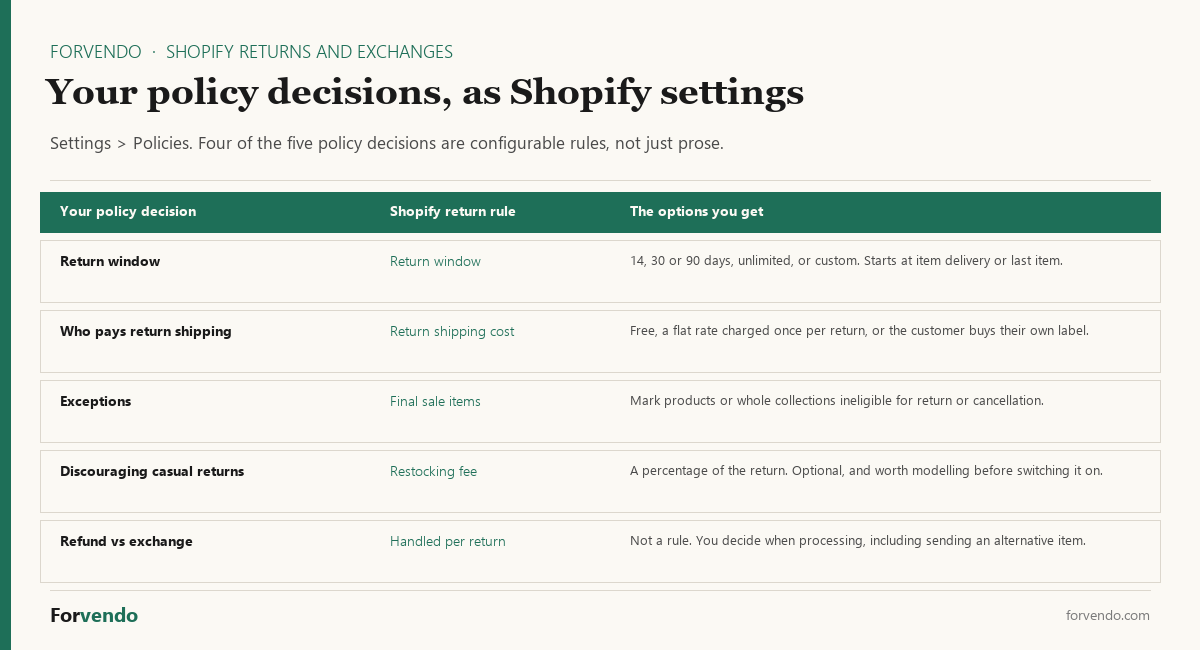
The return window offers 14, 30 or 90 days, unlimited, or a custom number, and you choose whether the clock starts at each item’s delivery or at delivery of the last item in the order. That second choice matters more than it looks for multi-item orders: starting from the last item quietly extends the window on everything else in the box.
Return shipping cost has three settings — free returns, a flat rate charged once per return, or the customer buys their own label. That maps directly onto the change-of-mind rule above, with one nuance: the flat rate is charged once per return, not per item, so a customer returning three items pays it once.
Final sale items handles exceptions by marking specific products or whole collections ineligible. Doing it at the collection level is the version that survives adding new products.
A restocking fee is available as a percentage of the return. It’s the one setting worth resisting by default. It reduces casual returns, and it also reduces conversions from shoppers who read the policy before buying — which is the return policy’s other job. Model both sides before switching it on.
One timing detail that catches people out: changes to your return rules apply only to future orders, not to orders already placed. Set the rules before a busy period, not in the middle of one.
The return workflow (minutes, not messages)
The cost of returns for a solo store owner is rarely the refund — it’s the time spent negotiating each one. A fixed workflow removes the negotiation.
Shopify’s built-in returns and refunds tools handle labels and refunds natively, so most solo stores don’t need a separate returns app until volume justifies one.
Forvendo newsletter
Operating notes, once a week
One email a week for US-based solo Shopify operators at $5,000–$50,000 MRR: a decision, a checklist, or a teardown. No fluff, unsubscribe anytime.
Join the newsletter →Self-serve returns: the setting that removes the messages
For a one-person store the cost of returns is time, and almost all of that time is messages — a customer asking how to return something, you explaining the policy, them asking about the label. Self-serve returns delete that conversation.
With them turned on, customers request a return for a delivered item, or cancel one that hasn’t shipped yet, directly from their order status page. You get a notification, the request lands in your admin, and you approve or decline it against your policy. Turn it on under Settings > Customer accounts.
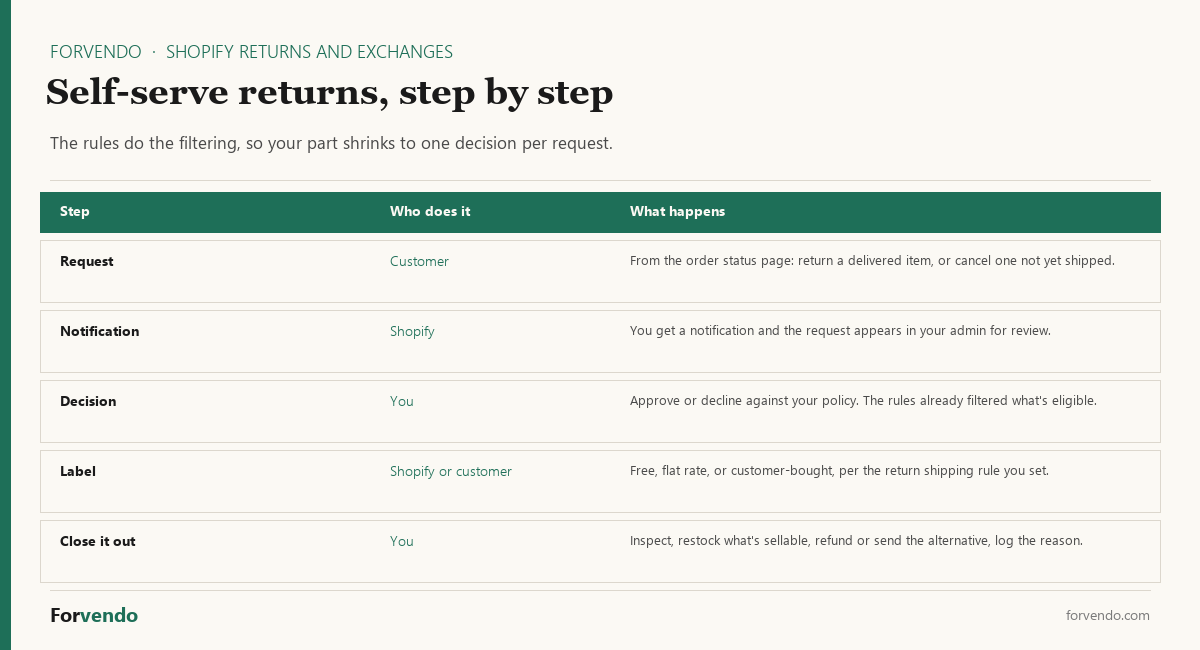
The reason this pairs with the rules above is that the rules do the filtering first. Self-serve returns work with your return and cancellation rules to control which items are eligible and how long customers have to ask, so a request for a final-sale item or one outside the window doesn’t reach you as a negotiation. What reaches you is a request that already fits your policy, and a single approve-or-decline.
That’s the whole shift the workflow section is aiming at. Step one — check against policy — stops being something you do per message and becomes something the settings did before you looked.
Exchanges are handled natively too: as part of processing a return you can send the customer an alternative item, such as a different size or color, rather than issuing a refund and waiting for a second order. That makes the “default to exchange” rule practical instead of aspirational, because it’s one flow rather than two.
What the rules still won’t do
Automation covers eligibility. It doesn’t cover judgment, and it’s worth being clear about where you’re still in the loop.
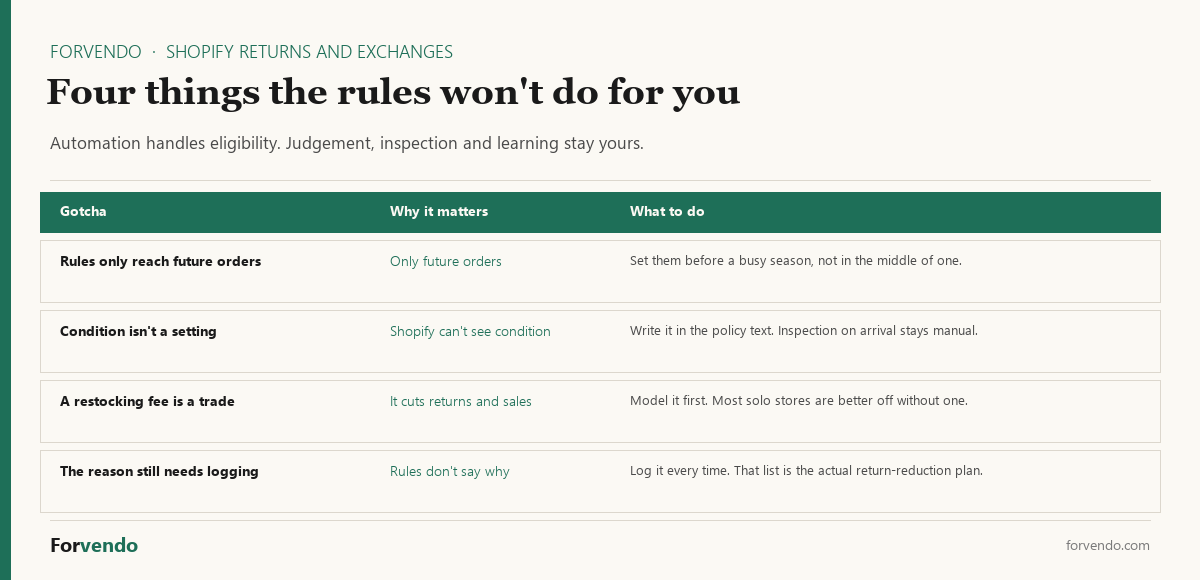
Condition is the obvious one. No setting can tell whether an item came back unworn with its tags on, so the condition line in your policy text is still doing real work, and inspection on arrival stays a manual step. Write the condition specifically enough that you can point at it when you decline a return — “unused, in original packaging, with tags attached” beats “in resalable condition,” which invites an argument.
The other is the return reason. The rules will process returns efficiently and tell you nothing about why items are coming back, which is the part that actually reduces future returns. Keep logging it during the close-out step, even when the rest of the flow is automatic.
Returns are product data
Every return carries a reason, and the reasons cluster. If “too small” keeps appearing, the fix is a sizing note or chart, not a tighter policy. If “not as described” recurs, the product photos or copy are over-promising. Logging the reason turns a cost into a roadmap — often the highest-value output of the whole workflow.
Give that log a monthly read rather than a quarterly one — return reasons move faster than most operating numbers, because a single new product or a changed supplier can shift them in weeks. Three questions each month: which reason grew, is the return window doing what you expected, and did any request get declined for something your policy text should have said more clearly. A reason that grows two months running is a product-page job. A run of declines usually means the policy text and the return rules disagree with each other, and the text is normally the one that’s wrong.
Common mistakes
- Hiding the policy. If shoppers can’t find it, it neither converts nor protects.
- Negotiating every return. The policy should decide; per-request bargaining is where the time goes.
- Defaulting to cash refunds. Offer exchange or store credit first where it fits — it keeps the revenue.
- Ignoring the reason. A return you don’t learn from is a cost you’ll pay again.
- Promising what you can’t run. A generous policy you abandon under load damages trust more than an honest, modest one.
What this article does not cover
This is an operating guide to a store’s return policy and workflow, not legal advice on consumer-protection law. Return-window and who-pays requirements vary by country and state, and some are mandatory — confirm the rules for the regions you sell into. It also doesn’t cover chargeback disputes (a separate process) or wholesale/marketplace return terms.
Related Forvendo guides
A refund that becomes a dispute is a different problem — the How to Fight a Shopify Chargeback covers that side. Most return requests arrive as messages before they arrive as returns, so the daily handling block and reply templates in Customer Support for a One-Person Store are what keep this policy from turning into an inbox. Return reasons often point back to product pages and pricing, where Shopify Discount Strategy and the broader Solo Shopify Operations guide come in.
Frequently asked questions
How do I turn on self-serve returns in Shopify?
Enable them under Settings > Customer accounts, then set your return and cancellation rules under Settings > Policies. The order matters: the rules decide which items are eligible and how long customers have to ask, so turning on self-serve returns without setting the rules first means requests arrive that your policy would have filtered out. Once both are in place, customers request a return from their order status page and you approve or decline it in the admin.
Can Shopify handle exchanges, or only refunds?
Exchanges are native. When you process a return you can send the customer an alternative item — a different size or color, for example — instead of issuing a refund. That’s what makes an exchange-first default workable for a solo store: it’s one flow rather than a refund plus a hope that they reorder. Store credit and a refund to the original payment method remain available for the cases where an exchange doesn’t fit or the law requires a refund.
Should I charge a restocking fee?
Usually not, at this size. Shopify lets you set one as a percentage of the return, and it does reduce casual returns. It also reduces conversion, because the shoppers most likely to read your return policy before buying are exactly the hesitant ones the policy is there to reassure. For a store still building trust, the conversion cost tends to outweigh the returns saved. Revisit it if a specific product develops a return rate that a fee would actually change.
What is a good return window for a small Shopify store?
14 to 30 days from delivery is a common, workable default. A longer window can lift conversion by lowering purchase risk, but it raises return volume and ties up inventory longer — test it against your own numbers rather than copying the longest policy you’ve seen.
Who pays for return shipping on Shopify?
Whichever way you set it. Shopify’s return shipping cost rule has three options: you offer free return shipping, you charge a flat rate that applies once per return regardless of how many items come back, or the customer buys their own label. The common solo-store split is that the customer covers change-of-mind returns while you cover defects and your own mistakes — but note that the rule is one setting, not two, so the defect case is handled when you process that specific return rather than automatically. Say both halves in your policy text so the customer knows which one applies before they ask.
Should I offer free returns?
Free returns can increase conversion but shift cost to you. A common solo-store middle ground is: the customer pays return shipping for change-of-mind, and you cover it for defects or your own error. Free returns make most sense on higher-margin products where the conversion lift outweighs the shipping cost.
Exchange, store credit, or refund — which should I default to?
Offer an exchange or store credit first where the situation allows, because it keeps the revenue and often resolves the issue. Refund to the original payment method for defects, your errors, and any case the law requires. State the default clearly in the policy so it isn’t negotiated each time.
Do I need a returns app for Shopify?
Usually not at solo scale. Shopify’s built-in return and refund tools handle labels and refunds natively. A dedicated returns app earns its place only when return volume makes the manual workflow the bottleneck — a decision worth running through an app-by-app cost check first.
How do I reduce returns?
Treat return reasons as data. Recurring “too small” points to a sizing chart; recurring “not as described” points to clearer photos and copy. Fixing the product page that causes a pattern of returns usually pays back more than tightening the policy.
Forvendo Editorial note. Forvendo publishes educational operating resources for solo ecommerce operators. Articles may cover tax, sales tax, 1099-K reporting, software pricing, platform policies, and other operating topics that change over time.
This content is for general research and operational planning. It is not legal, tax, accounting, financial, or professional advice. Readers should verify details with official sources or qualified professionals before acting on them. Platform rules, tax thresholds, software pricing, and affiliate program terms can change without notice.
Forvendo articles may be drafted with AI assistance and are reviewed by the operator before publication according to our Editorial Policy, which covers sourcing, AI use, update cadence, and corrections. See also About, Disclosure, and Privacy Policy.