How to Calculate a Reorder Point for Your Shopify Store
Last updated: · Shopify features, pricing, and platform policies change. Verify with official sources before acting.
Quick answer
Reorder when available inventory ÷ daily sales velocity ≤ lead time days × 1.5. Available is the number that matters, not on hand — on hand includes committed stock you can’t actually sell. Below: the formula, the Shopify inventory states behind it, and a free calculator.
Who this Shopify reorder point SOP is for
This SOP is for solo Shopify sellers in the $5K–$50K MRR range who hold their own inventory (or use a single 3PL) and reorder from one to a few vendors. It assumes a one-person store, 20–200 active SKUs, monthly cadence on inventory review, and limited time to build a full ERP-style inventory system. If you’re running drop-ship only, this guide doesn’t apply — your “reorder point” is the vendor’s stock, not yours. If you have a dedicated inventory manager, the framework here is still useful but you can layer additional precision (per-channel splits, multi-warehouse allocation) on top of it.
The framework is built around one constraint solo store owners consistently hit: the time spent on inventory review compounds. A 30-minute monthly review on twenty SKUs is sustainable. A 2-hour weekly review on the same twenty SKUs isn’t. The SOP below is built for the 30-minute cadence.
Why “reorder when low” breaks at $5K–$50K MRR
At $1K MRR with five SKUs, “reorder when low” works because you eyeball the shelf weekly. At $5K MRR with twenty SKUs and growing, the eyeball approach starts to fail in three predictable ways.
The first failure is the silent stock-out. A bestseller dips below threshold during a holiday weekend, and you only see it on Tuesday morning. The order was placed, the customer waited five days for shipment, and the review on the product page mentions the wait. The lost margin from one stock-out is usually two to four months of margin from the same SKU sold normally.
The second failure is the surprise over-stock. You panic-order after a stock-out scare, the vendor ships double the usual, and now you have nine months of dead capital sitting in boxes. The cost is the opportunity cost on the cash plus warehousing or 3PL fees.
The third failure is the lead time blind spot. Your vendor ships in ten days for nine months in a row, then suddenly ships in twenty-one days because of a port delay or factory holiday you didn’t track. Your reorder point was calibrated to the average, not the variance, and you stock out.
A Shopify reorder point SOP fixes all three failure modes by making the reorder decision a number on a sheet, not a feel — every reorder trigger fires from the same shopify reorder point formula, not from gut.
The reorder point formula (3 variables)
The basic formula has three variables.
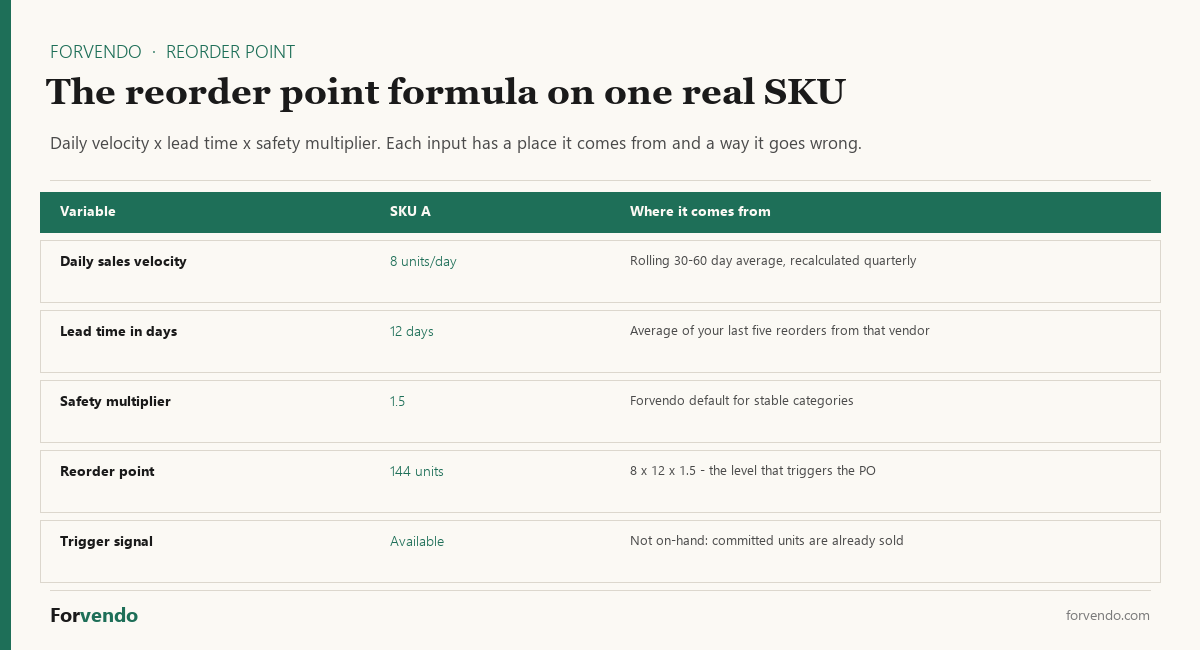
Reorder point (units) = Daily sales velocity × Lead time in days × Safety multiplier
- Daily sales velocity — units sold per day, rolling 30 or 60 day average. Lower for slow movers, higher for trending products. Recalculate quarterly at minimum.
- Lead time in days — calendar days from purchase order issued to shipment received at your location (or your 3PL). Includes vendor processing time plus transit. Use the average of your last five reorders for each vendor.
- Safety multiplier — a buffer above the simple average to absorb lead time variance and demand spikes. The Forvendo default is 1.5, which works for most stable categories. Raise to 2.0 for highly seasonal SKUs or vendors with inconsistent ship windows; drop to 1.2 only when you have at least eight stable reorders to base the average on.
Worked example. SKU A sells eight units a day. Vendor lead time averages twelve days. Safety multiplier is 1.5. Reorder point = 8 × 12 × 1.5 = 144 units. When available inventory drops to 144, issue the purchase order.
The multiplier is the only input that is a judgment call rather than a measurement, which makes it the one worth setting deliberately:
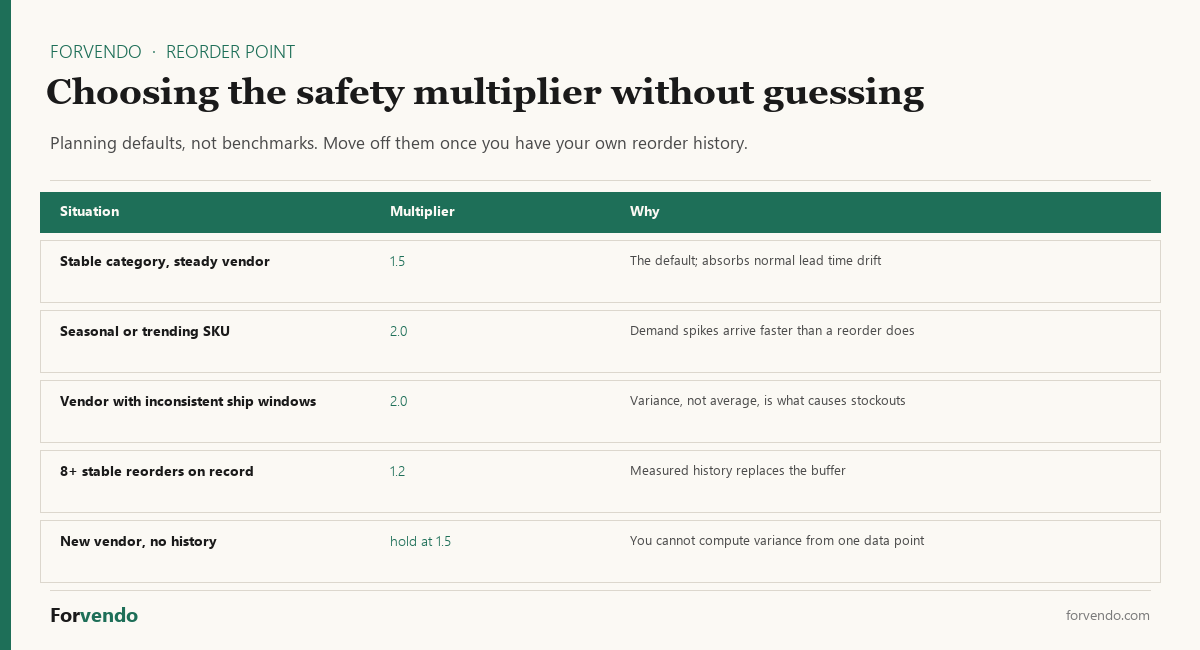
These multipliers and threshold ranges are planning assumptions, not universal benchmarks. Actual thresholds depend on category, vendor reliability, cash float, and demand variability — start with the defaults below and adjust to your own measured numbers after the first quarter.
The trigger is available inventory, not on-hand. The next section explains why.
Available vs on-hand vs incoming: the Shopify inventory signals that matter
Shopify Admin exposes several inventory states for each SKU. Most sellers running everything themselves look at “on hand” and stop there. That misses the number that actually matters for reorder decisions.
The five states you should know:
- On hand — total physical units across all your locations. This is the warehouse count, including units that are already committed to open orders, units flagged as damaged, and units in quality control.
- Committed — units in unfulfilled customer orders. Already sold; not available to sell to the next visitor.
- Unavailable — units physically present but not sellable: damaged, reserved for returns processing, in quality hold.
- Available — on hand minus committed minus unavailable. This is the number that drives “Add to cart” availability on your storefront and the number that should drive reorder decisions.
- Incoming — units in transit from purchase orders or transfers, expected to arrive on a date you set when you issued the purchase order.
A worked example: SKU A shows on-hand 200 units. Committed 35 units in unfulfilled orders. Unavailable 8 units in damage hold. Available = 200 − 35 − 8 = 157 units. If your reorder point is 144, you’re still above threshold — but if you used “on hand” 200 you would feel even safer than you’re, and a Black Friday day with sixty orders could drop you below available 144 before you notice.
The Shopify Admin inventory view lets you sort by Available, not just On hand. Use Available for reorder decisions in most cases. Use On hand for physical reconciliation against your 3PL or warehouse count. Use Incoming when you’re deciding whether a stock-out is already addressed by an open purchase order.
For how Incoming stock and safety stock held as Unavailable change that comparison, see Shopify Available vs On hand.
The 5 inventory signals compared
For the reorder decision itself, available inventory is the trigger — but it isn’t the only signal worth tracking. Five signals together build the decision context.
Free download
The Solo Shopify Weekly Operating Checklist
A one-page PDF plus a copyable Google Sheet — the weekly cadence these guides build on. Free; bring your own store data.
Get the free checklist →These ranges are planning signals, not industry benchmarks. Actual cadence depends on category, vendor relationship, and order volume — adjust to what fits a 30-minute monthly review.
Forvendo decision rule
Forvendo decision rule
Reorder when available inventory ÷ daily sales velocity ≤ lead time days × 1.5. Equivalently: reorder when available inventory ≤ daily sales velocity × lead time days × 1.5. By default, use available inventory rather than on-hand for the reorder trigger — on-hand includes committed (in open orders) and unavailable (damaged, in QC) stock that cannot be sold to the next visitor.
The 1.5 is a safety multiplier for lead time variance and demand spikes. Raise to 2.0 for seasonal or vendor-unreliable SKUs; drop to 1.2 only after eight or more stable reorders. Recalculate quarterly. Pre-approve nothing — the trigger fires the reorder, you confirm the quantity against current cash float before issuing the purchase order.
The 3-axis decision: velocity × lead time variance × cash float
The reorder formula tells you when to reorder. The three-axis decision tells you how much to reorder when the trigger fires. The three axes aren’t independent — they compound.
Shopify reorder point decision — velocity sets the trigger, variance sets the safety, cash float caps the quantity.
Worked example. SKU A: velocity 8 units/day, lead time average 12 days, lead time spread 8 to 16 days (50% spread → safety multiplier 1.5), cash float allows up to a $3,000 purchase order. Reorder point = 8 × 12 × 1.5 = 144 available units. When you hit 144 available, the order quantity target is enough to cover the next 60 to 90 days of velocity (480 to 720 units). If vendor minimum is 500 units at $4 each = $2,000, that fits within cash float — issue the purchase order. If vendor minimum is 1,000 units at $4 = $4,000, cash float caps you — issue 500 units and accept the smaller cushion.
The 4-tier SKU classification: A / B / C / D
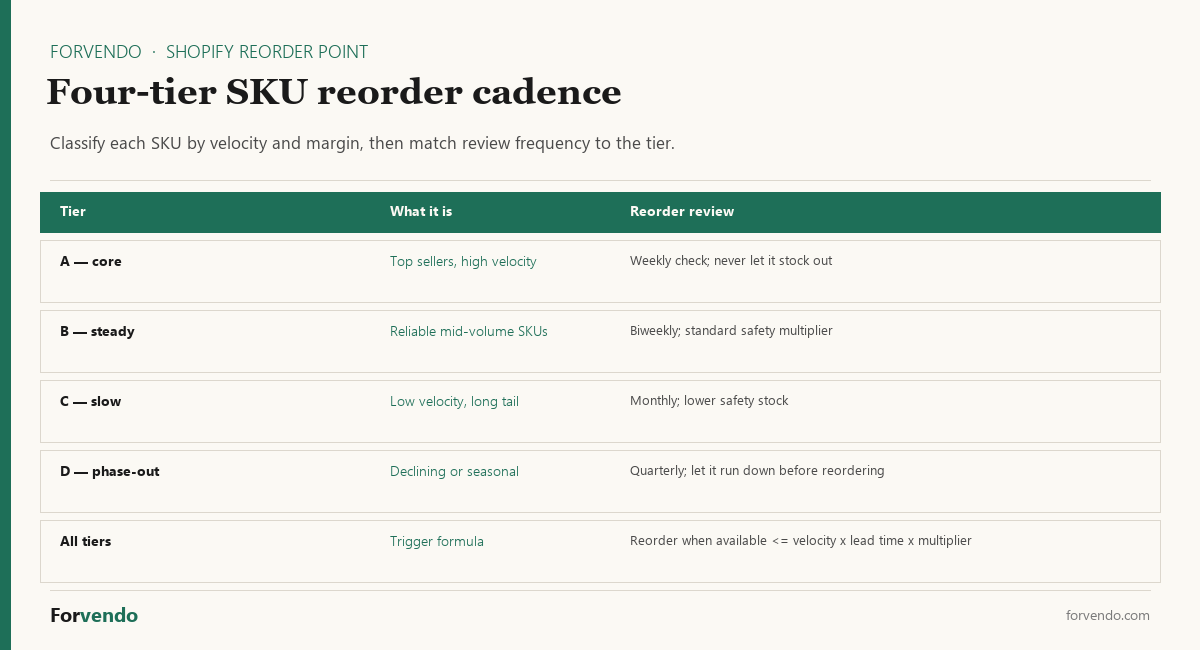
Not every SKU deserves the same review effort. A 4-tier classification keeps the 30-minute monthly review focused on the SKUs that move the most revenue.
The classification isn’t permanent. Recalculate quarterly with the rolling 90-day revenue contribution per SKU. A B-tier SKU that moves up to A gets the tighter monitoring. A C-tier that drops to D becomes a phase-out candidate.
The monthly reorder workflow
Once the tiers, the formula, and the safety multipliers are set, the recurring monthly work is mechanical. The full workflow takes about 30 minutes for twenty SKUs.
Step 1 — Pull the available inventory snapshot. In Shopify Admin, go to Products → Inventory. Sort by Available. Export to CSV. The export gives you on-hand, committed, unavailable, and available per SKU per location.
Step 2 — Calculate the reorder point per SKU. Open the Reorder Point Calculator (paired asset below). Paste the available column. For each Tier A and B SKU, the sheet auto-calculates whether available ≤ velocity × lead time × multiplier. Cells that trigger flip to a “Reorder now” flag.
Forvendo newsletter
Operating notes, once a week
One email a week for US-based solo Shopify operators at $5,000–$50,000 MRR: a decision, a checklist, or a teardown. No fluff, unsubscribe anytime.
Join the newsletter →For a quick check on a single SKU without the sheet, the reorder point calculator takes daily sales velocity, supplier lead time and a safety buffer in days.
Step 3 — Confirm against cash float and vendor minimums. For each triggered SKU, the calculator shows the recommended reorder quantity. Cross-check against your current cash float for the next 60 days. If cash float is tight, lower the quantity to the vendor minimum and accept a tighter cushion. If a vendor minimum is unreachable, defer the reorder or consolidate the order with another SKU from the same vendor.
Step 4 — Issue the purchase order and log. Use Shopify Admin’s Purchase Orders feature (Products → Purchase orders) to issue the order directly. Record the expected ship date and arrival date in the calculator’s lead time log. Six weeks later, when the units arrive, update the lead time log with the actual ship and arrival dates. The log feeds back into your lead time variance calculation for next quarter.
That’s the workflow. No more eyeballing. No more panic reorders. No more silent stock-outs.
Quarterly review trigger
Even after the formula is set and the monthly workflow is running, the inputs drift. The Forvendo quarterly review checks five items and forces a recalibration when any one of them moves materially.
- Daily sales velocity — recalculate the rolling 30-day average for every Tier A and B SKU. If any moved more than 20% versus the prior quarter, update the reorder point formula and the implied trigger threshold.
- Lead time average and spread — pull the last five reorders per vendor from the calculator’s lead time log. If the average moved more than 3 days or the spread widened by more than 50%, raise the safety multiplier toward 2.0 for affected SKUs.
- SKU tier classification — re-rank SKUs by rolling 90-day revenue contribution. SKUs that moved up to A get the tighter monitoring; ones that dropped to D become phase-out candidates.
- Cash float window — confirm the next 60 to 90 days of fixed costs and reserved cash. If the window tightened, the maximum reorder quantity caps drop accordingly.
- Shrinkage rate — compare physical count to system count for a sample of Tier A SKUs. If shrinkage moved above 2% on any SKU, adjust available downward in the calculator.
If three of the five trigger items move materially in the same quarter, run a full recalibration of the formula and tier classifications. If fewer than three move, surgical updates per SKU are sufficient.
Free Reorder Point Calculator 2026
The Forvendo Reorder Point Calculator is a five-sheet spreadsheet that holds the SOP in one file. It includes a SKU master where you enter daily sales velocity per SKU, a lead time tracker per vendor (last five reorders with auto-calculated average and spread), an auto-calculating reorder point sheet, and a monthly reorder log. There’s no email gate.
Download the free Reorder Point Calculator 2026 to score your SKUs against velocity, lead time variance, and cash float in a single sheet.
Download the Reorder Point Calculator 2026 · XLSX 14 KB
The calculator pairs with the Weekly Shopify Checklist for a One-Person Store, which includes a weekly block for Tier A SKU monitoring alongside the rest of your operating cadence.
Reorder Point Calculator
A planning starting point; widen the safety buffer for variable lead times.
Common mistakes
The first common mistake is using on-hand instead of available as the reorder trigger. A 200-unit on-hand reading with 50 committed in open orders and 5 unavailable is only 145 available — and a normal Friday could push that below your reorder point before you notice.
The second is calibrating safety multiplier to the lead time average without checking the spread. A 12-day vendor with a 4-to-22 day range isn’t the same as a 12-day vendor with an 11-to-13 day range. The multiplier should reflect the spread.
The third is reviewing every SKU at the same cadence. Twenty SKUs at the same monthly review is fine. Two hundred SKUs at the same monthly review is impossible — the 4-tier classification keeps focus where revenue lives.
The fourth is panic-reordering after a stock-out scare. A bigger order doesn’t solve the underlying calibration problem; it just buys time at the cost of tying up cash. Recalibrate the formula first, then issue the reorder at the formula-implied quantity.
The fifth isn’t logging actual arrival dates. Lead time variance is the second-most-important driver of safety multiplier, and you can’t calculate variance without a log of actual ship-to-arrival days for each reorder.
What this article does not cover
This article doesn’t cover multi-warehouse allocation across channels or 3PL providers, dropship inventory (which has no reorder point in this sense — the vendor’s stock is the constraint), or full MRP / ERP integrations. It doesn’t benchmark third-party inventory apps head-to-head, because the framework here is method-first; specific apps follow once the method is in place. It doesn’t address customs, importing, or duties beyond their effect on lead time variance.
Related Forvendo guides
Reorder decisions connect to the rest of the solo operating cadence. The The Weekly Shopify Checklist for a One-Person Store sets the weekly review block where reorder checks live. When to Hire Help for Your Shopify Store covers handing off fulfillment once volume justifies it, and the How Many Shopify Apps Is Too Many? helps decide whether a dedicated inventory app earns its monthly cost. For setting shipping rates that protect margin once inventory costs are under control, see Shopify Shipping Rates: A Margin-First Decision System.
Frequently asked questions
Should I use on-hand or available inventory as my reorder trigger?
Use available inventory. On hand is your total physical count and includes committed (already in open orders) and unavailable (damaged, in quality hold) stock that can’t be sold to the next customer. The Shopify Admin storefront uses available to control “Add to cart” availability, and your reorder decision should use the same number.
What safety multiplier should I start with?
Start with 1.5 for most SKUs. Raise to 2.0 only for seasonal or vendor-unreliable SKUs where lead time spread is wide (more than 50% of the average). Drop to 1.2 only after you have at least eight stable reorders from the same vendor at a consistent lead time. These are planning thresholds, not industry benchmarks — adjust based on your own measured variance.
How often should I recalculate daily sales velocity?
Quarterly is the default for Tier B, C, and D SKUs. Tier A SKUs justify monthly recalculation, because a 20% velocity shift on a Tier A SKU moves the reorder point materially. Run the recalculation as part of your monthly reorder review for A SKUs.
Can I run this whole SOP in a spreadsheet, or do I need an inventory app?
A spreadsheet is sufficient for 20 to 200 SKUs and one to three vendors at $5K–$50K MRR. The Reorder Point Calculator above is the spreadsheet implementation. Once you cross roughly 300 SKUs or five vendors, a dedicated inventory app starts to pay for itself in time saved — but the method doesn’t change.
How do I handle a new SKU with no sales velocity history?
Use the closest existing SKU as a velocity proxy for the first 30 days, then switch to the new SKU’s own rolling 30-day average. Set a temporary safety multiplier of 2.0 for the first three reorders, then drop to 1.5 once you have actual lead time data.
What if my vendor has a minimum order quantity higher than my formula-implied reorder quantity?
You have three options. First, accept the vendor minimum and the larger cash outlay (and the longer time before the next reorder). Second, consolidate the order with another SKU from the same vendor to hit the minimum without overstocking any single SKU. Third, negotiate or find an alternate vendor — usually only worth it if the gap is large and the SKU is Tier A.
How do I track lead time variance without an inventory app?
Log the ship date and arrival date of every reorder in the Reorder Point Calculator’s lead time sheet. After five reorders from the same vendor, the sheet auto-calculates average and spread. After eight reorders, the average becomes stable enough to tighten the safety multiplier.
Does this SOP work for drop-ship products?
No. Drop-ship inventory doesn’t sit in your warehouse — the vendor’s stock is the constraint. Your “reorder” decision becomes a vendor selection and SLA monitoring problem, not a reorder point problem. This SOP is built for owned inventory.
Forvendo Editorial note. Forvendo publishes educational operating resources for solo ecommerce operators. Articles may cover tax, sales tax, 1099-K reporting, software pricing, platform policies, and other operating topics that change over time.
This content is for general research and operational planning. It is not legal, tax, accounting, financial, or professional advice. Readers should verify details with official sources or qualified professionals before acting on them. Platform rules, tax thresholds, software pricing, and affiliate program terms can change without notice.
Forvendo articles may be drafted with AI assistance and are reviewed by the operator before publication according to our Editorial Policy, which covers sourcing, AI use, update cadence, and corrections. See also About, Disclosure, and Privacy Policy.