How Much Does Shopify Really Cost? The Plan Fee Is the Small Part
Last updated: · Shopify features, pricing, and platform policies change. Verify with official sources before acting.
Shopify’s Basic plan is $25 a month. So how much does Shopify really cost? That number answers almost nothing on its own, because the largest line on a small store’s bill usually isn’t the plan at all.
Quick answer
- Basic is $25/mo billed monthly, or $19/mo billed yearly, per Shopify’s pricing page. Grow is $65 or $49, Advanced is $399 or $299, and Plus starts at $2,300.
- The plan fee is the small part. Card processing scales with your sales, so it passes the plan cost early and never stops growing.
- Shopify doesn’t publish its card rates on the pricing page. It says only that the fees “vary depending on the plan that you choose.”
- Using an outside payment provider adds a separate fee. 2% on Basic, 1% on Grow, 0.6% on Advanced, 0.2% on Plus — on top of whatever that provider charges you.
- Hosting, bandwidth, and SSL are included. Don’t budget for them twice.
- The real variables are apps and payment routing, not which plan you sit on.
Who this is for
You’re pricing out a first store, or you’re on Basic and wondering whether the bill makes sense. The numbers here are US pricing, read from Shopify’s own pricing page. Shopify notes that pricing and payment options can differ by country, so check your own currency before you plan around any figure.
What the plan actually costs
Shopify shows two prices for every plan, and the pricing page defaults to the cheaper one. Billing yearly costs less per month, and locks you in for the year.
Two additions worth knowing before you compare: POS Pro is $89 a month per location if you sell in person, and Shopify states there are no setup fees on any plan.
What moving up a plan actually buys
Before assuming a higher tier is the answer to a rising bill, look at what the extra money buys. On the listed plans the differences are narrow and specific:
- Additional staff accounts — none listed on Basic, 5 on Grow, 15 on Advanced, unlimited on Plus
- Third-party transaction fee — 2%, then 1%, then 0.6%, then 0.2%
- Sales credits — Shopify lists earnable credits of up to $3,500 on Basic, $5,000 on Grow, $7,000 on Advanced, and $10,000 on Plus
- Advanced-tier extras — live third-party shipping rates and regional store customization
For a one-person store, most of that list is inert. Staff seats don’t matter when there’s no staff, and regional customization isn’t a first-year problem. The line that does move money is the transaction fee percentage, which is why the upgrade question and the payment routing question are really the same question.
The fee that isn’t on the pricing page
Here’s the part that makes plan comparisons misleading. Shopify’s own FAQ says it “charges a small fee to allow you to accept major credit cards, such as Visa and Mastercard,” and that “these fees vary depending on the plan that you choose.” It doesn’t print the rate.
So the single largest variable cost for most small stores is the one number the pricing page leaves out. You see it when you create the store, in your own admin, for your own country.
That has a practical consequence: any monthly estimate you build from the pricing page alone is incomplete by design. Get the rate from your admin before you model anything.
Where your actual card rate lives
This guide keeps telling you to get the rate from your admin, so here’s the path, and one thing that surprises people when they open it.
Go to Settings > Payments, find the Shopify Payments section, and click Manage. Under Standard rates you’ll see your Domestic and Rest of World credit card rates. Clicking Manage payment methods and then View payment rates breaks it down further by payment method.
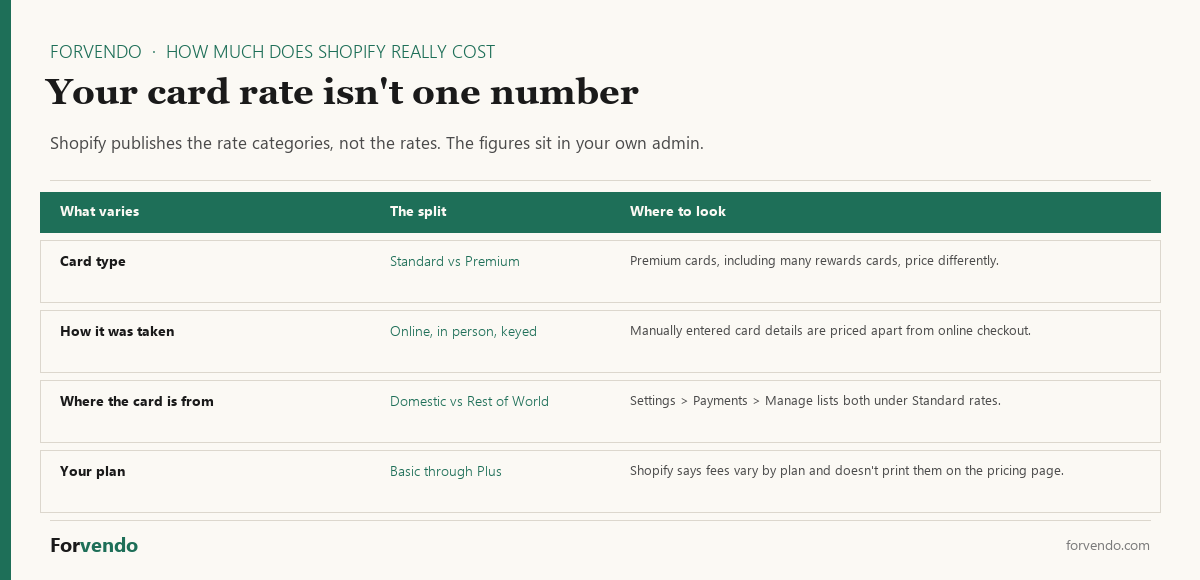
The surprise is that there isn’t one rate. Shopify’s help documentation describes rates varying by card type — standard versus premium, and many rewards cards are premium — by how the payment was taken, whether that’s online checkout, in person, or card details keyed in manually, and by whether the card is domestic or from elsewhere. Your effective rate is a blend of all of those, weighted by what your customers actually use.
That matters for planning in a specific way. If you model your costs on the domestic online rate and a meaningful share of your orders come from abroad, or from rewards cards, or get keyed in over the phone, your estimate will run light. The fix isn’t to model every combination — it’s to take last month’s actual processing charge and divide it by last month’s sales. That single number is your real blended rate, and it’s more useful than any published one would be.
Free download
The Solo Shopify Weekly Operating Checklist
A one-page PDF plus a copyable Google Sheet — the weekly cadence these guides build on. Free; bring your own store data.
Get the free checklist →Shopify’s documentation is consistent about where those figures live: in the Shopify Payments section of your admin. Which is also why nobody can hand you an accurate monthly estimate from the outside.
The 2% you can pay by accident
If you use a payment provider other than Shopify Payments, Shopify charges a third-party transaction fee on top. On Basic that’s 2%. That fee is separate from what your chosen provider charges you to process the card — you pay both.
Run it on a small store and the ranking inverts:
- $10,000/mo in sales, Basic plan, outside payment provider
- Plan: $25
- Third-party transaction fee: 2% of $10,000 = $200
- Plus your provider’s own processing cost, on top of that
The plan is 11% of that bill. The fee nobody put on a comparison chart is the rest. At $30,000/mo the same 2% is $600 a month, which is more than the Advanced plan costs. The Shopify fee calculator runs this on your own volume, with and without an outside provider, so the gap is a number rather than an argument. These fees come out before the money is batched, which is why a payout is smaller than the sales it covers.
This is why “which plan is cheapest” is usually the wrong first question. How you route payments decides more of your bill than which tier you sit on, and it decides it earlier.
What’s already included
Shopify’s FAQ is explicit that hosting comes with the plan, including unlimited bandwidth with no bandwidth fees, and a free TLS/SSL certificate for domains you add. Every store also gets a free myshopify.com address.
The part that quietly grows
Apps are where a predictable bill turns unpredictable. Each one is a small recurring charge added in a moment when you needed it, and small recurring charges are the kind that outlive the reason for them. A paid theme is a one-off; a stack of apps isn’t.
The pattern is predictable. A store adds a review app during launch week, an upsell app during a slow month, and a shipping calculator for one problem order. Each was reasonable. Together they can outweigh the plan several times over, and no single charge is large enough on its own to trigger a look at the total.
The discipline that works is a scheduled audit rather than restraint in the moment. If you want the version with the arithmetic set up, the app stack audit walks through finding what you pay for and no longer use.
Forvendo newsletter
Operating notes, once a week
One email a week for US-based solo Shopify operators at $5,000–$50,000 MRR: a decision, a checklist, or a teardown. No fluff, unsubscribe anytime.
Join the newsletter →About the $1 offer
Shopify’s current terms are a 3-day free trial with no credit card required, after which most plans run at $1 per month for the first 3 months before standard pricing starts.
Treat that as a testing window, not a price. The useful thing to do inside it is find your actual card rate in the admin and check whether Shopify Payments is available in your country, because Shopify notes availability varies. Those two facts set your real monthly cost far more than the plan you pick on day one.
So, how much does Shopify really cost?
Put the pieces together and the answer is a shape rather than a figure — but the shape is consistent enough to plan around.
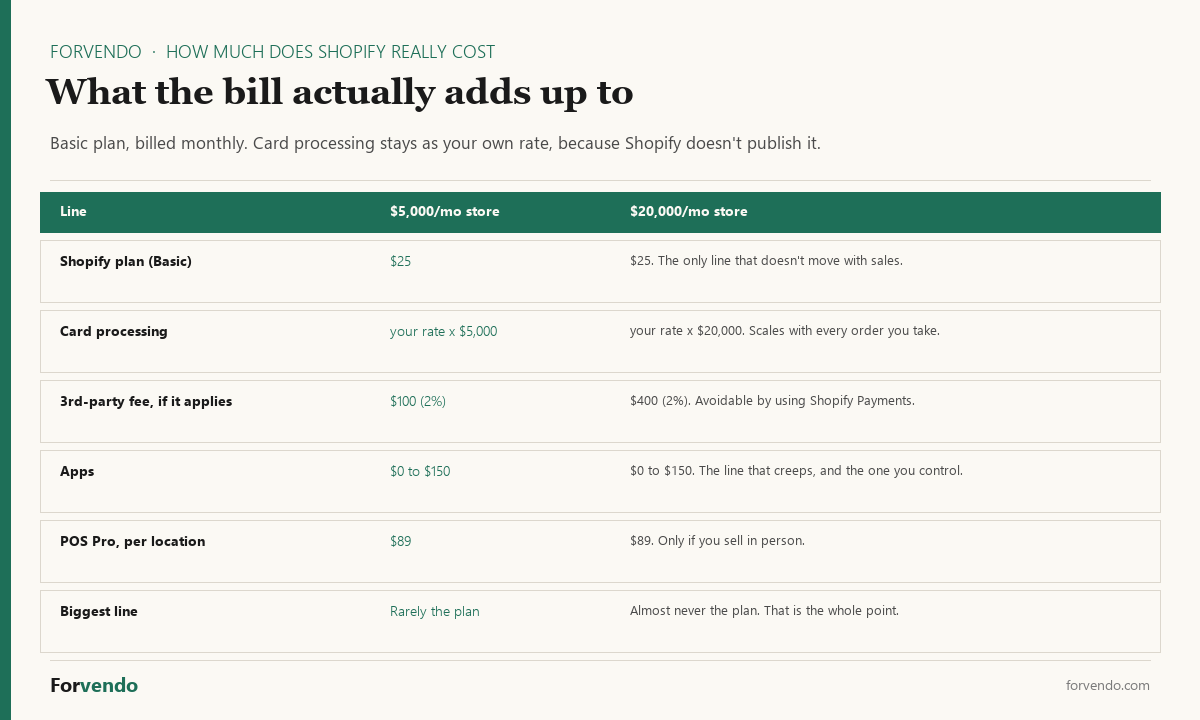
One line is fixed, one scales with everything you sell, one is entirely avoidable, and one creeps. The plan fee is the fixed one, and it’s the only line most comparison articles talk about.
At $5,000 a month in sales, the $25 plan is a real share of the bill and the decision genuinely feels like a plan decision. At $20,000 it isn’t: card processing has long since passed it, and if a third-party transaction fee applies, that alone is $400 against a $25 plan. The plan line stops mattering at roughly the point people start worrying about it.
Which reframes the upgrade question. Moving from Basic to Grow costs $40 more a month and cuts the third-party fee from 2% to 1%. If you’re paying that fee on $20,000 a month, the upgrade saves $200 and costs $40 — worth doing. If you’re on Shopify Payments and paying no third-party fee at all, the same upgrade buys you staff seats you don’t need. Same $40, completely different answer, and the plan tier had nothing to do with it either way.
The honest summary: budget the plan, expect card processing to be the largest line before you reach any meaningful volume, treat the third-party fee as a decision rather than a cost, and audit apps quarterly.
Forvendo decision rule
Do not move up a plan to chase a lower card rate until the monthly processing saving actually exceeds the plan difference at your current volume. Below that crossover the upgrade raises the bill it was meant to lower.
Re-run the comparison once a quarter, and check the app line while you are there — it is the part of the bill that grows without a decision being made. The app-stack audit walks that review, and the free calculators and spreadsheets do the arithmetic.
Reading the bill you already have
If the bill is higher than your estimate, the gap is findable in a few minutes, and there’s an order that finds it fastest.
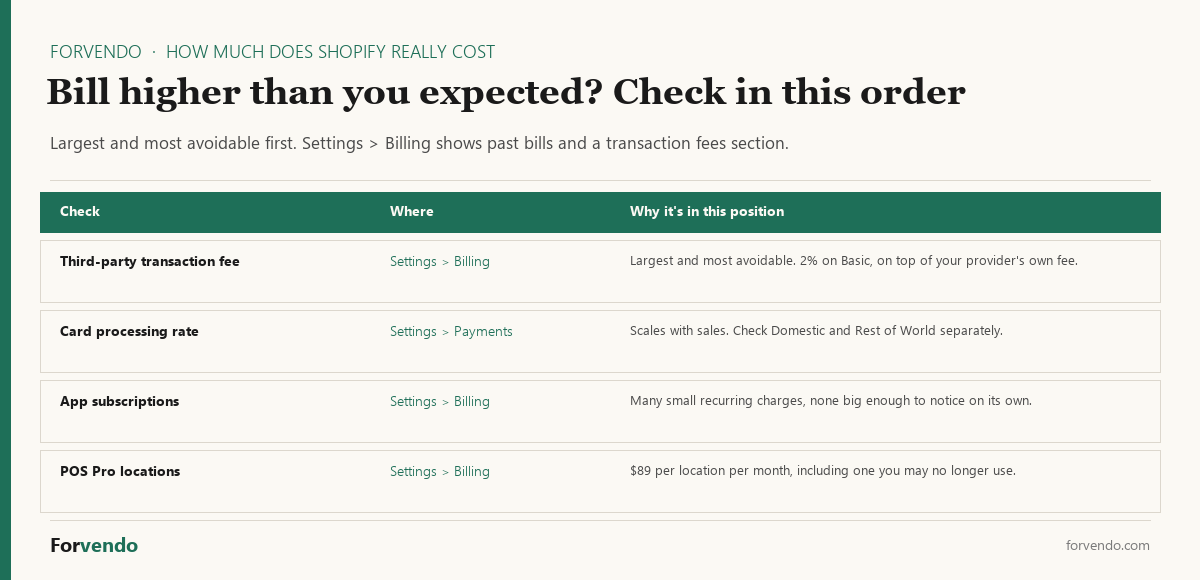
Past bills live under Settings > Billing. Open the bill you want and, if it includes transaction fees, a transaction fees section shows the total for orders in that date range — which is exactly the number to compare against your own sales figure for the same period.
Work largest and most avoidable first. A third-party transaction fee is both, so it goes at the top: it’s the one line you can remove entirely by changing how you take payments, rather than reduce by negotiating. Card processing comes second because it’s large but not avoidable. Apps are third — individually small, collectively the reason a bill drifts. POS Pro locations are last only because they’re rare, but they’re worth a glance if you ever ran a market stall and left the location active.
A quick way to sanity-check your own number
You don’t need a spreadsheet to know whether your bill makes sense. Three figures settle it.
Take last month’s sales, multiply by your card rate from the admin, and add the plan fee. If your actual invoice is meaningfully higher than that, the gap is almost always one of three things: a third-party transaction fee you didn’t realize applied, app subscriptions, or POS Pro locations. Checking in that order finds it faster than reading the invoice line by line, because it goes from largest to smallest.
Do this once a quarter rather than once. Costs on a store drift upward quietly, and the month you notice is rarely the month it started.
What this guide does not cover
- Pricing outside the US, which Shopify says can differ by country
- Shopify Plus contract terms, which are negotiated rather than listed
- Per-app pricing, which each developer sets
- Payment provider comparisons and processing rate negotiation
- Tax treatment of platform fees, which should be reviewed with a CPA
FAQ
Where do I find my Shopify Payments rate?
Settings > Payments, then Manage in the Shopify Payments section. Standard rates lists your Domestic and Rest of World credit card rates, and Manage payment methods then View payment rates breaks it down further. Shopify’s documentation points to the admin rather than publishing the figures, which is why no outside guide can quote your rate. The most useful version of the number is your own blended one: last month’s processing charge divided by last month’s sales.
Is an outside payment provider cheaper than Shopify Payments?
It has to clear a bar first. On Basic, using a provider other than Shopify Payments adds a 2% third-party transaction fee on top of whatever that provider charges you to process the card. So an outside provider needs to beat your Shopify Payments rate by more than two percentage points before it saves you anything, and on Grow the bar is one point. That’s a wide gap for a card processor to close, which is why the routing decision usually settles in Shopify Payments’ favor where it’s available.
Does my plan change my card processing rate?
Shopify says the card fees vary depending on the plan you choose, but it doesn’t print the per-plan rates on its pricing page. What it does publish per plan is the third-party transaction fee — 2% on Basic, 1% on Grow, 0.6% on Advanced, 0.2% on Plus. If you use Shopify Payments, that fee doesn’t apply to you at all, and the plan decision comes down to the features rather than the percentages.
How much does Shopify cost per month?
Basic is $25 billed monthly or $19 billed yearly, Grow is $65 or $49, Advanced is $399 or $299, and Plus starts at $2,300. Card processing and any apps are additional.
Is there a cheaper way to pay?
Yearly billing is lower per month on every listed plan — $19 against $25 on Basic, about 25% off. It commits you for the year, so it fits a store that has already decided to stay.
Should a brand-new store pay yearly?
The saving on Basic is $3 a month, or $36 across a year. That’s a small return for committing before you know whether the store works. Monthly billing while you validate, then yearly once revenue is steady, costs very little and keeps the exit open.
When does my bill jump after the $1 promotional period?
At the end of it. Shopify’s current terms are a 3-day free trial with no card required, then $1 a month for the first 3 months on most plans, then standard pricing. The jump people feel isn’t only the plan going from $1 to $25 — it’s that the promotional months are usually your lowest-sales months, so card processing and any third-party transaction fee are also scaling up at the same time. Use the promo window to find your card rate and confirm Shopify Payments is available in your country, and the fourth month won’t surprise you.
Why is my bill higher than the plan price?
Most likely card processing, which scales with sales, or a third-party transaction fee if you use a payment provider other than Shopify Payments. Apps are the third common cause.
Do I need to pay for hosting separately?
No. Shopify includes commerce hosting, unlimited bandwidth, and a free TLS/SSL certificate for domains you add.
Does Shopify charge a setup fee?
Shopify states there are no setup fees on any of its plans.
Next step
Before you commit to a plan, open the admin and write down two numbers: your card processing rate, and whether a third-party transaction fee applies to how you take payments. Those decide your bill. The plan line decides much less than it appears to.
Forvendo Editorial note. Forvendo publishes educational operating resources for solo ecommerce operators. Articles may cover tax, sales tax, 1099-K reporting, software pricing, platform policies, and other operating topics that change over time.
This content is for general research and operational planning. It is not legal, tax, accounting, financial, or professional advice. Readers should verify details with official sources or qualified professionals before acting on them. Platform rules, tax thresholds, software pricing, and affiliate program terms can change without notice.
Forvendo articles may be drafted with AI assistance and are reviewed by the operator before publication according to our Editorial Policy, which covers sourcing, AI use, update cadence, and corrections. See also About, Disclosure, and Privacy Policy.