Customer Support for a One-Person Shopify Store: A Daily System
Last updated: · Shopify features, pricing, and platform policies change. Verify with official sources before acting.
Customer support is the task that quietly takes over a solo store’s day. Without a system, every message is an interruption — answered live, from scratch, whenever it lands — and a store doing even modest volume can lose an hour a day to it. A support SOP turns that into a 20-minute block: the same questions answered the same way, on a schedule, so support stops running you.
This guide is that SOP. It covers how to batch support instead of reacting to it, how to triage messages by type, the canned replies that handle most of the volume, and when a paid helpdesk app actually earns its place over Shopify’s free tools. The goal is consistent, fast support that takes minutes a day, not a second job.
The thresholds here are planning defaults for a $5,000–$50,000 MRR solo store; adjust them to your volume and product.
Quick answer
- Batch support into a fixed daily block. One or two scheduled windows beat answering live all day. Set a response expectation (for example, within one business day) and let it hold.
- Triage by type. Most messages fall into a few buckets — order status, returns, product questions, issues. Handle each with a standard path.
- Build canned replies for the top recurring questions. Five to ten saved responses usually cover the majority of volume; personalize the opening line, keep the body consistent.
- Start with Shopify’s free tools. Shopify Inbox and order/email notifications handle most solo stores. Add a paid helpdesk only when volume makes the manual flow the bottleneck.
- Mine support for fixes. A question you answer repeatedly is a product-page or FAQ gap — fix the source and the message stops coming.
Who this is for
This is for a one-person store on Shopify, $5,000–$50,000 MRR, handling support personally between everything else. If you’re below that range, the native tools plus a handful of canned replies are almost certainly all you need. If you have a part-time helper, the SOP is what lets you hand support off without quality dropping.
Why support eats solo time without a system
Reactive support is expensive in a way that doesn’t show up as a line item: it fragments the day. Answering messages the moment they arrive means constant context-switching, and writing each reply from scratch means re-solving problems you’ve already solved. The cost isn’t the support itself — it’s the interruption tax on everything else you were doing.
A system removes both. Batching ends the context-switching; canned replies end the re-solving. The same volume that felt like a constant drain becomes a predictable, short block.
The support SOP
Three moves turn support from reactive to systematic.
Batch. Pick one or two times a day for support and answer everything in that window. State the expectation publicly — “we reply within one business day” — so customers aren’t waiting on an instant response and you aren’t pulled out of other work.
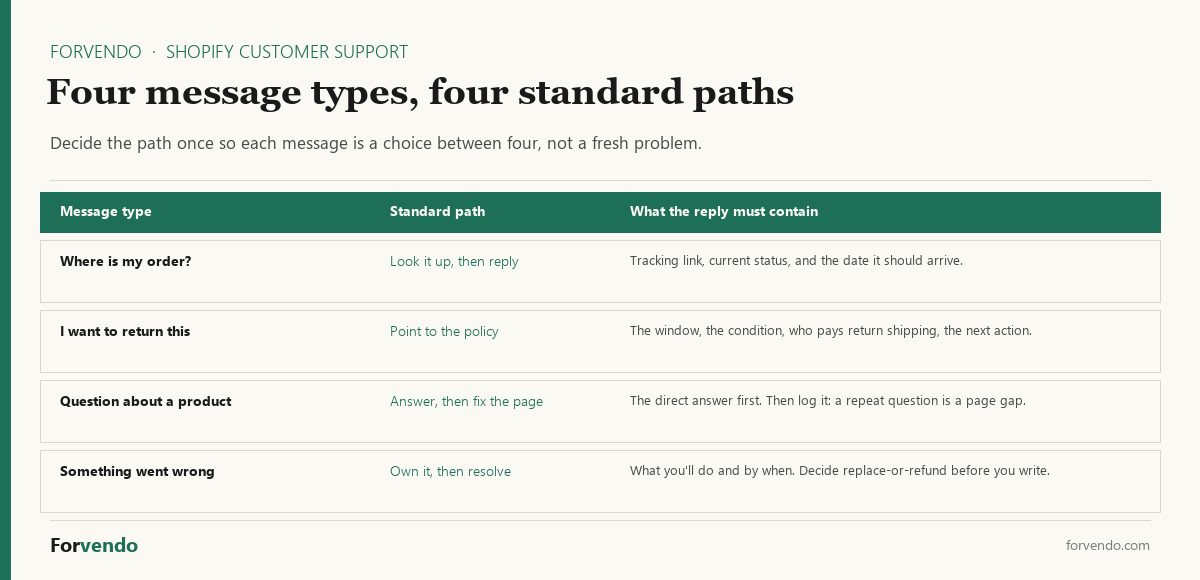
Triage. Most messages are one of four types: where is my order, I want to return/exchange, a question about a product, or something went wrong. Decide the standard path for each once, so you’re choosing a path, not inventing one per message.
Templatize. The top five to ten questions repeat. Write a clean saved reply for each — shipping times, return process, sizing, a common product question — and reuse it, personalizing only the greeting. Saved replies cut the per-message time dramatically while keeping answers consistent.
Forvendo decision rule
Run support as a batched daily block with a stated response window, a standard path per message type, and 5–10 canned replies for recurring questions. Track which questions repeat — each frequent one is a product-page or FAQ fix that removes the message at its source.
Do not add a paid helpdesk yet if Shopify Inbox plus saved replies still clears your daily block in a reasonable time. A helpdesk earns its place at volume or with a helper, not before.
The four customer support replies that do most of the work
Templatize is the step people skip, because “write saved replies” isn’t an instruction you can act on at 9pm. So here are the four, written out. Copy them, change the details to match your store, and save them where your replies live.
1. Where is my order?
Hi [name] — thanks for checking in. Your order [#1234] shipped on [date] and is currently [status]. You can follow it here: [tracking link]. Based on the carrier’s estimate it should reach you by [date]. If it hasn’t arrived by [date + 3 days], reply to this message and I’ll chase it with the carrier directly.
Free download
The Solo Shopify Weekly Operating Checklist
A one-page PDF plus a copyable Google Sheet — the weekly cadence these guides build on. Free; bring your own store data.
Get the free checklist →
The last sentence is the one that matters. It gives the customer a clear next step and a date, which stops the second and third “any update?” message before they’re written.
2. I want to return or exchange this
Hi [name] — happy to sort that out. Our return window is [30] days from delivery, and items need to be [condition]. Here’s what happens next: [reply with the item and reason / use this link]. Return shipping is [paid by us / paid by you at $X]. Once it arrives, refunds go back to your original payment method within [X] business days, and exchanges ship out the same day.
Say who pays return shipping in the first reply. Leaving it out guarantees a follow-up message, and it’s the part customers actually want to know.
3. A question about a product
Hi [name] — good question. [Direct answer in one or two sentences.] For reference, [specification or detail that supports it]. If you’re deciding between [A] and [B], the short version is [distinguishing factor]. Happy to answer anything else before you order.
Answer first, context second. And log the question — if it arrives twice in a month, the product page is missing something, and fixing the page removes the message permanently.
4. Something went wrong
Hi [name] — sorry about that, and thanks for telling me. Here’s what I’m doing: [specific action], and you’ll have [outcome] by [date]. [Replacement is going out today / a refund of $X is on its way back to your card.] You don’t need to send anything back / please use this label: [link]. If anything about that doesn’t work for you, reply here and I’ll fix it.
Decide replace-or-refund before you start typing. The reply that costs you a customer is the one that asks the customer to decide how you should make it right.
Personalize the first line of each and leave the body alone. Consistency is the point — a saved reply that gets rewritten every time is just a slower way of writing from scratch.
Native tools vs a helpdesk app
The tool is rarely the constraint at solo scale — the system is. Start with what Shopify includes.
Shopify’s Inbox and customer messaging cover saved replies and order context natively, which is enough for most solo stores. A helpdesk app is a real upgrade once you’re routing across channels (email, chat, social) or handing support to a helper — but it’s a cost decision worth running through an app-by-app check first.
Forvendo newsletter
Operating notes, once a week
One email a week for US-based solo Shopify operators at $5,000–$50,000 MRR: a decision, a checklist, or a teardown. No fluff, unsubscribe anytime.
Join the newsletter →Name the limit before you pay. A helpdesk is worth its fee when you can point at something the native flow won’t do: routing messages from more than one channel into a single queue, handing a conversation to a helper without losing history, or reporting on volume and response time that you can’t reconstruct by hand. Those are real constraints. “It feels messy” is not one, and neither is a features page that looks impressive.
The reverse test is just as useful. If your daily block still clears in twenty minutes with quick replies and a handful of instant answers, a paid tool has nothing to remove — it will make the same work look tidier while adding a monthly cost to the app budget. Revisit the question when volume or a helper changes the shape of the work, not on a schedule.
Where these live in Shopify
Two native features do different halves of the job, and it’s worth being clear about which is which.
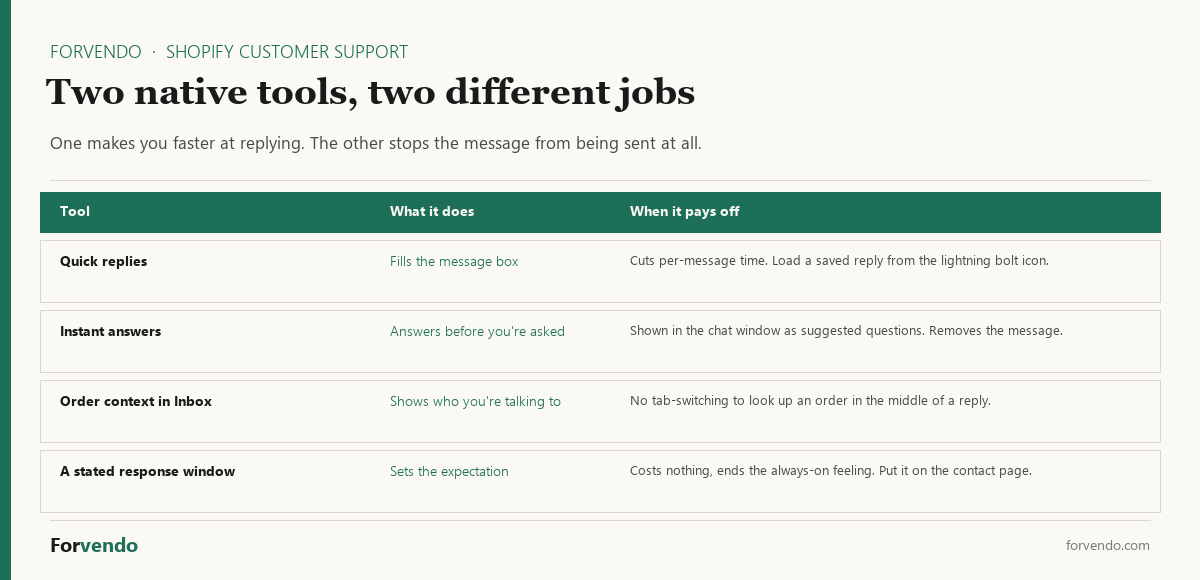
Quick replies are the saved responses themselves. In Shopify Inbox on desktop or mobile you create replies for messages you send often, then load one from the lightning bolt icon to auto-fill the message window. That’s where the four templates above go. They make you faster at answering.
Instant answers do something better: they answer the question before anyone sends a message. When a customer opens the chat window they see your greeting and a list of suggested questions, and clicking one shows the predefined answer. You set them up under Sales channels > Inbox > Chat settings, in the Instant answers section, and Shopify will display up to 100 of them.
That distinction is the whole leverage point of this guide. Quick replies shrink the time each message costs. Instant answers shrink the number of messages. If you only have 20 minutes to invest, spend it on instant answers for your top five recurring questions rather than on polishing saved replies — one reduces the work, the other just speeds it up.
Start with your shipping timeline, your return window, and the two product questions you answer most. Those four will cover a surprising share of what currently reaches your inbox.
Support is product feedback
The most valuable output of support isn’t the answers — it’s the pattern. If “where is my order” dominates, your shipping-time messaging or tracking emails need work. If the same product question keeps coming, the product page is missing it. Logging the recurring types turns support from a cost into a list of fixes that quietly shrink the volume over time.
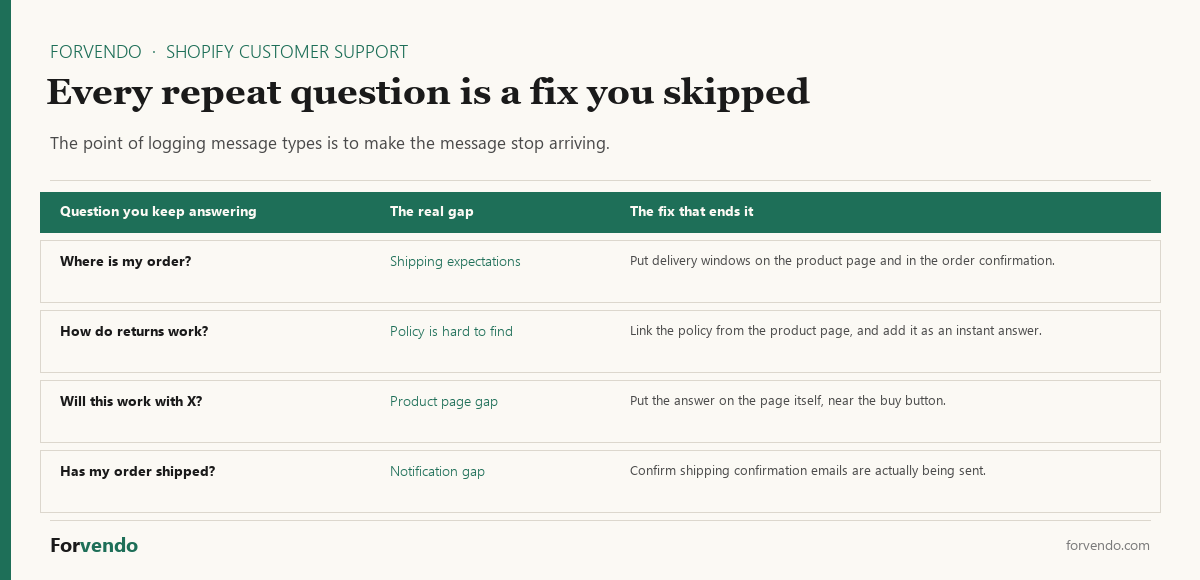
Keep the log simple enough that you’ll actually keep it: a note with four tallies, one per message type, marked during your support block. At the end of each month, look at which tally grew and fix the source rather than getting faster at answering it.
Set the review as a monthly trigger. If one type is more than roughly half your volume, that’s the fix to make this month. If the total volume is climbing while your order count is flat, something upstream changed — a shipping delay, a confusing new product page, a notification that stopped sending. And if the log is flat and low, you’re done: keep the block, skip the project.
Your first 30 minutes
If support currently has no shape, this is the order to build it in.
- 5 minutes — pick the block. Choose one time of day and write it in your calendar. Late morning works for most stores: overnight messages have landed, and the day isn’t gone yet.
- 5 minutes — state the window. Put “we reply within one business day” on your contact page. This single line does more for your day than any tool.
- 10 minutes — save the four replies. Paste the templates above in, swap the details for your store’s real numbers, and save them as quick replies.
- 10 minutes — add five instant answers. Shipping timeline, return window, and your three most-asked product questions. These stop messages rather than speeding them up.
That’s the system. Everything after it is refinement: logging which questions repeat, and deciding much later whether a paid helpdesk removes a limit you can actually name.
Common mistakes
- Answering live all day. The interruption tax is the real cost. Batch it.
- Writing every reply from scratch. Saved replies cut time without cutting quality.
- No stated response window. Without one, customers expect instant answers and you feel always-on.
- Ignoring the patterns. A question you answer weekly is a source fix you keep skipping.
- Buying a helpdesk too early. At low volume, the native tools plus a system beat a paid app.
What this article does not cover
This is an operating system for handling support efficiently, not a customer-experience or brand-voice guide, and not a chargeback-dispute process. It doesn’t benchmark specific helpdesk apps head-to-head or cover live-chat staffing. Those are separate decisions.
Related Forvendo guides
Support overlaps returns and disputes: the Shopify Returns and Exchanges policy answers a large share of messages before they’re sent, and the How to Fight a Shopify Chargeback handles the dispute side. Whether a helpdesk app earns its place is a Shopify App Decision Framework call, and the support block lives in the Solo Shopify Operations guide.
Frequently asked questions
Where do I set up saved replies and instant answers?
Quick replies live in Shopify Inbox itself — create them for messages you send often, then load one from the lightning bolt icon to fill the message window. Instant answers are separate: go to Sales channels > Inbox > Chat settings, then the Instant answers section, and create one per recurring question. Shopify will display up to 100 of them in the chat window. Start with five and add more only as the questions actually repeat.
How much time should customer support take for a solo store?
With a system — batched windows, triage, and canned replies — most solo stores can keep it to roughly 15–30 minutes a day. Without one, the same volume can consume an hour or more, mostly to context-switching and writing repeat answers from scratch.
Can I hand support to a helper without a paid helpdesk?
For a while, yes. Shopify lets you assign a chat conversation to a staff member who has the online store chat permission, and once assigned, only that person gets notifications for it. That covers a single helper handling a defined slice of the queue. The point where it stops working is history and reporting: when you need to see what was promised on an older conversation, or measure response times across a week, reconstructing it by hand costs more than the app would. That’s the named limit worth paying to remove.
Do I need a help desk app for Shopify?
Usually not at solo scale. Shopify Inbox plus saved replies and order/email notifications handle most stores. A helpdesk app earns its place when you route support across multiple channels, bring on a helper, or the manual flow becomes the daily bottleneck — and even then it’s a cost decision worth checking first.
What should my response time be?
Set a window you can hold consistently — within one business day is a common, workable standard for a solo store. State it on your contact page. A reliable one-day reply beats an inconsistent “sometimes instant” experience, and it frees you from feeling always-on.
How many canned replies do I need?
Five to ten usually cover the majority of volume: shipping times, the return process, a common sizing or product question, order-status, and a general “we’re on it.” Personalize the opening line and keep the body consistent so answers stay uniform.
How do I reduce the number of support messages?
Treat recurring questions as source fixes. If the same question arrives weekly, add it to the product page or an FAQ, improve the shipping-time and tracking messaging, and make the return policy easy to find. Fixing the source removes the message rather than just answering it faster.
Forvendo Editorial note. Forvendo publishes educational operating resources for solo ecommerce operators. Articles may cover tax, sales tax, 1099-K reporting, software pricing, platform policies, and other operating topics that change over time.
This content is for general research and operational planning. It is not legal, tax, accounting, financial, or professional advice. Readers should verify details with official sources or qualified professionals before acting on them. Platform rules, tax thresholds, software pricing, and affiliate program terms can change without notice.
Forvendo articles may be drafted with AI assistance and are reviewed by the operator before publication according to our Editorial Policy, which covers sourcing, AI use, update cadence, and corrections. See also About, Disclosure, and Privacy Policy.