Shopify Abandoned Cart Recovery: What Actually Works for Small Stores
Last updated: · Shopify features, pricing, and platform policies change. Verify with official sources before acting.
Most people who add to cart never check out. For a solo Shopify store, that gap is the single cheapest revenue to recover, because the shopper already chose the product — they just didn’t finish. Abandoned cart recovery is the system that brings a measurable share of them back, and for a one-person store the whole decision comes down to one question: which recovery channel, and when.
This guide answers that. It compares the three real options — Shopify’s built-in abandoned checkout email, a dedicated recovery app, and SMS — and gives a rule for which to run at your stage, plus the setup and the mistakes to avoid. The point isn’t to run all three; it’s to run the one that fits, well.
The figures here are planning assumptions for a $5,000–$50,000 MRR solo store, not guarantees — recovery rates vary by product, price, and audience.
Quick answer
- Start with Shopify’s native abandoned checkout email. It’s built in, free, and recovers a meaningful share of carts with zero added cost. Turn it on before anything else.
- Add a dedicated email app only when the native flow’s limits cost you money — when you need multi-step sequences, better timing control, or segmentation the native version can’t do.
- Add SMS only above a clear volume, and only with proper consent — it converts well but carries compliance and per-message cost that a small store rarely justifies.
- One channel, set up well, beats three half-configured. Sequence and timing matter more than channel count.
Who this is for
This is for a one-person store on Shopify, typically the Basic plan, doing $5,000–$50,000 MRR, who has checkout traffic but isn’t yet recovering abandoned carts in a deliberate way. If you’re below that range, the native email alone is almost always the right and only move. If you already run a recovery flow and want to optimize it, the decision table below still helps you decide whether a channel upgrade is worth the cost.
Why this is the cheapest revenue you have
A shopper who abandoned a cart is the warmest audience a store has: they found you, chose a product, and started checkout. Recovering even a modest fraction of them adds revenue with no new acquisition spend. That’s why recovery is worth setting up early — not because the recovered share is huge, but because the cost to capture it is close to zero once the flow runs on its own.
The trap is treating recovery as a tooling decision (which app?) instead of a sequencing decision (what message, when, on which channel?). The channel matters far less than having a clear, well-timed sequence that the native tools can already deliver.
What Shopify’s native recovery actually covers
Before comparing channels, it’s worth knowing who the built-in email can reach, because it’s a narrower group than “people who abandoned a cart.”
Shopify’s documentation is specific: an abandoned checkout “refers to a checkout process that remains incomplete, even though the customer has provided their email information,” and a checkout is marked abandoned after more than ten minutes. The email address is the condition. A shopper who added to cart and left from the product page or the cart page never gave you one, so there’s nothing for the automation to send to.
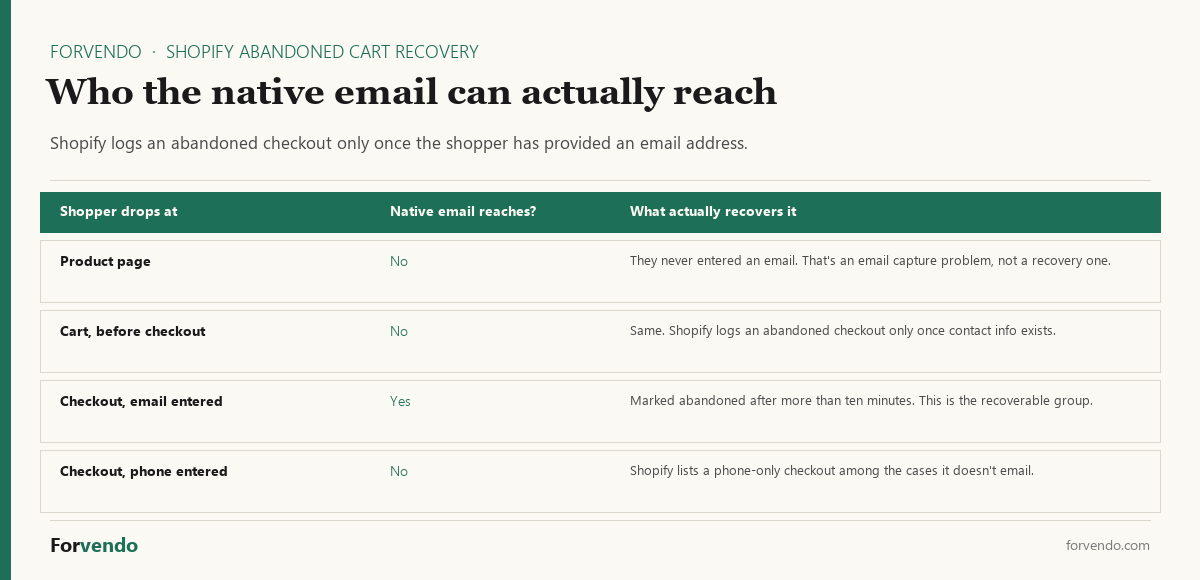
That reframes the problem usefully. If your recovery numbers look small, the cause is often not the recovery flow at all — it’s that few shoppers reach the contact step in the first place. Widening that group is an email capture and product-page job, and it happens upstream of anything a recovery app can do.
Two more details worth knowing before you build on top of the native tool. Shopify sends one recovery email per abandoned checkout, not a sequence — which is the concrete limit the decision table below is really about. And abandoned checkouts older than three months are automatically deleted from the admin, so if you want a longer history to analyze, export it before it ages out.
The decision: native vs app vs SMS
For most solo stores, the right path is native first, an email app second once you can name the specific limit you’re hitting, and SMS only later, if at all. Shopify’s own abandoned checkout recovery is the baseline — confirm it’s switched on before you evaluate anything paid.
Forvendo decision rule
Turn on Shopify’s native abandoned checkout email first. Upgrade to a dedicated email app only when you can name the exact limit it removes — more sequence steps, finer timing, or segmentation — and the app stays inside your 3–6%-of-MRR app budget.
Do not add SMS yet if you cannot show clear, logged opt-in consent for it, or if you have not first maxed out a well-sequenced email flow. SMS amplifies a good sequence; it does not fix a missing one.
The setup that does most of the work
Channel aside, the sequence is what recovers carts. A simple, well-timed flow:
Free download
The Solo Shopify Weekly Operating Checklist
A one-page PDF plus a copyable Google Sheet — the weekly cadence these guides build on. Free; bring your own store data.
Get the free checklist →The order matters: lead with a plain reminder and an objection-handler, and hold any discount for last. Opening with a discount teaches shoppers to abandon on purpose and wait for the email.
Now the part that decides your tooling: the native automation covers the first step of that sequence and nothing after it. Shopify sends one recovery email per abandoned checkout, so steps two and three don’t exist unless you move to a dedicated email app. That’s the concrete limit worth naming before you pay for anything.
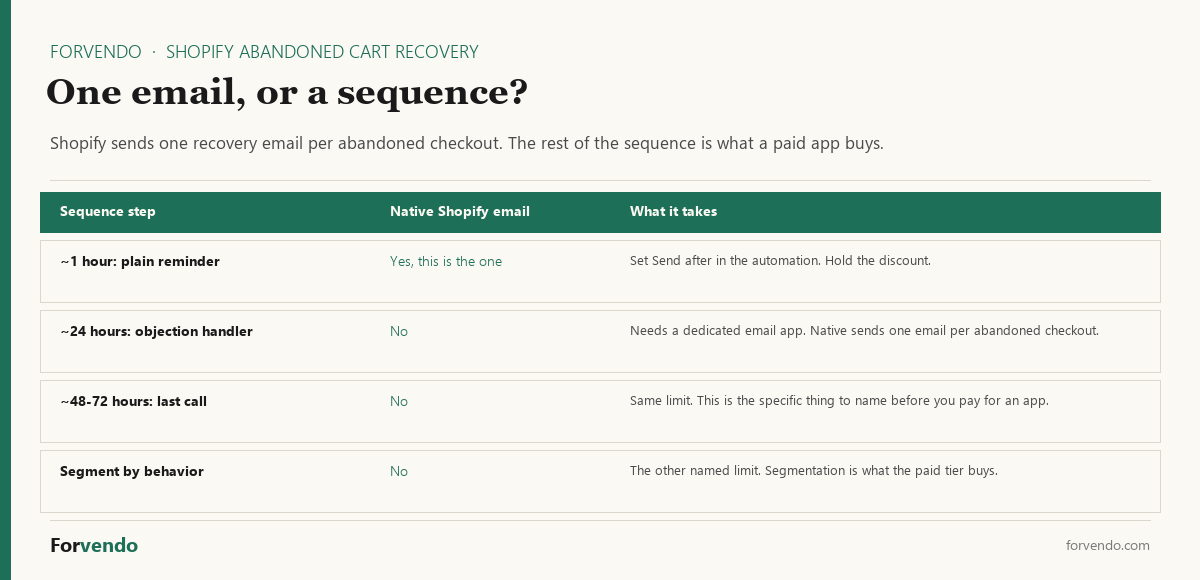
Which is not an argument for buying one immediately. A single well-timed reminder with a clear return link recovers the easiest carts — the distracted ones — and those are most of the recoverable group at small volume. Run step one natively for a month, look at what it recovers, and only then decide whether steps two and three are worth a monthly fee.
Turning it on, and choosing the delay
The automation lives in Apps > Messaging > Automations, in the “Abandoned checkout emails by Shopify” automation. Open Edit settings, and under the abandoned checkout emails section select Send abandoned checkout emails automatically. The same screen has a Send after setting that controls how much time passes between the abandonment and the email.
Send after is the one real decision on that screen. A short delay reaches the shopper while the decision is still live — they may still be comparing tabs. A longer delay risks arriving after they’ve bought elsewhere or lost interest. For most solo stores, an hour is a reasonable starting point: long enough that it doesn’t read as surveillance, short enough that the purchase is still open.
Set it, note the date, and leave it alone for a month. Changing the delay every week makes the results unreadable for the same reason a rushed A/B test is: at solo-store checkout volume, a handful of recoveries either way is noise, not signal.
When the recovery email doesn’t send
If the automation is on and you’re still seeing abandoned checkouts with no email going out, Shopify documents a specific set of cases where it holds the send. Checking these first is faster than rebuilding the flow.
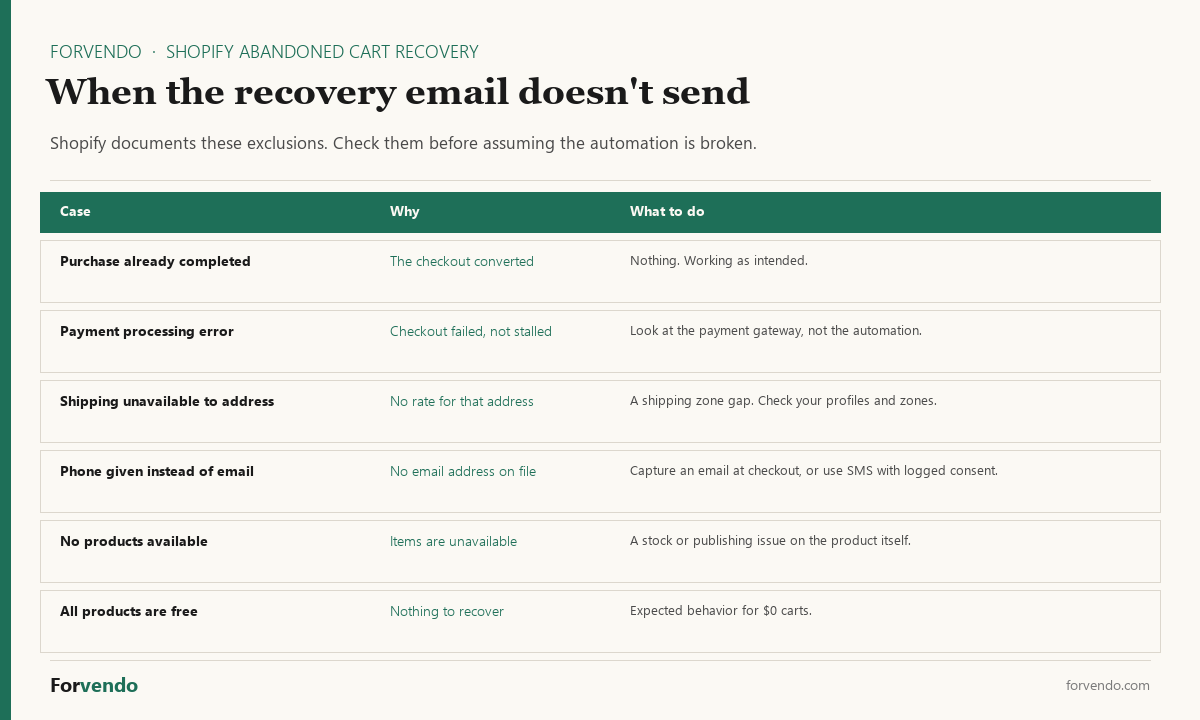
Two of these are worth acting on rather than shrugging at. Shipping unavailable to the address means a customer reached checkout and your rates didn’t cover where they live — a gap in your shipping zones and profiles, not a recovery problem, and one that’s costing you the sale outright rather than just the follow-up. Phone given instead of email is the quiet one: those shoppers are recoverable, but only over SMS, and only if you have logged consent. If you see this case often, that’s a genuine data point in favor of SMS rather than a general assumption that SMS converts.
Forvendo newsletter
Operating notes, once a week
One email a week for US-based solo Shopify operators at $5,000–$50,000 MRR: a decision, a checklist, or a teardown. No fluff, unsubscribe anytime.
Join the newsletter →The rest are working as intended. A completed purchase, a $0 cart, and an unavailable product all correctly produce no email.
Telling what it actually recovered
A recovery flow you can’t measure is a guess. Shopify keeps the record in Orders > Abandoned checkouts, and that page carries a Recovery status column: once an email has gone out and the customer completes the order, the checkout counts as recovered.
Check it monthly, not daily. At solo-store volume, a single week’s recoveries is too small a number to read anything into, and the three-month retention window means a monthly rhythm still catches everything before it ages out of the admin.
Two numbers are worth writing down each month: how many checkouts were abandoned, and how many came back. The first number is the more useful one, oddly enough. A rising abandoned-checkout count with a steady recovery rate usually means something upstream broke — a shipping rate that stopped covering an address, a payment method acting up, a product page that started overpromising. The recovery flow is doing its job; something before it is not.
Set a quarterly trigger against those two numbers rather than revisiting the channel decision whenever a new app ad shows up. Once a quarter, look at three things: how many checkouts were abandoned, how many recovered, and whether you can now name a specific limit the native email imposed on you.
If the abandoned count is growing and the recovery rate is flat, the fix is upstream — shipping, payment, or product page. If the recovery rate is healthy and you still can’t name a limit, keep the free tool for another quarter. Only when you can point at a real constraint — you wanted a second message and couldn’t send one, or you needed to treat first-time and repeat buyers differently — does a paid app have something to sell you.
That’s the same test the app decision framework applies everywhere else on this site: name the limit before you pay to remove it.
The same page is also where you handle the occasional high-value cart by hand. Open the abandoned checkout, click the customer’s email under the customer information, and Shopify opens an email with the checkout link already in it. That’s not a system, and it doesn’t scale — but for a $400 cart from a repeat buyer, sending one real message yourself beats waiting on an automation.
Common mistakes
- Discounting in the first email. It trains customers to abandon for the coupon. Reminder first, incentive last.
- Running every channel at once. Three half-built flows underperform one good one. Sequence before channel.
- Adding SMS without consent. SMS without logged opt-in is a compliance risk, not a growth tactic.
- Skipping the timing test. The first send window matters; test it against your own data instead of copying a generic schedule.
- Assuming a low recovery count means a broken flow. Check the exclusion list first, and check how many shoppers reach the contact step at all.
- Judging the flow weekly. Checkout volume at this size makes a week’s numbers noise. Read it monthly.
- Treating it as set-and-forget. Re-check the flow quarterly alongside the rest of your operating cadence.
What this article does not cover
This is a channel-and-sequence decision guide, not a head-to-head of specific recovery apps or a copywriting course. It doesn’t cover on-site cart abandonment reduction (checkout UX, trust badges, payment options), paid retargeting ads, or post-purchase flows. Those are separate decisions.
Related Forvendo guides
Recovery sits inside the email side of your operation. The Shopify Email Capture Decision Framework covers getting the address in the first place, and Kit vs Klaviyo Welcome Email Flow covers the tool and the welcome sequence a recovery flow plugs into. Whether a paid recovery app earns its place is a Shopify App Decision Framework call. Recovery is also only one point in the funnel — if carts are being abandoned at an unusual rate, the cause is often upstream, which is what How to Increase Your Shopify Conversion Rate works through in return-on-effort order. The whole thing lives in the Solo Shopify Operations guide.
Frequently asked questions
Should I put a discount in the abandoned cart email?
Not in the first one. A shopper who got distracted mid-checkout usually needs a reminder and a working link, not a price cut — and discounting that group hands margin to people who would have finished anyway. Worse, a reliable first-email discount teaches repeat customers to abandon deliberately and wait for it. If you use an incentive at all, put it in the last message of a sequence, only where margin allows, and check it against your discount strategy rather than treating recovery as a separate rulebook.
Does Shopify recover abandoned carts, or only abandoned checkouts?
Only abandoned checkouts. Shopify’s definition requires that the customer has provided their email information, and the checkout is marked abandoned after more than ten minutes. Someone who left from the product page or the cart page without entering an email isn’t in that group, so the automation has no address to send to. Widening the recoverable group is an email capture problem, not a recovery-tool problem.
Why am I not getting abandoned checkout emails?
Shopify holds the send in several documented cases: the purchase was already completed, a payment processing error occurred, shipping wasn’t available to the address, the customer gave a phone number instead of an email, no products were available, or every product in the checkout was free. Check those before rebuilding the flow. The shipping-unavailable case is the one worth chasing — it means a real customer couldn’t buy at all.
How long does Shopify keep abandoned checkouts?
Abandoned checkouts older than three months are automatically deleted from the admin. If you want a longer history for analysis, export the list before it ages out. For most solo stores a monthly check of Orders > Abandoned checkouts is enough to stay ahead of that window.
Does Shopify have built-in abandoned cart recovery?
Yes. Shopify can automatically email shoppers who reach checkout and don’t finish, at no extra cost. Confirm it’s enabled in your marketing automations before evaluating any paid app — it’s the right starting point for almost every solo store.
When is a paid recovery app worth it over the native email?
When you can name the specific limit the native flow imposes — more steps in the sequence, finer timing control, or segmentation by behavior — and the app fits inside your 3–6%-of-MRR app budget. If you can’t name the limit, the native email is still the better deal.
Should I use SMS for cart recovery?
Only with explicit, logged opt-in consent and usually only at higher volume. SMS converts well but carries per-message cost and compliance obligations that a smaller store rarely justifies. Max out a well-sequenced email flow first.
Should the first recovery email include a discount?
Usually not. Leading with a discount trains shoppers to abandon on purpose. Start with a plain reminder, handle objections in the second message, and hold any incentive for the final email — and only if your margin supports it.
How many recovery emails should I send?
Two to three is plenty for most solo stores: a reminder, a reassurance, and an optional last call. More than that risks fatigue for little added recovery.
Forvendo Editorial note. Forvendo publishes educational operating resources for solo ecommerce operators. Articles may cover tax, sales tax, 1099-K reporting, software pricing, platform policies, and other operating topics that change over time.
This content is for general research and operational planning. It is not legal, tax, accounting, financial, or professional advice. Readers should verify details with official sources or qualified professionals before acting on them. Platform rules, tax thresholds, software pricing, and affiliate program terms can change without notice.
Forvendo articles may be drafted with AI assistance and are reviewed by the operator before publication according to our Editorial Policy, which covers sourcing, AI use, update cadence, and corrections. See also About, Disclosure, and Privacy Policy.