How to Fight a Shopify Chargeback: A 6-Step Response Process
Last updated: · Card network rules, processor policies, and Shopify chargeback response windows change between calendar years. Confirm response windows and fees with your current processor documentation before relying on this article for live disputes.
A one-person store between $5,000 and $50,000 MRR sees one to three chargebacks a quarter. Without a set procedure, each one eats an hour of email and dashboard digging. With one, a refund is a 5-minute decision and a chargeback response is a 15-minute checklist. Both workflows are below, along with the evidence kit to assemble before you need it.
Quick answer
- Refund and chargeback aren’t the same process. A refund is voluntary, initiated by the merchant or in agreement with the customer. A chargeback is involuntary, initiated by the cardholder through their bank, and a fee is deducted from the merchant either way.
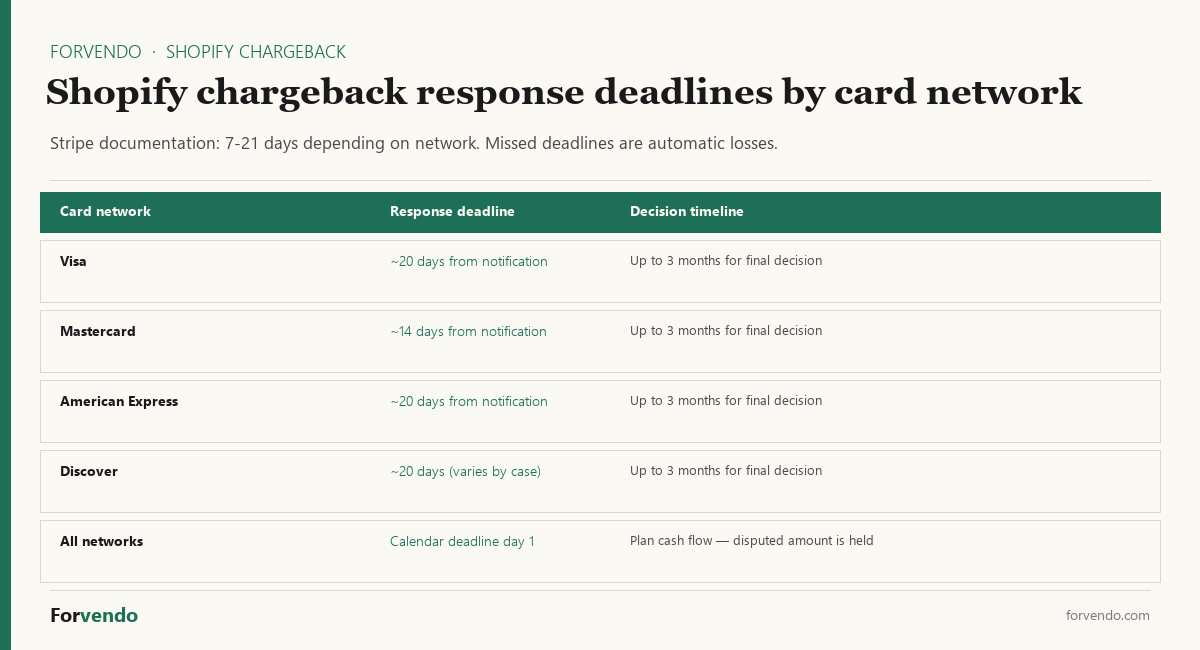
- Stripe (which powers Shopify Payments) gives merchants a 7–21 day response window after a dispute is filed, depending on the card network. The final decision can take up to 3 months.
- A clear refund-first policy reduces chargebacks. When the friction of requesting a refund is lower than the friction of filing a chargeback, most disputes typically don’t reach the card network.
- The evidence kit is built in advance, not at dispute time. Tracking number, delivery confirmation, customer communication log, and a clearly worded refund policy posted on the store cover most of what a chargeback response needs.
- Chargeback fees are charged by the card network regardless of outcome. Winning the dispute returns the disputed amount but typically not the fee, though Shopify may refund its share in some regions.
For the broader weekly cadence that includes a refund/chargeback block, see The Weekly Shopify Checklist for a One-Person Store.
Table of Contents
- Who this is for
- Why refunds and chargebacks need an SOP
- Refund decision tree
- How to issue a refund in Shopify Admin
- The Shopify chargeback response workflow
- The evidence kit (build in advance)
- Four scenario walk-throughs
- Refund and chargeback SOP checklist
- Common mistakes
- What this article does not cover
- Frequently Asked Questions
Who this is for
This article is built for the same reader as the rest of Forvendo’s operations coverage.
- You sell physical or digital goods on Shopify, typically on the Basic plan or Shopify (not Plus).
- Monthly revenue sits between $5,000 and $50,000.
- You handle customer service yourself, often around a full-time job, with at most a part-time virtual assistant.
- You receive 1–10 refund requests per month and 1–3 chargebacks per quarter.
- You use Shopify Payments (Stripe) as the primary processor.
If you operate a multi-employee customer support team, run high-ticket products with average orders above $500, or use a non-Shopify processor with a different dispute portal, parts of this article still apply but the calibration will differ.
Why refunds and Shopify chargebacks need an SOP
Three structural reasons one-person stores benefit disproportionately from a written SOP.
Refunds are emotional decisions when handled ad-hoc. A one-person store gets a refund request at 11pm, half-tired, and either over-refunds (giving away margin) or under-refunds (creating a future chargeback). A decision tree removes the emotion.
Chargeback windows are short and absolute. Stripe documentation notes the response window is “usually 7 to 21 days, depending on the card network.” Missing the window means automatic loss regardless of merits. A solo store owner who isn’t checking dashboard alerts daily will miss windows.
Evidence is hardest to assemble in the moment. At the time of dispute, a seller running everything alone who hasn’t pre-built an evidence template has to reconstruct customer communication, dig for tracking, and write a coherent response under time pressure. The pre-built evidence kit converts a 60-minute panic into a 15-minute fill-in-the-blank.
For a solo Shopify seller running 5–10 hours per week on the store, the per-dispute saving of running an SOP is roughly 45 minutes. Over a quarter with two chargebacks and ten refund requests, that compounds to roughly 5–8 hours recovered.
Refund decision tree
The decision tree below applies to most physical-goods stores. Digital goods and subscriptions follow a similar logic but with different defaults around delivery confirmation. The Shopify chargeback and refund SOP that runs across both surfaces follows the same six-step pattern.
Shopify chargeback and refund SOP workflow — six steps for solo store owners.
| Trigger | Refund? | Why |
|---|---|---|
| Customer reports product never arrived, tracking shows undelivered | Yes — full refund or reshipment | Carrier loss is a cost of doing business; chargeback risk is high if denied |
| Customer reports product never arrived, tracking shows delivered | Investigate before refunding | Possible porch theft, address mismatch, or friendly fraud; consider partial refund or reship at customer cost |
| Product defective, customer can return | Yes — full refund after return received | Refund-after-return covers both parties; offer return label if you can |
| Product defective, customer can’t return (consumable, low value) | Yes — full refund, no return required | Cost of return logistics exceeds the dispute risk |
| Customer changed mind, within stated return window | Yes — refund per posted policy | Posted policy is the contract; honor it consistently |
| Customer changed mind, past stated return window | Discretionary partial refund or store credit | Document the decision; store credit reduces refund cost without escalating to chargeback |
| Wrong item sent (your error) | Yes — full refund + ship correct item + apologize | This is the highest-trust recovery moment; over-deliver |
| Customer claims unauthorized charge (friendly fraud) | Refund only after confirming with cardholder | If fraud is real, refund and report; if friendly fraud, prepare evidence for likely chargeback |
The single most important rule: the posted refund policy on the store is the operating contract. Honoring it consistently reduces chargeback risk more than any single tactic. Inconsistent enforcement is what generates angry chargebacks.
Forvendo decision rule
Decide every refund request within 24 business hours — yes, no, partial, or store credit. The cost of waiting three days is usually a chargeback filing, which costs the merchant the disputed amount plus a per-dispute fee regardless of the outcome.
When a single refund decision is ambiguous, default to the posted policy. The cost of one slightly over-issued refund is small. The cost of inconsistent enforcement compounds into chargebacks over months.
How to issue a refund in Shopify Admin
According to Shopify’s official refund documentation, the procedure is:
- From Shopify Admin, go to Orders
- Click the order to refund
- Click Refund
- Enter the quantity of each item to refund (refunding all items creates a full refund; selecting a subset creates a partial refund)
- Adjust the refund shipping amount if appropriate
- Optionally toggle Restock items (selected by default when inventory tracking is on)
- Select whether to refund Duties and import taxes on refunded items if relevant
- Add an internal note explaining the reason (for your own records)
- Click Refund to confirm
Shopify’s documentation notes specifically: “You can’t cancel or reverse a refund after you initiate a refund from your Shopify admin.” Confirm amounts before clicking the final button.
For very recent orders that haven’t yet been fulfilled or charged, Cancel order may be the cleaner action than Refund, since it stops fulfillment and reverses the charge in one step. Shopify’s documentation states: “In some cases, you can cancel an order and then issue a refund.”
Refunds via Shopify Payments typically return to the original card within 5–10 business days, depending on the issuing bank. Communicate this expectation to the customer at the time of refund to reduce follow-up support tickets.
The Shopify chargeback response workflow
Shopify chargebacks arrive as a notification in Shopify Admin and (for Shopify Payments accounts) trigger an immediate deduction from your next payout. The disputed amount is held until the Shopify chargeback is resolved.
Free download
The Solo Shopify Weekly Operating Checklist
A one-page PDF plus a copyable Google Sheet — the weekly cadence these guides build on. Free; bring your own store data.
Get the free checklist →Step 1 — Read the chargeback notification carefully. The reason code matters. Common reason codes include:
- Fraudulent — cardholder claims they didn’t authorize the transaction
- Product not received — cardholder claims the product never arrived
- Product unacceptable — cardholder claims the product is defective or not as described
- Subscription / recurring — cardholder claims they canceled and was charged anyway
- Credit not processed — cardholder claims a refund was promised but not issued
- Duplicate — cardholder claims they were charged twice
The evidence you assemble depends on the reason code. A “product not received” chargeback is won with delivery proof; a “fraudulent” chargeback is won with a combination of customer communication, IP/device match, and prior order history.
Step 2 — Note the response deadline. Stripe documentation notes the response window is “usually 7 to 21 days, depending on the card network.” For Visa, the deadline is typically 20 days; for Mastercard, often 14 days; for American Express, 20 days. Calendar the deadline immediately — most one-person-store chargeback losses come from missed windows, not weak evidence.
Step 3 — Assemble evidence from the kit. Pull from the pre-built evidence kit (see next section). Add reason-code-specific items.
Step 4 — Submit through Shopify Admin or processor dashboard. Stripe’s dispute response documentation describes a five-step submission flow: open the response form, explain why the dispute is erroneous, upload supporting files, add background information, and submit. Stripe notes: “your response is final” — once submitted, no further evidence can be added.
Step 5 — Wait for the decision. Stripe documentation states: “This can take up to 3 months. When Stripe receives the decision, you receive an email from us.”
Forvendo newsletter
Operating notes, once a week
One email a week for US-based solo Shopify operators at $5,000–$50,000 MRR: a decision, a checklist, or a teardown. No fluff, unsubscribe anytime.
Join the newsletter →Step 6 — Win or lose, the chargeback fee may stay charged. The card network fee is deducted regardless of the outcome. Shopify documentation notes: “Shopify might refund the chargeback fee depending on your country or region.” Don’t assume the fee will be returned.
The evidence kit (build in advance)
The evidence kit is a single folder (cloud or local) containing templates and live data sources you can pull from at dispute time. Building it once takes about 90 minutes; using it cuts each chargeback response from 60 minutes to 15.
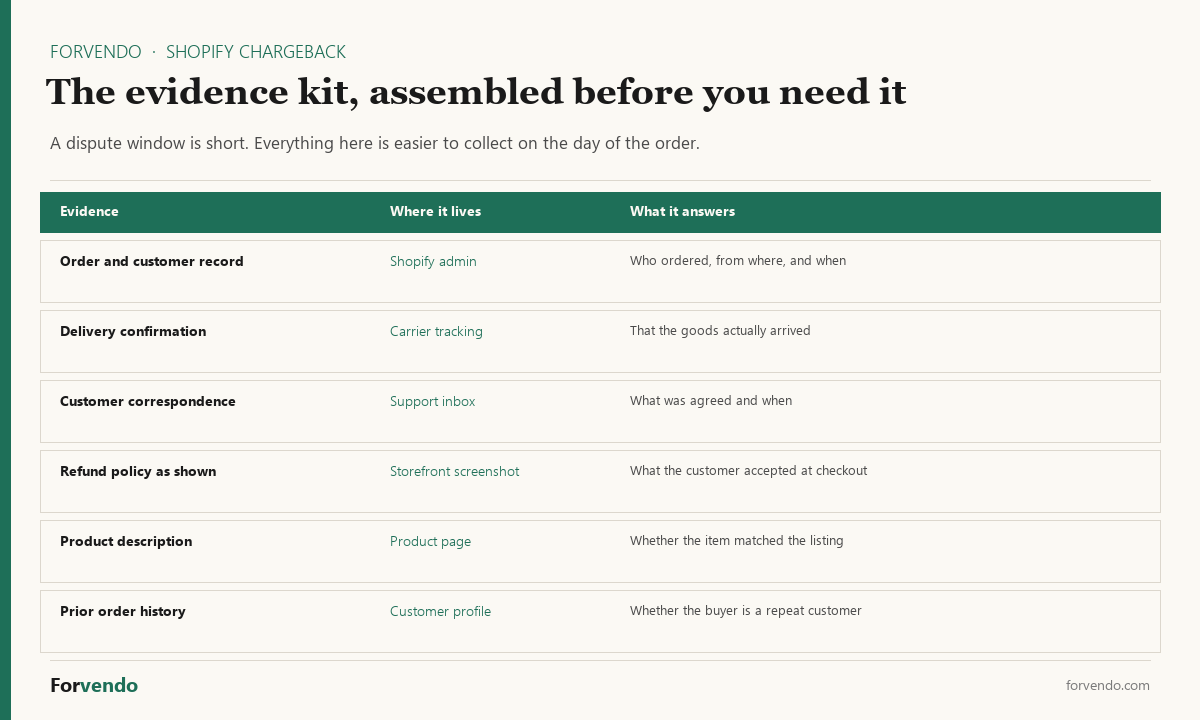
Static templates (build once):
– A written refund policy that matches what is posted on the store
– A written shipping policy with delivery time ranges
– A response template for each common reason code (fraudulent / product not received / unacceptable / subscription / credit not processed / duplicate)
– A boilerplate “compelling evidence” introduction paragraph
Live data sources (know where to pull from):
– Carrier tracking URL pattern for your primary shipping carrier
– Customer email or support ticket archive (filterable by email or order number)
– Shopify Admin order page (URL pattern with order ID)
– Customer’s order history for repeat buyers
– IP and device fingerprint logs if your store captures them
Reason-code-specific evidence:
A reusable evidence kit is the highest-leverage single artifact a one-person store can build for dispute work.
Four scenario walk-throughs
The patterns below cover most of the dispute work a one-person store sees.
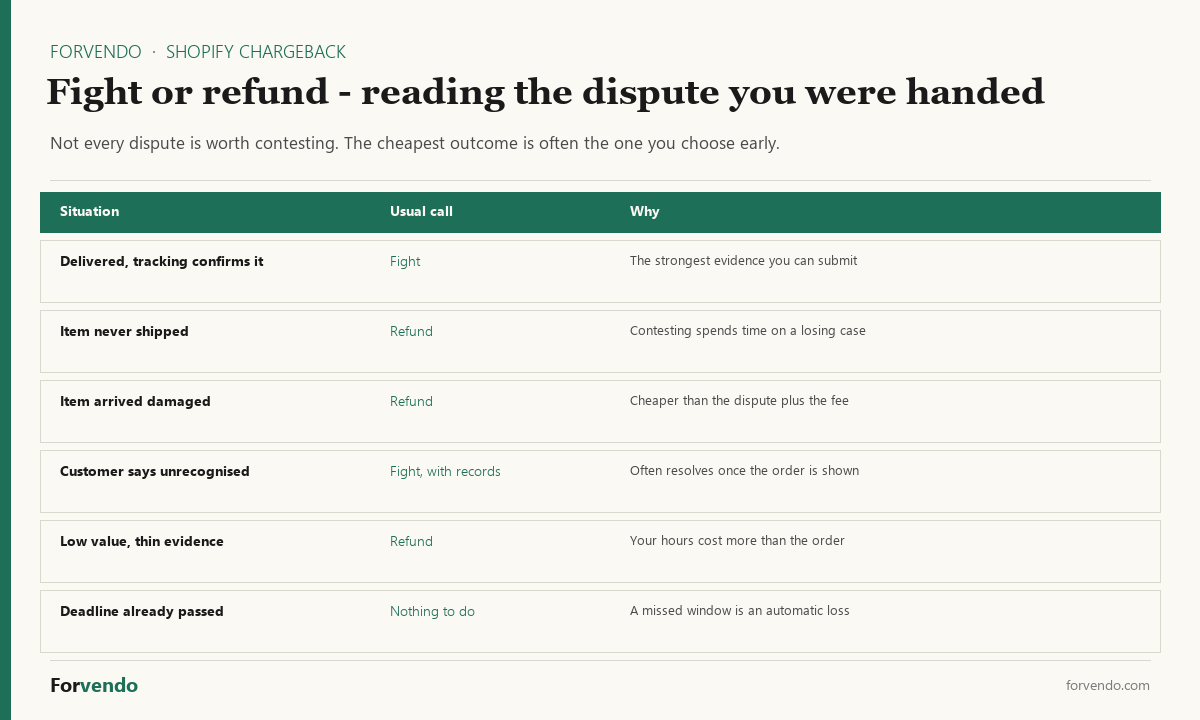
Scenario 1 — “Product not received” with tracking shows delivered
The customer claims the product never arrived. Carrier tracking shows it delivered. This is the most common chargeback for physical-goods sellers running everything themselves.
Refund decision: don’t refund proactively. First, ask the customer to check with neighbors and the local carrier. Offer to file a carrier claim on their behalf. About half of these resolve when the customer finds the package.
If the customer escalates to chargeback before resolving: respond with carrier tracking screenshot (showing delivered status with date and time), customer’s shipping address on the order matching the carrier’s destination, and customer communication log showing your investigation offer. This combination wins most “delivered but disputed” chargebacks.
Scenario 2 — “Product unacceptable” with no prior communication
The first you hear about a problem is the chargeback notification. The customer never emailed or contacted support.
This is a documentation chargeback, not a product chargeback. Respond with refund policy citation (showing where it was posted at the time of purchase), customer communication log demonstrating no prior contact, and the offer to resolve the issue if the customer reaches out.
The card network typically sides with the customer on product condition disputes, but a clean documentation response sometimes wins on procedural grounds — the customer is required to attempt resolution with the merchant first under most card network rules.
Scenario 3 — Friendly fraud on a high-value order
The customer received the product, then claims they didn’t authorize the transaction.
Refund decision: don’t proactively refund. This is the type of dispute most worth fighting.
Evidence: prior order history at the same email and shipping address (if a repeat customer), AVS and CVV pass confirmation, IP/device fingerprint if captured, customer communication confirming order details, carrier tracking with delivery confirmation. Stripe’s Visa Compelling Evidence 3.0 framework (referenced in their dispute documentation) is designed for this exact scenario.
If the address has multiple prior orders that weren’t disputed, the chargeback success rate for the merchant is meaningfully higher.
Scenario 4 — Subscription cancellation dispute
A customer claims they canceled a subscription and was charged anyway.
Evidence: subscription terms agreed at signup (screenshot of the checkout flow with the recurring-billing language), the cancellation log from your subscription app, any customer communication about the cancellation, and the date of the last successful login or order.
For subscriptions, the strongest preventive measure is a clear cancellation flow on the store. If a customer can cancel in two clicks without contacting support, the “I tried to cancel” defense in chargebacks weakens substantially.
Refund and chargeback SOP checklist
The free Refund and Chargeback Response Kit packages this checklist with the evidence kit table, six reason-code response templates with bracketed placeholders, and a quarterly dispute log with auto-calculated totals.
Quarterly setup (90 minutes once)
– [ ] Write or review your posted refund policy on the store
– [ ] Write or review your posted shipping policy
– [ ] Create six response templates (one per common reason code)
– [ ] Compile the evidence kit folder with carrier tracking URL, customer email archive access, and order page URL pattern
For each refund request (5 minutes)
– [ ] Identify the refund category in the decision tree above
– [ ] Confirm refund amount and shipping handling
– [ ] Issue refund in Shopify Admin per the documented procedure
– [ ] Send customer a confirmation email with refund timing expectation (5–10 business days)
– [ ] Log the refund reason in your internal records
For each chargeback (15 minutes)
– [ ] Read the reason code carefully
– [ ] Calendar the response deadline (7–21 days; usually closer to 7–14)
– [ ] Pull evidence per the reason-code-specific matrix
– [ ] Submit the response in Shopify Admin or processor dashboard
– [ ] Calendar a 3-month follow-up to check the final decision
– [ ] Log the chargeback in a tracker (date, reason code, outcome, fee)
Common mistakes
The patterns below generate most of the avoidable losses.
- Missing the response window. The single most common cause of chargeback losses. The 7–21 day window is absolute. Calendar it immediately.
- Issuing a partial refund out of negotiation, then receiving a chargeback for the rest. Partial refunds can be perceived by card networks as merchant acknowledgement of fault. If you partial-refund, document the reason carefully.
- Inconsistent enforcement of the posted refund policy. Card networks weigh “merchant followed posted policy consistently” as a positive signal. Selective enforcement weakens that defense.
- Treating every chargeback the same. A “fraudulent” chargeback and a “product not received” chargeback need different evidence packages. Using the same template loses both.
- Refunding after a chargeback is filed. The chargeback continues regardless. You end up paying twice (refund + chargeback fee).
- Not tracking chargeback ratio. Card networks monitor chargeback ratio. Sustained ratios above 1% can trigger processor warnings or account holds. Track it monthly.
What this article does not cover
This article is scoped to refund and chargeback operations for a solo Shopify Payments store. It doesn’t cover:
- Tax treatment of refunds (sales tax refund to the state; see the multi-state sales tax operating guide)
- 1099-K implications of refunds and chargebacks (covered in Does Shopify Send You a 1099-K?)
- Non-Shopify Payments processors (Stripe direct, PayPal, Square) — workflows are similar but UI differs
- High-risk merchant categories (CBD, supplements, adult, firearms) where chargeback policies are stricter
- B2B / invoice-based disputes
- Legal action when chargebacks involve criminal fraud
Any of those scenarios benefits from a qualified professional.
Frequently Asked Questions
How long does a chargeback take to resolve?
Stripe’s documentation states the final decision can take “up to 3 months” from the date the dispute is filed. During that period the disputed amount is held by the processor. One-person stores should plan cash flow accordingly when a high-value dispute is open.
Will I get the chargeback fee back if I win?
Generally no. The chargeback fee is charged by the card network and is typically not refunded even when the merchant wins. Shopify documentation notes: “Shopify might refund the chargeback fee depending on your country or region.” Confirm the policy in your specific country with Shopify support.
Should I just refund every chargeback to avoid the hassle?
Not usually. Reflexive refunding signals to the card network that you concede fault, which can affect your chargeback ratio over time. The decision tree in this article distinguishes the cases worth fighting (especially friendly fraud and “delivered but disputed”) from the cases not worth fighting (clean documentation losses, low-value disputes).
How do I prevent chargebacks in the first place?
The strongest preventive measures: clear product photos and descriptions, accurate shipping time estimates, a low-friction refund process, prompt customer communication, and a visible refund policy at checkout. Most chargebacks come from customers who couldn’t easily contact you or couldn’t easily get a refund through normal channels.
What is a safe chargeback ratio for a solo Shopify store?
Card networks generally start flagging merchants above a 1% chargeback ratio (chargebacks divided by transactions in a rolling window). Most healthy solo stores run well under 0.5%. Sustained ratios above 1% can trigger processor warnings or, in extreme cases, account suspension. Track it monthly as part of your weekly operating review.
Forvendo Editorial note. Forvendo publishes educational operating resources for solo ecommerce operators. Articles may cover tax, sales tax, 1099-K reporting, software pricing, platform policies, and other operating topics that change over time.
This content is for general research and operational planning. It is not legal, tax, accounting, financial, or professional advice. Readers should verify details with official sources or qualified professionals before acting on them. Platform rules, tax thresholds, software pricing, and affiliate program terms can change without notice.
Forvendo articles may be drafted with AI assistance and are reviewed by the operator before publication according to our Editorial Policy, which covers sourcing, AI use, update cadence, and corrections. See also About, Disclosure, and Privacy Policy.