Should You Install That Shopify App? A 5-Check Framework
Last updated: · App pricing, plan limits, and platform policies change. Verify on the vendor’s own pages before acting.
Every Shopify app install feels small in the moment — a few dollars a month, a click to add a feature. The cost shows up later, as a stack of $19-and-$49 line items that quietly eats 8% of MRR, plus the mental overhead of keeping each one working. The apps rarely get removed, because nobody remembers which one does what.
The fix is a decision at the door. Before any Shopify app goes in, it should pass five checks. This framework is the install-side companion to auditing the stack you already have: it stops the marginal app from getting in, so the audit has less to clean up later.
The ranges here are planning assumptions for a solo store in the $5,000–$50,000 MRR band, not universal rules — adjust them to your own margins and time.
Quick answer: the five checks
Before installing a Shopify app, confirm all five. A “no” on any one is a reason to wait.
- Cost — Does it keep your total app spend inside roughly 3–6% of MRR?
- ROI — Does it replace manual time worth more than its monthly fee?
- Lock-in — Can you remove it later without breaking the store or losing data?
- Trial discipline — Have you set a kill-date to evaluate it before it auto-renews?
- Overlap — Does an existing app or a native Shopify feature already do this?
Who this is for
- You run a single Shopify store alone, typically on the Basic plan, between $5,000 and $50,000 MRR.
- You install apps yourself and pay for them out of the store’s margin, so every Shopify app competes with your own take-home.
- Nobody reviews the app spend but you, and nothing forces the review to happen on a schedule.
- You want a rule you can apply in five minutes at the app store, not a comparison of vendors.
If you have a team evaluating tools through a formal procurement process, the checks still apply but the discipline problem is smaller — someone else is already asking these questions. If you’re below $5,000 MRR, the answer to most app questions is “not yet”: keep the app stack minimal until revenue is stable enough that a fixed monthly cost isn’t a bet.
The five checks
Check 1 — Cost as a share of MRR. Total app spend for a solo store tends to work best in the 3–6% of MRR band. Before adding an app, add its fee to your current total and divide by MRR. If the result pushes past 6%, the honest move is to cut something first, not stack another tool on top. A single $49 app is 1% of MRR at $5,000 and a rounding error at $50,000 — the same app is a different decision at each end of the range.
Apps are only one line of the platform bill, and it helps to know the others before you set the band. What Shopify really costs breaks out the plan fee, card processing, and the third-party transaction fee that often dwarfs both.
Check 2 — Time-saved ROI. An app earns its place by replacing manual work worth more than its fee. Estimate the hours it saves per month, value them at what your time is worth, and compare to the cost. A $29 app that saves four hours a month is an easy yes; a $29 app that saves twenty minutes is a no, however nice the feature looks.
Check 3 — Lock-in and data portability. Some apps are features; others are dependencies you can’t leave without rebuilding part of the store. Before installing, ask what happens if you uninstall it in six months — does your data export cleanly, do your pages still work, does customer-facing functionality survive? The deeper an app embeds into checkout, theme, or customer records, the higher the bar it should clear.
Check 4 — Trial discipline. Most apps offer a trial and then auto-renew. The failure mode isn’t the trial — it’s forgetting it. The moment you install, put a kill-date on your calendar a few days before the trial ends, with a single question to answer: did this actually save the time it promised? If you can’t answer yes by the kill-date, uninstall.
Check 5 — Overlap. The most wasteful installs duplicate something you already have. Shopify’s native features cover more than most store owners realize — discounts, basic email, abandoned-cart recovery, basic reports. Another app in your stack may also already do the job. Check for overlap before paying for a second tool that does one thing the first already does.
Free download
The Solo Shopify Weekly Operating Checklist
A one-page PDF plus a copyable Google Sheet — the weekly cadence these guides build on. Free; bring your own store data.
Get the free checklist →What a Shopify app stack actually costs
Check 1 is the one people wave through, because no single Shopify app looks expensive. The cost is structural rather than per-item: five modest subscriptions arrive one at a time over eighteen months, and none of them is ever the decision that broke the budget.
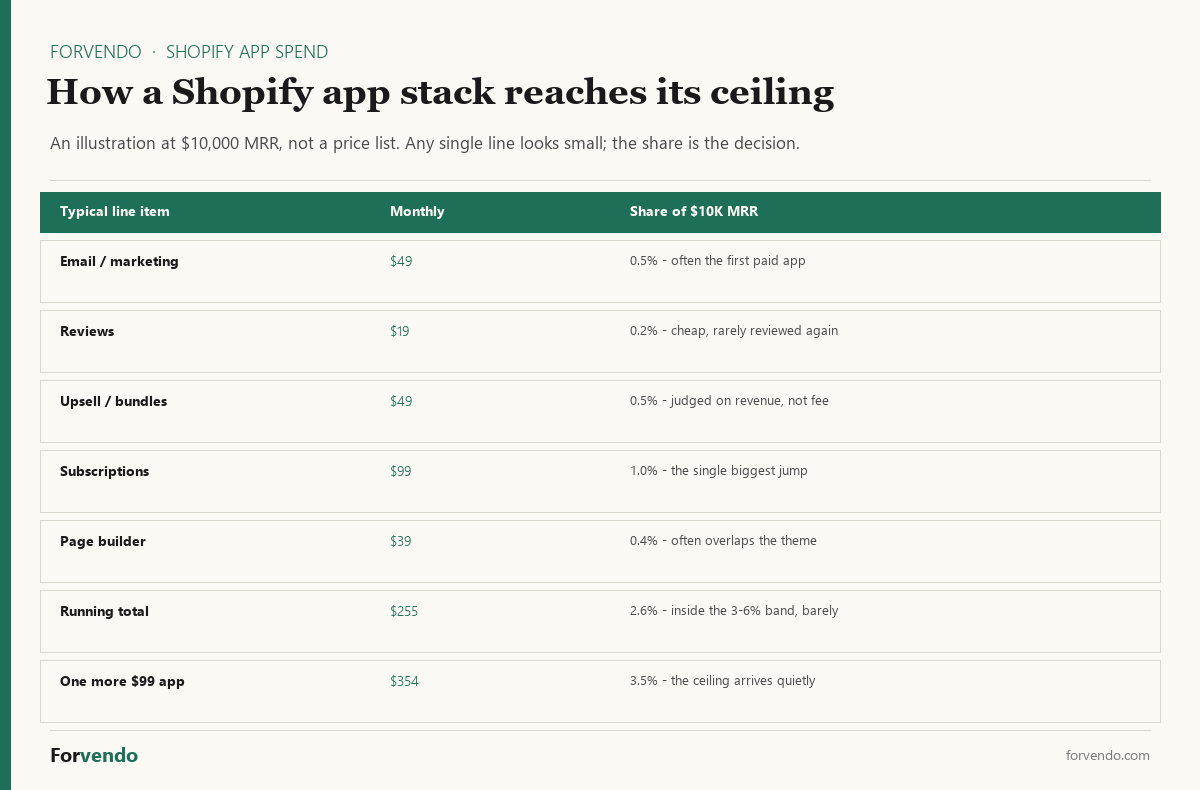
Two things fall out of doing this arithmetic once. First, the app that pushes a stack past its band is rarely the expensive one — it’s whichever one happens to arrive last. Second, the same Shopify app is a different decision at different revenue: a $99 subscription tool is 2% of MRR at $5,000 and 0.2% at $50,000, so an app you correctly declined last year may be an obvious yes now.
The practical habit is to keep the running total somewhere you’ll actually see it — a single line in the sheet you already open weekly — rather than reconstructing it from a year of Shopify invoices when the number has already gotten away from you.
Quick ROI test
Before installing, write down two numbers: the monthly fee, and the hours per month the app removes from your week. If the fee divided by those hours is close to what an hour of your time is worth, the app is not saving you money — it’s converting time into cost at par, with added complexity on top.
When a Shopify app is the wrong answer
The five checks assume the choice is which app. Often the better question is whether the problem needs an app at all. Four alternatives clear the same problem more often than store owners expect, and all four are cheaper to reverse.
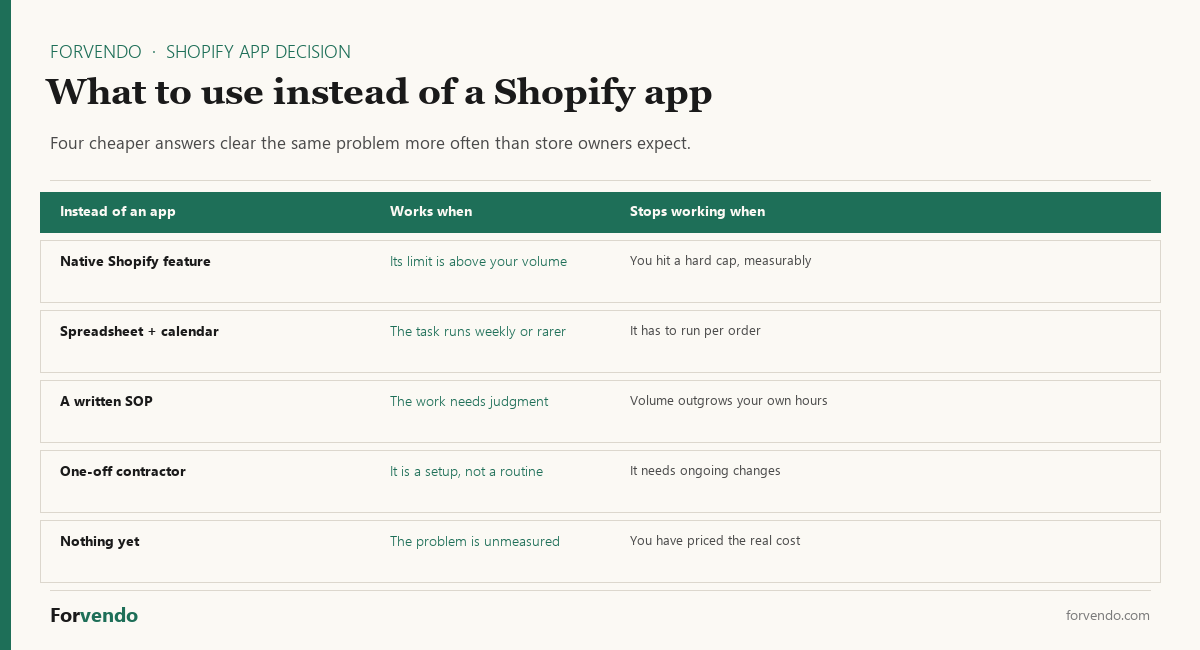
The native feature deserves the first look every time. Shopify’s built-in tools cover discounts, basic email, abandoned-cart recovery, and reporting, and the usual reason a store owner skips them isn’t a measured limitation — it’s that a comparison article made the paid version sound obligatory. Use the native version until you can name the specific limit you hit and what it cost you.
A spreadsheet plus a calendar reminder handles more recurring work than it gets credit for, right up to the point where the task has to run per order rather than per week. That threshold is easy to spot, which makes it a good trigger: when the manual version starts running on every order, the app has earned a look.
The honest fourth option is doing nothing yet. If the problem hasn’t been measured, an app can’t be evaluated against it — you end up judging the app on its feature list instead of on your own numbers, which is how forgotten line items get created.
The install-to-keep flow
The checks aren’t just a gate at install — they run on a loop, because an app that earned its place at $10K MRR may not at $30K, and vice versa.
Forvendo decision rule
Install a Shopify app only when all five checks clear: it keeps total app spend in the 3–6%-of-MRR band, replaces time worth more than its fee, can be removed without breaking the store, has a calendar kill-date set, and does not overlap something you already run.
Do not install it yet if you are adding it during a busy week without time to evaluate it, or if it solves a problem you have not actually measured. An app installed on a hunch is the one still charging you a year later.
How to remove a Shopify app cleanly
Check 3 asked whether an app can be removed. This is what removing one actually involves — and the reason the check matters, because uninstalling is a single click while the cleanup around it is not.
Forvendo newsletter
Operating notes, once a week
One email a week for US-based solo Shopify operators at $5,000–$50,000 MRR: a decision, a checklist, or a teardown. No fluff, unsubscribe anytime.
Join the newsletter →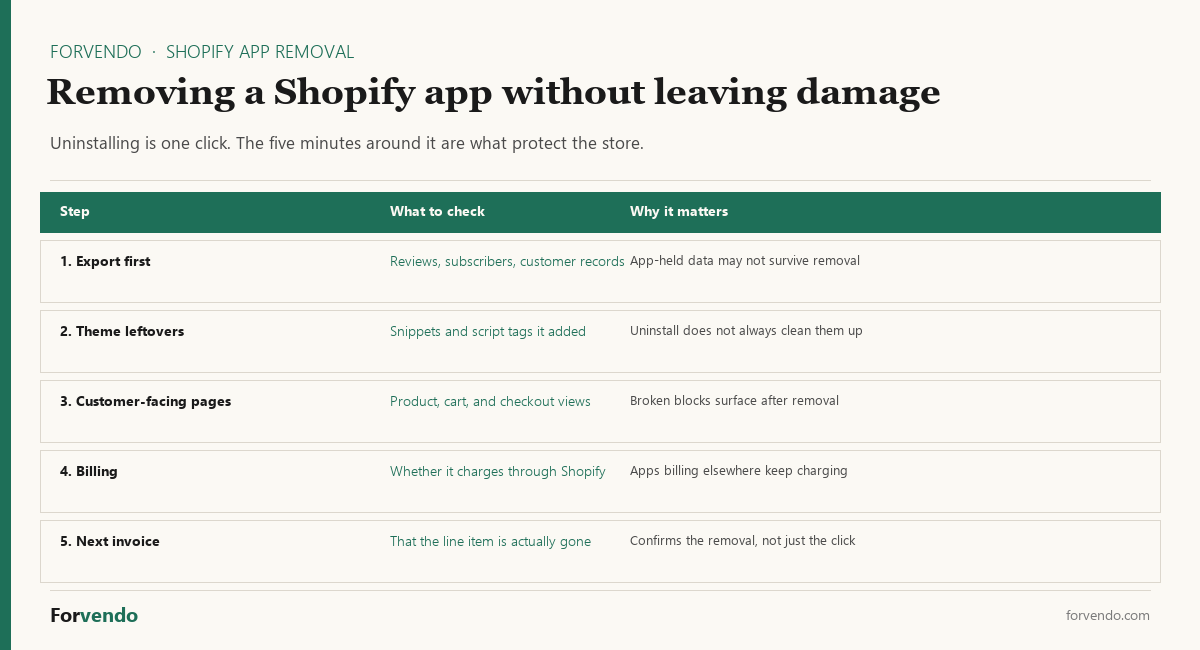
Export anything the app holds. Product reviews, subscriber lists, wishlist data, custom fields — if it lives in the app rather than in your Shopify records, removing the app can take it with it. Export before you uninstall, not after, and keep the file even if you’re confident you won’t need it.
Look for what it left in the theme. Many apps add snippets or script tags to make themselves visible on the storefront, and uninstalling does not reliably remove them. Leftovers usually show up as a broken block or an empty section on a product page rather than as an error, which is why they can sit unnoticed for months.
Walk the customer path once. After removal, open a product page, add to cart, and start checkout. That thirty-second pass catches the visible damage that a settings screen won’t show you.
Confirm the charge stopped. Apps billed through Shopify normally stop charging when uninstalled, but anything billed on its own account keeps going regardless of what your store shows. Check the next invoice rather than assuming — a subscription that survives its own uninstall is the most avoidable line item in the whole stack.
A store where removal is routine can afford to be more experimental at install. That’s the real payoff of Check 3: an app you know how to leave is a much smaller decision than one you don’t.
Common mistakes
- Installing during a crunch. Apps added under pressure never get evaluated. Wait for a calm window.
- Skipping the kill-date. The trial is free; forgetting it isn’t. Calendar it at install.
- Ignoring overlap. Two apps doing one job is the most common avoidable spend.
- Treating the fee as the only cost. Setup time, learning curve, and lock-in are real costs the monthly price hides.
- Skipping the re-audit. An app that earned its place once isn’t exempt forever. Re-check the whole app stack quarterly.
- Buying the comparison article’s answer. Round-up posts are written to rank, not to fit your store. Check the native feature yourself before accepting that a paid Shopify app is required.
- Installing to test an idea you haven’t validated. If the underlying offer or workflow is still unproven, the app is measuring nothing — and it will outlive the experiment on your invoice.
What this article does not cover
This is a decision framework for whether to install an app, not a catalog of specific apps or a head-to-head of any category. It doesn’t cover enterprise procurement, theme or custom-code decisions, or Shopify plan upgrades. For specific decisions, the deep-dives below go category by category.
Related Forvendo guides
Installing is one half of app discipline; cutting is the other. The How Many Shopify Apps Is Too Many? is the audit-and-cut companion to this install-side framework. For specific app decisions, the UpPromote review applies the same checks to an affiliate app, the Should You Add Subscriptions to Your Shopify Store? to subscriptions, and Kit vs Klaviyo to email tools. The whole stack sits inside the broader Solo Shopify Operations guide.
App Spend Health Check
Planning heuristic for solo stores; the 3–6%-of-MRR band is a guideline, not a rule.
Frequently asked questions
How many apps should a solo Shopify store run?
There’s no fixed number — the better measure is total spend as a share of MRR, which tends to work best in the 3–6% band. A focused store at $15K MRR might run five apps; the question for each is whether it replaces time worth more than its fee, not the count.
What is a reasonable monthly budget for Shopify apps?
Roughly 3–6% of MRR across the whole stack. At $10,000 MRR that’s about $300–$600; at $30,000 it’s $900–$1,800. Treat it as a ceiling, not a target — most stores do well near the lower end.
How do I decide between two apps that do the same thing?
Run both through the five checks and compare on ROI and lock-in, not feature lists. The one that saves more verifiable time and is easier to leave later usually wins. A trial with a kill-date on each makes the comparison concrete.
Should I use a paid app or Shopify’s native feature?
Start with the native feature and upgrade only when you hit its limit and can measure the cost of that limit. Shopify’s built-in tools cover more than most sellers expect; a paid app earns its place when the native version is demonstrably holding back revenue or eating real time.
Are Shopify apps worth it for a small store?
Individually, some are; as a stack, only if you keep score. The useful question isn’t whether a Shopify app is worth $29, it’s whether your total app spend still sits in the 3–6%-of-MRR band and every line in it still replaces time worth more than it costs. Apps stop being worth it collectively long before any single one looks unreasonable.
Do Shopify apps slow down my store?
Many add front-end scripts, so it’s a fair concern — but treat it as something to measure rather than assume. Check your store’s speed before and after an install, and be aware that removing an app doesn’t always remove the code it added, which is why the removal steps above matter.
How long should a Shopify app trial be before I decide?
Long enough to use it in a normal week, not a quiet one. The kill-date matters more than the length: set it a few days before the trial converts, with one question written down at install — did this save the time it promised? An undecided trial that auto-renews has answered no.
Should I remove a Shopify app I’m unsure about?
Run it through Check 2 and Check 3 rather than through instinct. If you can’t name the manual hours it replaces, it isn’t earning its fee; if removal is clean, the downside of being wrong is a reinstall. Uncertainty plus easy removal is a reason to cut. Uncertainty plus deep lock-in is a reason to schedule a proper evaluation instead of deciding in passing.
What should I do with apps I installed and forgot about?
Run a quarterly stack audit: list every app, its fee, and what it does, then cut anything that no longer saves time worth its cost. The forgotten line items are usually where the easiest savings are.
Forvendo Editorial note. Forvendo publishes educational operating resources for solo ecommerce operators. Articles may cover tax, sales tax, 1099-K reporting, software pricing, platform policies, and other operating topics that change over time.
This content is for general research and operational planning. It is not legal, tax, accounting, financial, or professional advice. Readers should verify details with official sources or qualified professionals before acting on them. Platform rules, tax thresholds, software pricing, and affiliate program terms can change without notice.
Forvendo articles may be drafted with AI assistance and are reviewed by the operator before publication according to our Editorial Policy, which covers sourcing, AI use, update cadence, and corrections. See also About, Disclosure, and Privacy Policy.